Raspberry Pi Explained as a Small Single-Board Computer
Raspberry Pi is a small single-board computer designed to provide computing functions on a compact board. It combines core computer components, including a processor and memory, with connection points such as ports and GPIO on a single computer board.
Raspberry Pi is a small single-board computer designed to provide computing functions on a compact board.
Raspberry Pi functions as a learning computer and project platform where users can explore computing, coding, and electronics projects. The board uses an operating system to run programs, manage files, and interact with connected peripherals. Its ports allow connections with external devices, while GPIO supports electronics projects involving sensors and control components. These features make Raspberry Pi useful for beginners who want practical experience with computer systems and project development.
These conditions influence which programs, projects, and computing tasks the board can support.
Raspberry Pi is a computer board, but it belongs to a different category from a full desktop computer and from microcontroller boards. Its practical capability is determined by factors such as the specific model, connected accessories, installed software, and workload. These conditions influence which programs, projects, and computing tasks the board can support.
Table of Contents
What a Raspberry Pi Means
Raspberry Pi is a small single-board computer that combines the essential functions of a computer into a compact board. It is a computer board that can run an operating system, execute programs, and support learning and project computing.
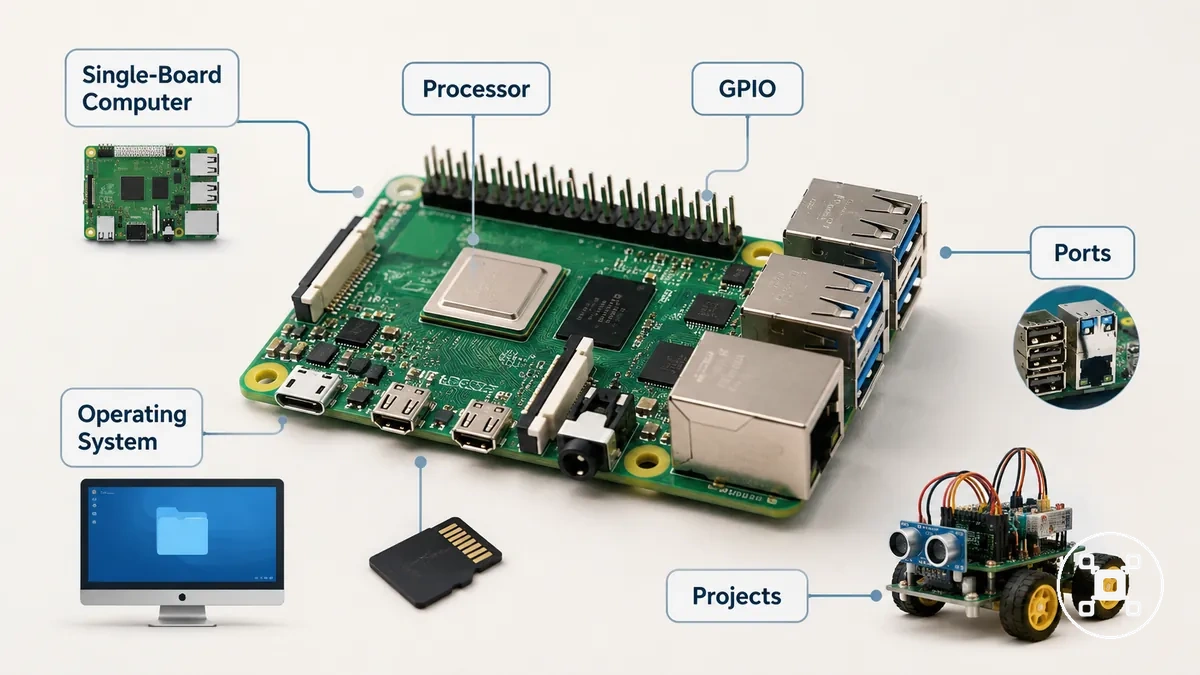
Raspberry Pi represents a practical way to learn how computer systems work through software control, coding, and projects. The operating system provides the environment for running programs and managing files, while the board structure allows users to connect peripherals and explore different computing tasks. Raspberry Pi capability changes according to the model, software environment, connected accessories, and workload.
For a broader overview of categories, guidance, and related topics, visit the Raspberry Pi hub .
Raspberry Pi is a real computer, but it is not always a replacement for a conventional PC because its capability is shaped by the model and the intended use case. For a broader overview of categories, guidance, and related topics, visit the Raspberry Pi hub.
How a Raspberry Pi Works as a Computer
Raspberry Pi works as a computer by combining hardware, an operating system, storage, power, and connected peripherals into one usable system. The board provides the physical computing structure, while the operating system manages programs, files, and interaction. Hardware and software work together to make the Raspberry Pi function as a computer.
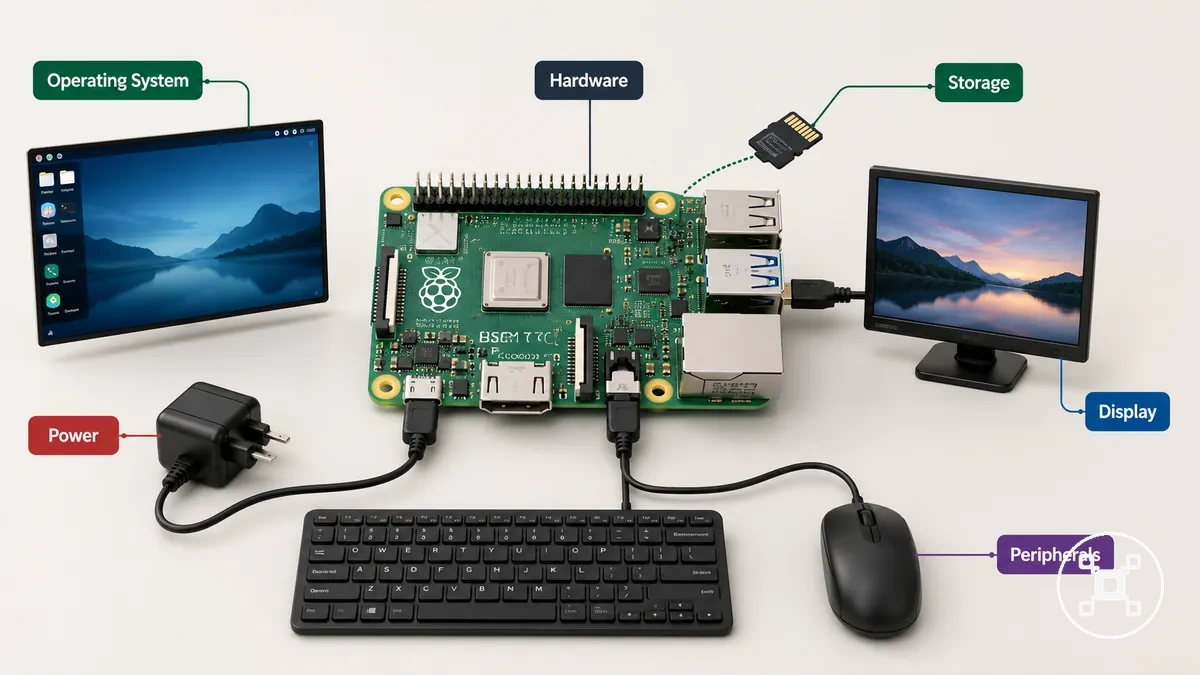
A Raspberry Pi computer system starts when the board boots from its storage and loads the operating system environment. The operating system provides the software layer for running programs, managing files, and controlling computer functions. Storage holds the operating system, programs, and user data, while power supplies the energy required by the board and connected peripherals. A display, keyboard, mouse, and other peripherals provide the input and output connections needed for user interaction.
A Raspberry Pi computer system starts when the board boots from its storage and loads the operating system environment.
The connected parts of a Raspberry Pi system work together in different roles:
- Power: Provides the electrical supply required for the Raspberry Pi board and connected devices.
- Storage: Stores the operating system, programs, and files used by the computer system.
- Operating system: Creates the software environment used to run programs and control interactions.
- Display and input: Connects screens, keyboards, mice, and other peripherals for communication with the computer.
- Programs and projects: Allow the Raspberry Pi to perform computing tasks, learning activities, and project-related functions.
The way a Raspberry Pi performs depends on the model, connected accessories, software environment, and workload. Different configurations create different computer capabilities, so the board should be understood as a flexible computer system rather than a fixed type of computer experience.
Main Raspberry Pi Parts and Connections
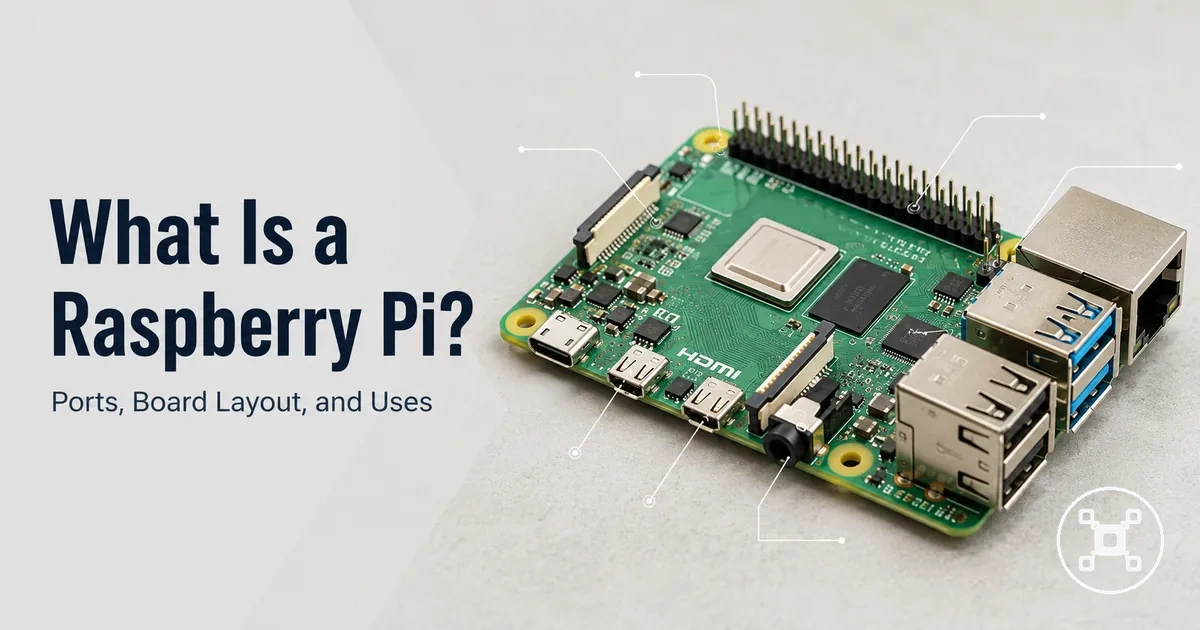
Raspberry Pi parts and connections explain how the board functions as a compact computer. The main parts include computing components, such as the processor and memory, and connection points, such as storage, ports, GPIO, power, display, and network connections.
Raspberry Pi parts and connections explain how the board functions as a compact computer.
The following table organizes the main Raspberry Pi parts by their practical role, purpose, and effect on computer use.
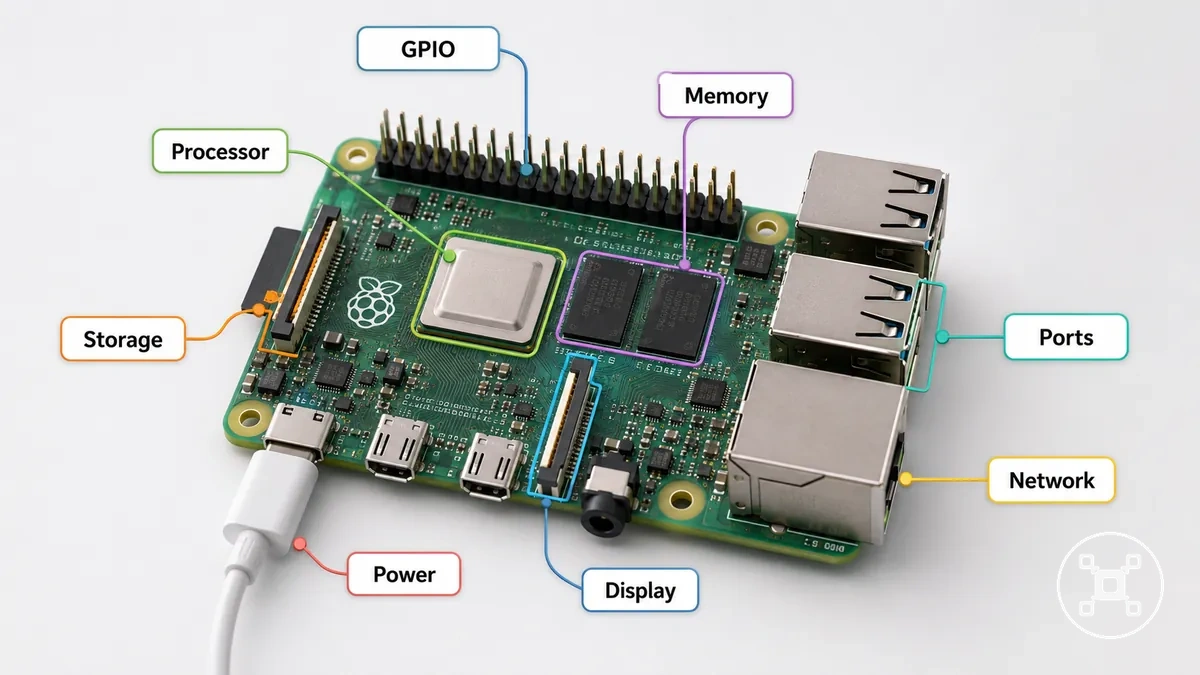
| Part or connection | What it does | What it affects | Beginner note |
|---|---|---|---|
| Processor | Handles computing operations and program execution on the Raspberry Pi board. | Affects how the computer processes software tasks. | The processor provides the main computing function of the board. |
| Memory | Provides working space for active programs and system tasks. | Affects how the computer manages running activities. | Memory works with the processor during computing operations. |
| Storage | Holds the operating system, programs, and user files. | Affects where software and data are stored for computer use. | Storage provides the information used when the system starts and runs. |
| Ports | Provide connection points for displays, USB devices, and peripherals. | Affects how the Raspberry Pi connects with external equipment. | Ports allow the board to communicate with connected devices. |
| GPIO | Provides connection points for electronics projects, sensors, and control components. | Affects how the Raspberry Pi interacts with external electronics. | GPIO is used for projects that require electronic connections. |
| Power | Provides the electrical supply required for the Raspberry Pi system. | Affects whether the board and connected components receive power. | Power is required for the computer system to operate. |
| Network connection | Provides communication with networks and connected services. | Affects network-based computing activities. | Network connections support connected computer tasks. |
A simple beginner example is a Raspberry Pi connected with storage, power, a display, and input devices to create a usable computer system. The processor and memory handle computing work, while ports and GPIO provide additional connection options for peripherals and electronics projects.
Computer Hardware on the Board
The computer hardware on a Raspberry Pi board forms the local hardware layer that performs computing work. The processor manages program operations, while memory supports active tasks that allow the computer system to handle running software.
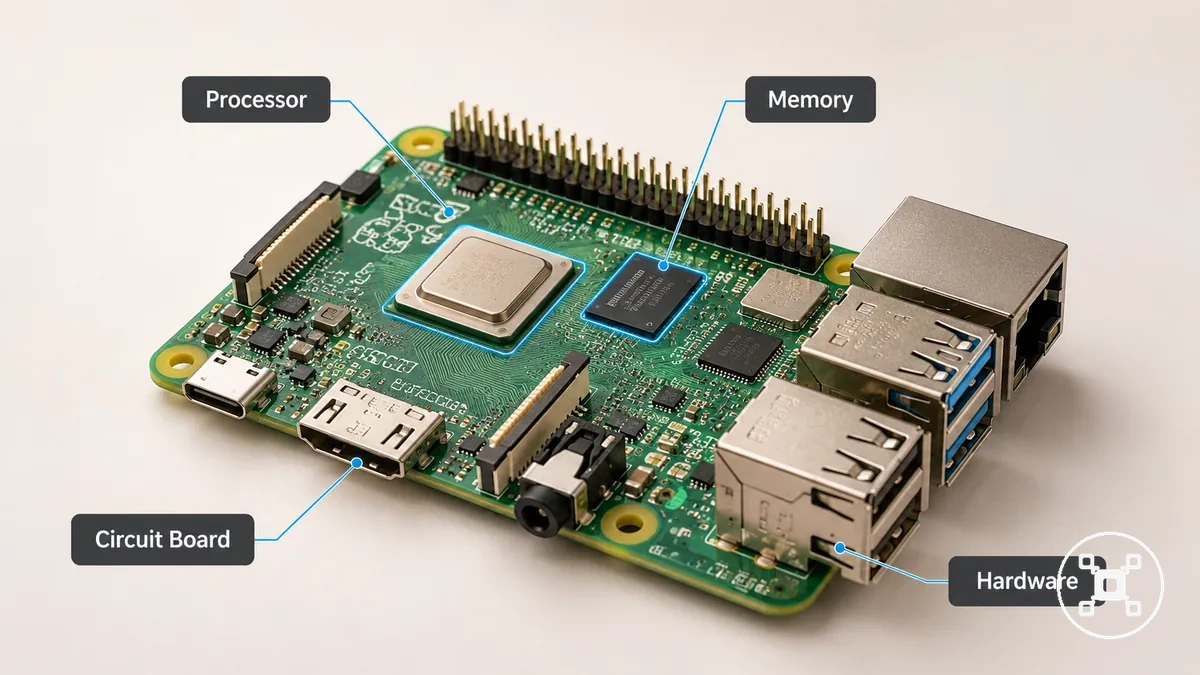
The main hardware elements work together through the circuit board layout, which integrates computing components into a compact computer structure.
- Processor: The processor performs computing operations and program execution, affecting how the Raspberry Pi handles different workloads.
- Memory: Memory provides working space for active tasks and supports program management during computer use.
- Circuit board: The circuit board connects integrated hardware components, including the processor, memory, and connection areas, into one system.
- Model variation: Different Raspberry Pi models can have different hardware capabilities, which affects suitable workloads and expected performance under different conditions.
The processor, memory, and circuit board provide the hardware foundation for Raspberry Pi computing work. The resulting performance depends on the model, software environment, and workload, so different configurations can support different computing tasks.
Ports, Storage, and GPIO Connections
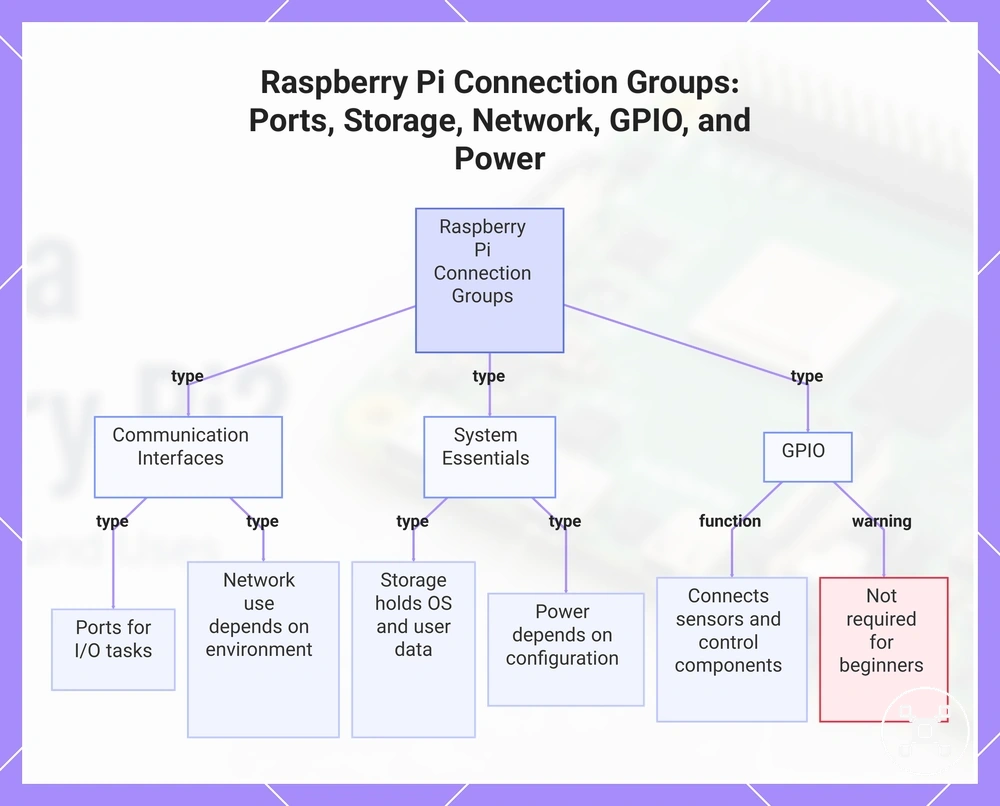
Raspberry Pi ports, storage, and GPIO connections provide the connection points that allow the board to interact with displays, networks, storage devices, peripherals, and electronics projects. These connections organize how the Raspberry Pi exchanges information, stores software, and extends its computer functions.
These connections organize how the Raspberry Pi exchanges information, stores software, and extends its computer functions.
The main connection groups can be organized by their purpose, required conditions, and resulting use:
- Ports: Ports enable connections with displays, USB devices, and peripherals. They support input and output tasks by linking the Raspberry Pi with external equipment.
- Storage: Storage holds the operating system, programs, and user files. A microSD card or another supported storage option provides the data source used when the Raspberry Pi boots and runs software.
- Network connection: Network connections allow communication with connected systems and online services. Their use depends on the available network environment and connected accessories.
- GPIO: GPIO provides connection points for electronics projects, sensors, and control components. It is useful for physical computing projects but is not required for every beginner Raspberry Pi use case. For a broader comparison of board categories, see Raspberry Pi vs microcontroller boards.
- Power connection: Power supplies the electrical input required for the Raspberry Pi board and connected components. The required power setup depends on the board configuration and attached accessories.
This chart shows the main connection groups on a Raspberry Pi, including their purpose and key characteristics.
What a Raspberry Pi Can Do
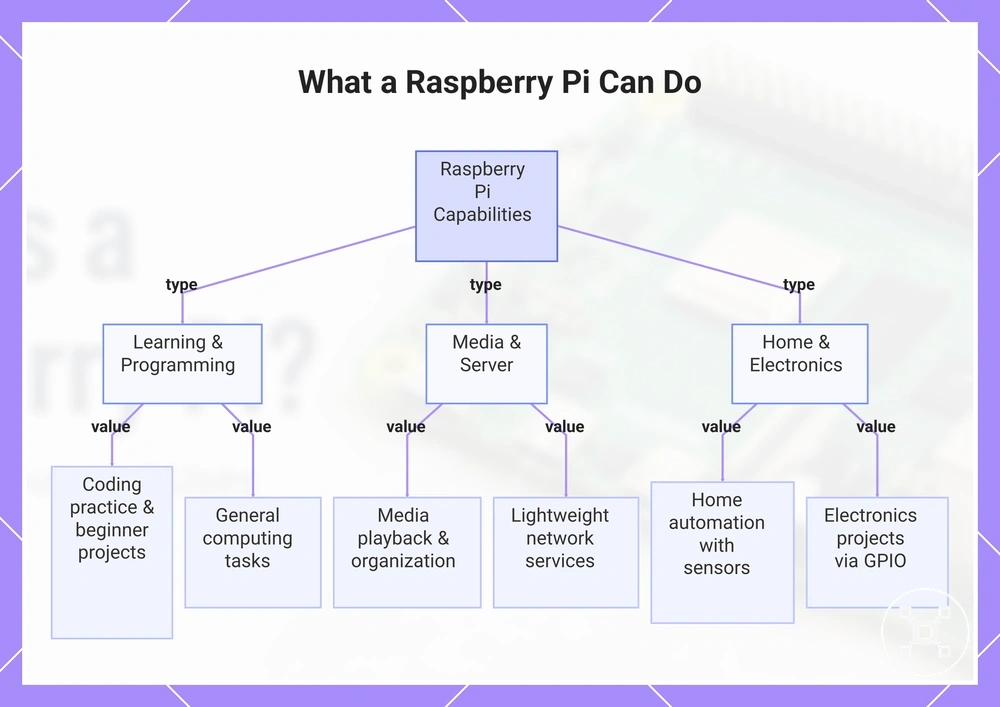
Raspberry Pi can support learning, programming, media, server tasks, home automation, electronics, and other practical projects when the model, accessories, software environment, and workload match the intended use. It provides a flexible computer platform that can run programs and control connected devices for different computing activities.
The type of learning activity depends on the model, accessories, and workload involved.
For learning and programming, Raspberry Pi can support coding practice, software experiments, and beginner projects when suitable programs and an operating system environment are available. It can be used for programming practice, simple computing tasks, and projects that help users understand how software interacts with computer hardware. The type of learning activity depends on the model, accessories, and workload involved.
Home automation and electronics projects can use GPIO, sensors, and control components when physical interaction with devices is required.
Raspberry Pi can support media, server, home automation, and electronics uses when the required software, accessories, and workload are suitable. Media tasks can involve running software for playback or organization, while server tasks can support lightweight network services in appropriate conditions. Home automation and electronics projects can use GPIO, sensors, and control components when physical interaction with devices is required.
- Learning and programming: Raspberry Pi can support coding practice and programming projects when suitable software tools and an operating system are available.
- Computing tasks: Raspberry Pi can run general computer activities when the model, software environment, and workload match the task requirements.
- Media: Raspberry Pi can support media-related activities when appropriate software, storage, and connected display equipment are used.
- Server tasks: Raspberry Pi can support lightweight server uses when the network environment, software, and workload are suitable.
- Home automation: Raspberry Pi can control automation projects when compatible accessories, sensors, and software are connected.
- Electronics projects: Raspberry Pi can support electronics projects using GPIO, sensors, and control components when the project requires physical computing connections.
For a broader overview of project categories and practical examples, explore Raspberry Pi uses.
For a broader overview of project categories and practical examples, explore Raspberry Pi uses .
This chart shows the main categories of tasks and projects that a Raspberry Pi can support, including learning, media, server, home automation, and electronics.
Learning, Programming, and Electronics Projects
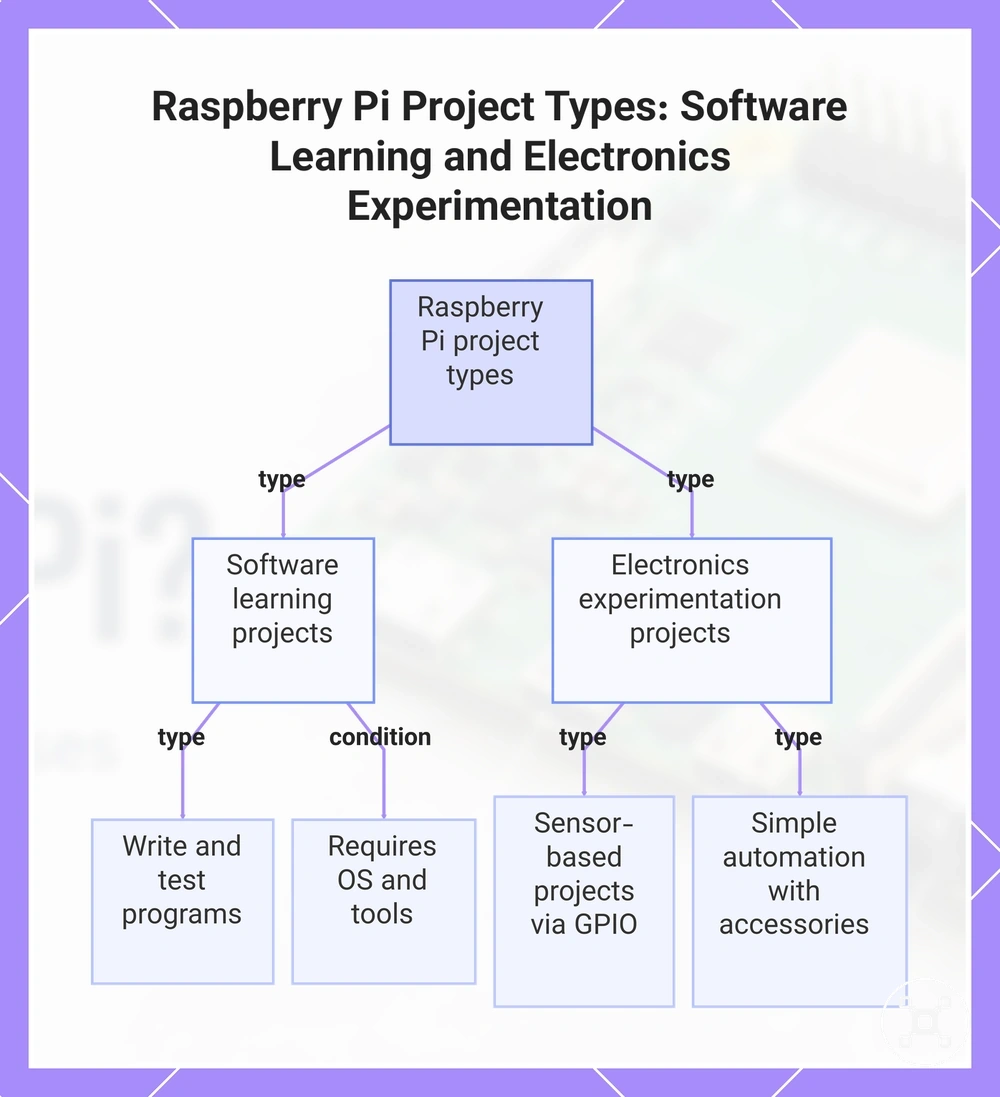
Raspberry Pi learning and electronics projects can help users explore coding, programming, and physical computing in different ways. Software learning focuses on writing and testing code, while electronics experimentation uses GPIO, sensors, and connected components to create interactions with the physical world.
Raspberry Pi learning and electronics projects can help users explore coding, programming, and physical computing in different ways.
These examples show how a learning goal, required condition, and realistic outcome can differ:
- Coding practice: A programming environment allows beginners to practice coding skills and develop software projects through writing and testing programs.
- Programming projects: Raspberry Pi can support software-based projects when a suitable operating system and programming tools are available.
- Electronics experiments: GPIO connections can support sensor-based projects when the project requires physical input, electronics components, and control.
- Automation projects: Raspberry Pi can support simple automation tasks when compatible accessories, software, and project conditions are suitable.
Beginner projects can range from software learning exercises to physical computing experiments, but project difficulty and required support depend on the user's skill level, project type, and connected accessories. Coding-only projects and GPIO-based electronics projects involve different learning paths because physical computing adds external hardware interaction.
This chart shows the two main types of Raspberry Pi projects—software learning and electronics experimentation—and their key characteristics.
This chart shows the two main types of Raspberry Pi projects—software learning and electronics experimentation—and their key characteristics.
Desktop, Server, Media, and Home Automation Uses
Raspberry Pi can support lightweight desktop tasks, server activities, media playback, and home automation when the model, software, accessories, network, and workload are suitable. These everyday uses depend on the connected hardware and software setup, which affects the practical results a Raspberry Pi system can achieve.
These everyday uses depend on the connected hardware and software setup, which affects the practical results a Raspberry Pi system can achieve.
These examples show how different use types connect with setup conditions and realistic outcomes:
- Lightweight desktop: A desktop setup can support everyday computing tasks when a display, input devices, operating system, and suitable software are available. It can provide a basic computing environment for workloads that match the model capability.
- Local server: A server setup can support smaller network services when the software, storage, network connection, and workload are appropriate. More demanding server tasks may require a more powerful computer.
- Media playback: Media use can support playback and organization tasks when the software, storage, display setup, and model capability match the media workload.
- Home automation: Home automation projects can control connected devices when suitable accessories, software, and network conditions are available. The result depends on the automation setup and required controls.
- Network-based projects: Network projects can use Raspberry Pi for connected tasks when the software environment, accessories, and workload fit the intended purpose.
Raspberry Pi is suitable for many lightweight and practical uses, but heavier desktop workloads, demanding media tasks, or larger server requirements may be better handled by a more powerful computer depending on the model, software, storage, network conditions, and workload.
Raspberry Pi Compared with a Regular Computer
Raspberry Pi and a regular computer share core functions such as running an operating system, programs, and files, but they use different hardware designs and target different workloads. Raspberry Pi is computer-like in function, but it is not identical to a regular PC because its size, power use, accessories, and limits shape how it is used.
Raspberry Pi is computer-like in function, but it is not identical to a regular PC because its size, power use, accessories, and limits shape how it is used.
The comparison below organizes key criteria, including size, operating system, performance, accessories, power use, expandability, and typical use, to show how each device affects everyday computing expectations.
| Criterion | Raspberry Pi | Regular computer | Practical meaning |
|---|---|---|---|
| Size | Uses a compact single-board design that combines computer components on one board. | Uses a larger desktop or laptop structure with integrated or separate computer components. | The physical size affects portability, setup style, and available hardware expansion options. |
| Operating system | Runs an operating system that manages programs, files, and user interaction. | Runs operating systems designed for broader desktop and laptop computing environments. | Both devices provide a software environment, but available programs depend on the system and setup. |
| Performance | Performance depends on the Raspberry Pi model, software environment, and workload. | Performance depends on computer hardware, configuration, and workload. | A regular computer may suit heavier workloads, while Raspberry Pi suits tasks that match its hardware limits. |
| Accessories | May require accessories such as a display, keyboard, mouse, storage, or other peripherals depending on the setup. | Usually supports common computer accessories as part of a complete computer setup. | Required accessories affect how each device is prepared for user interaction. |
| Power use | Uses a compact board design intended for lower-power computing tasks. | Power use depends on the hardware design and workload of the computer. | Power requirements differ because the devices are designed for different computing roles. |
| Expandability | Provides connection points for peripherals and electronics depending on the model and accessories. | Usually supports expansion through standard computer hardware and peripherals. | Expansion options depend on the device design and intended purpose. |
| Typical use | Often suits learning, projects, lightweight computing, and connected applications. | Often suits broader everyday computing tasks and higher workload requirements. | The suitable device depends on the required workload, software, accessories, and computing goals. |
Raspberry Pi can perform many computer functions, but the practical choice depends on the workload, software needs, accessories, and performance expectations. A regular computer may be more suitable for demanding tasks, while Raspberry Pi may be suitable for compact, learning-focused, and project-based computing uses.
Where a Raspberry Pi Is Similar to a PC
Raspberry Pi is similar to a PC because it shares common computer behaviors, including using an operating system, running programs, managing files, and connecting input and output devices. These similarities describe how Raspberry Pi functions as a computer system rather than showing equal performance with a regular computer.
These similarities describe how Raspberry Pi functions as a computer system rather than showing equal performance with a regular computer.
The shared functions between Raspberry Pi and a PC include:
- Operating system: Raspberry Pi uses an operating system to manage programs, files, and user interaction.
- Programs and files: Raspberry Pi can run programs and store files, allowing users to complete computer tasks through installed software and saved data.
- Keyboard, mouse, and display: Raspberry Pi can connect a keyboard, mouse, and display to provide input and output functions similar to a regular computer setup.
- Network connection: Raspberry Pi can connect to a network for activities such as browsing, communication, and other network-based tasks.
- Programming and applications: Raspberry Pi can support coding and lightweight applications when the software environment and workload are suitable.
For example, a Raspberry Pi connected to a display, keyboard, and mouse can support browsing, coding, or running a lightweight application. The similarity comes from shared computer functions, while performance and workload limits depend on the Raspberry Pi model and setup.
Where a Raspberry Pi Has Practical Limits
Raspberry Pi practical limits depend on the model, workload, accessories, and software setup. Raspberry Pi can support many computing tasks, but performance boundaries appear when a task requires more processing capability, faster storage, additional peripherals, or specific software support.
Raspberry Pi practical limits depend on the model, workload, accessories, and software setup.
These criteria show how workload requirements create practical trade-offs:
- Heavy multitasking: Multitasking with many active programs can require more memory and processing resources than a specific Raspberry Pi model provides. The practical outcome depends on the model, software environment, and workload size.
- Gaming: Gaming performance depends on the model, software support, accessories, and the type of game. More demanding gaming workloads may require hardware capabilities beyond a compact computer board.
- Professional software: Professional software tasks may require specific operating system support, hardware resources, or performance levels that are not available in every Raspberry Pi setup.
- Storage speed: Storage speed affects tasks that involve frequent data access, large files, or software loading. The storage device and workload influence the practical experience.
- Peripheral needs: Projects that use multiple external devices may require additional accessories and suitable connection options. The model and connected hardware affect what setup is practical.
Raspberry Pi is a capable compact computer with practical limits rather than a toy or a complete desktop replacement. Selecting a suitable use case depends on balancing the model, workload, accessories, and expected performance.
Whether a Raspberry Pi Is Good for Beginners
Raspberry Pi can be good for beginners when their learning goals, patience with setup, and available accessories match the type of experience they want. It is suitable for beginners who want to explore coding, projects, and computer learning, while users who only need a ready-made everyday computer may have different expectations.
Raspberry Pi can be good for beginners when their learning goals, patience with setup, and available accessories match the type of experience they want.
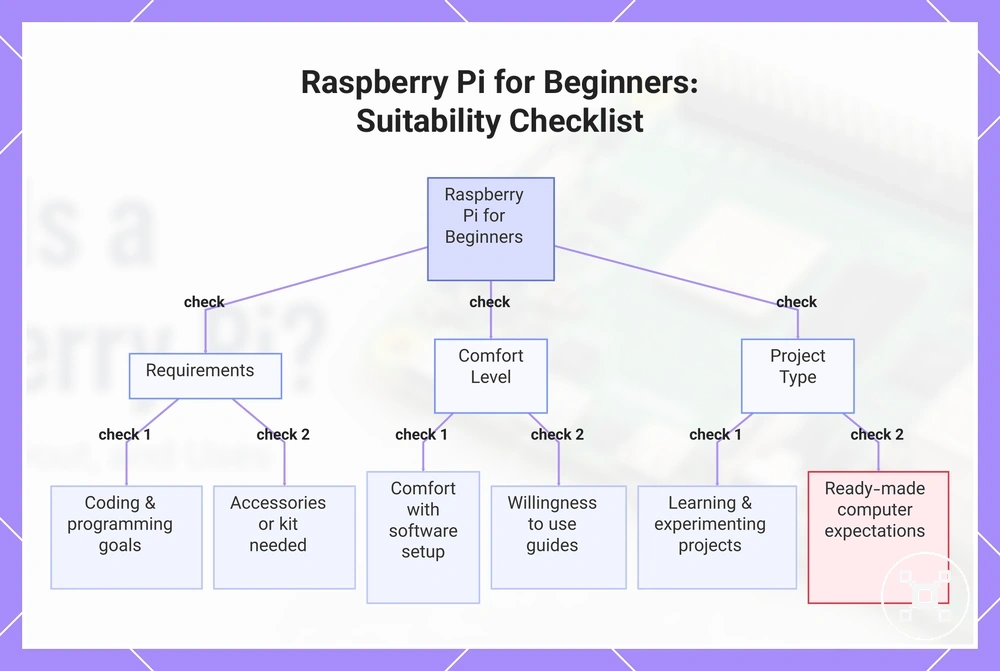
The following checklist helps verify beginner readiness by checking the requirements, comfort level, and intended project type:
- Learning goals: Beginners interested in coding, programming practice, or learning how computer systems work may find Raspberry Pi suitable for those goals.
- Accessories: Readiness depends on whether needed accessories are already available or whether a kit is required for the intended setup.
- Setup tolerance: Beginners who are comfortable with software setup, configuration, and learning through small challenges may adapt more easily to Raspberry Pi.
- Documentation: New users should be comfortable using documentation and guides to understand setup processes, software, and project requirements.
- Project type: Coding projects, electronics projects, and simple automation uses have different requirements, so suitability depends on the type of project being attempted.
- Support and troubleshooting: Beginners who are willing to use available support resources and investigate issues may have a better learning experience.
- Ready-made computer expectations: Users who want a computer that works immediately for everyday tasks without learning or setup may prefer a different type of computer.
Raspberry Pi is a good option for beginners who want to learn and experiment, but suitability depends on goals, setup readiness, and project expectations. After understanding these criteria, users can continue with choosing a Raspberry Pi based on their intended use and requirements.
After understanding these criteria, users can continue with choosing a Raspberry Pi based on their intended use and requirements.
This chart shows the key criteria to determine if a Raspberry Pi is suitable for a beginner, grouped into requirements, comfort level, and project type.
What Beginners Need Before Using a Raspberry Pi
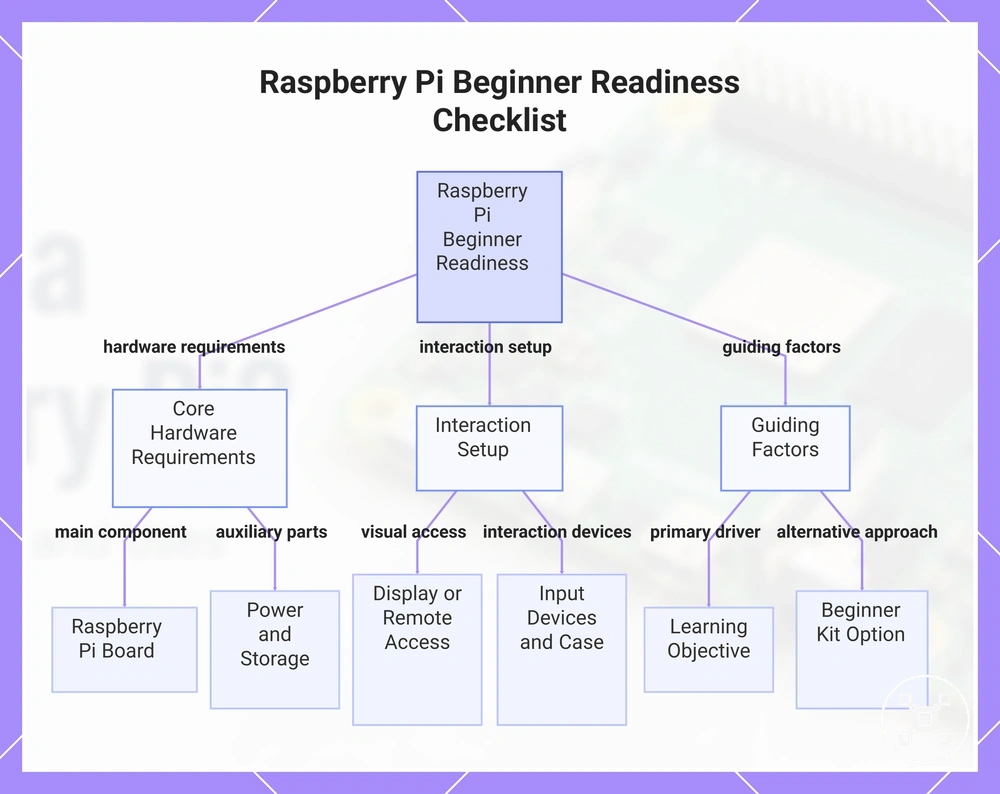
Beginners need a Raspberry Pi board, the required supporting parts, and a clear learning objective before using a Raspberry Pi effectively. Readiness depends on the required accessories, the intended use case, and whether the goal is learning programming, exploring electronics, or understanding computer systems.
Beginners need a Raspberry Pi board, the required supporting parts, and a clear learning objective before using a Raspberry Pi effectively.
The following checklist organizes beginner readiness conditions rather than purchase decisions:
- Raspberry Pi board: The Raspberry Pi board is the main computing component required for use. The suitable board setup depends on the learning objective and the type of project.
- Power: A suitable power source is required to operate the Raspberry Pi board. The power requirement depends on the board configuration and connected accessories.
- Storage and operating system image: Storage is needed for the operating system image, programs, and files. The storage setup affects how the Raspberry Pi starts and manages software.
- Display or remote access: A display connection or remote access method provides a way to interact with the Raspberry Pi. The suitable option depends on whether the user prefers direct screen access or network-based access.
- Input devices: Input devices such as a keyboard and mouse are needed when direct interaction with the Raspberry Pi is part of the intended use. The requirement depends on the setup method and learning objective.
- Case or protection: A case or protective solution can help protect the Raspberry Pi board. The need depends on the environment and how the board will be used.
- Learning objective: The learning objective helps determine the required setup. Coding, electronics projects, and general computer learning may require different accessories and levels of readiness.
Some beginners may use a beginner kit when they need multiple setup parts together, while others can reuse existing accessories such as a display, input devices, or storage. The suitable approach depends on available accessories, the learning objective, and the type of Raspberry Pi use rather than a fixed requirement.
The suitable approach depends on available accessories, the learning objective, and the type of Raspberry Pi use rather than a fixed requirement.
This chart shows the essential conditions and components a beginner needs before using a Raspberry Pi, organized by hardware requirements, interaction setup, and guiding factors.