
Raspberry Pi Overview for Beginners, Projects, and Buying Decisions
Raspberry Pi is a compact single-board computer for learning, software experiments, electronics work, and practical projects. It combines general-purpose computing with GPIO connections for compatible components, making Raspberry Pi the central entity for both desktop-like tasks and hands-on creation.
These goals connect projects, setup choices, and the buying decision.
A beginner might use a Raspberry Pi as a mini PC, build a software-only project, or connect a supported GPIO accessory for an electronics project. Computer-style tasks use display and input accessories, while electronics projects use compatible components and basic circuit planning. These goals connect projects, setup choices, and the buying decision.
A starter kit groups common setup parts, while a board-only option requires those parts to be selected separately.
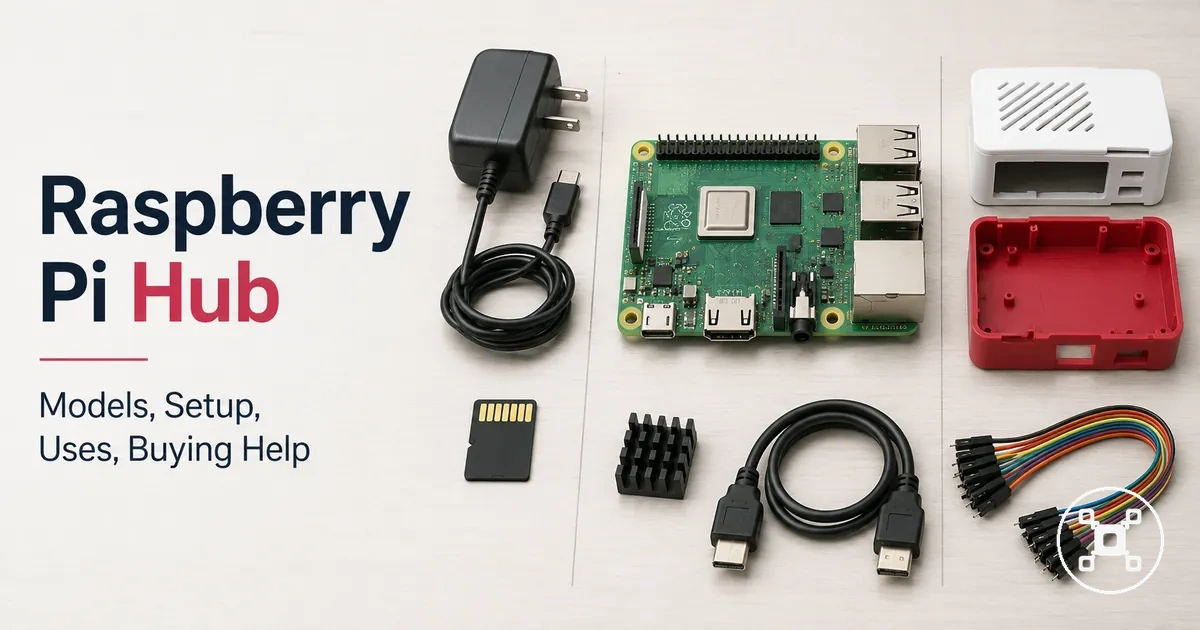
A usable setup includes a suitable Raspberry Pi model, a compatible power supply, storage such as a microSD card, and any accessories required by the intended use. A starter kit groups common setup parts, while a board-only option requires those parts to be selected separately. The right fit is the combination of model and accessories that matches the project type, budget, and setup environment.
The right fit is the combination of model and accessories that matches the project type, budget, and setup environment.
Raspberry Pi can support desktop-like computing and electronics tasks, but it is not a universal replacement for every PC or microcontroller. Buying confidence comes from matching the models, memory category, ports, power requirements, accessories, and compatibility needs to the intended use.
Table of Contents
What a Raspberry Pi is and where its scope ends
Raspberry Pi is a small single-board computer family used for computing, learning, projects, and control tasks. The board requires a compatible operating system to perform computing tasks and includes ports for peripherals together with a GPIO header for electronics connections. Raspberry Pi is a configurable single-board computer family.
Raspberry Pi is a configurable single-board computer family.
To understand what Raspberry Pi is, it helps to see the board features that define its scope. The image below labels the Raspberry Pi board, visible ports, GPIO header, storage area, and power connector that distinguish it from other types of devices.
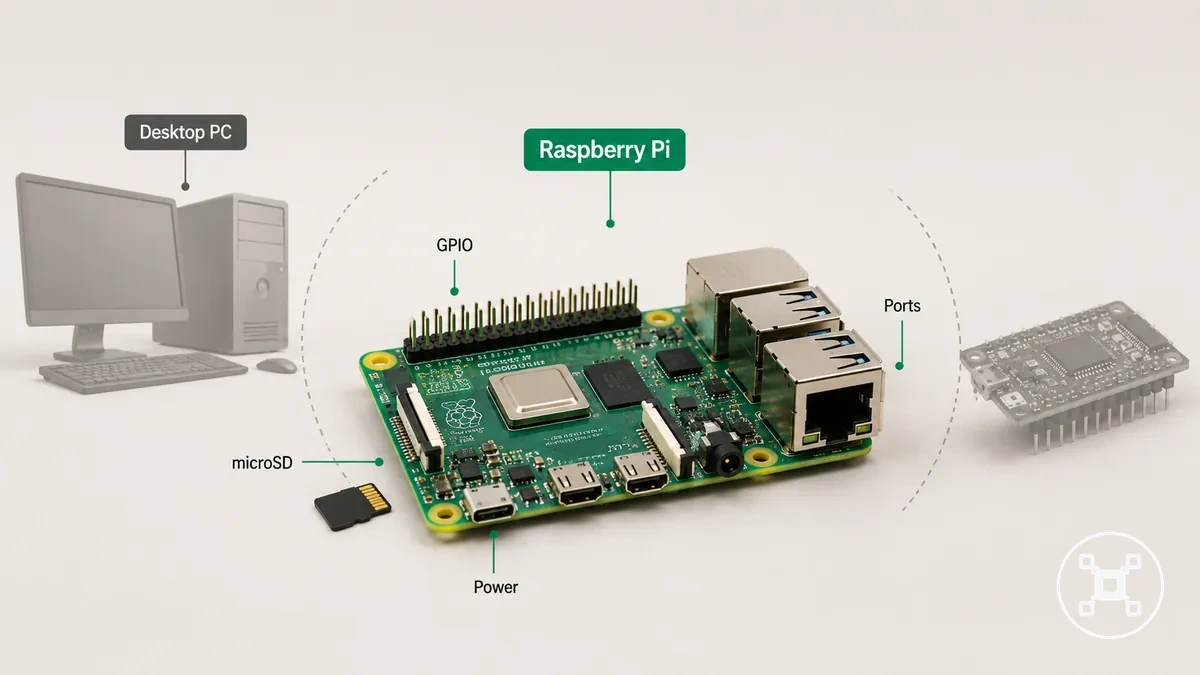
The scope of Raspberry Pi depends on whether the goal is to use it as a computer, a project board, or a finished device. With a compatible operating system, power source, storage, and peripherals, Raspberry Pi functions as a compact computer, while its GPIO interface allows connection to sensors and other electronics for project work. A desktop PC is typically supplied as a complete computing system, whereas a microcontroller is intended for dedicated embedded control rather than a general-purpose operating system. Raspberry Pi is neither a complete desktop PC nor a finished consumer device, and it is not a replacement for every microcontroller or computing environment.
Single-board computer, desktop substitute, and project controller boundaries
A Raspberry Pi is a single-board computer, not a universal desktop substitute or project controller. These Raspberry Pi boundaries clarify realistic use by separating computer tasks from GPIO-based control tasks. The practical role depends on the intended workload and setup.
The practical role depends on the intended workload and setup.
The diagram below separates the single-board computer, desktop substitute, and project controller boundaries so the role differences are easier to understand before choosing a use case.
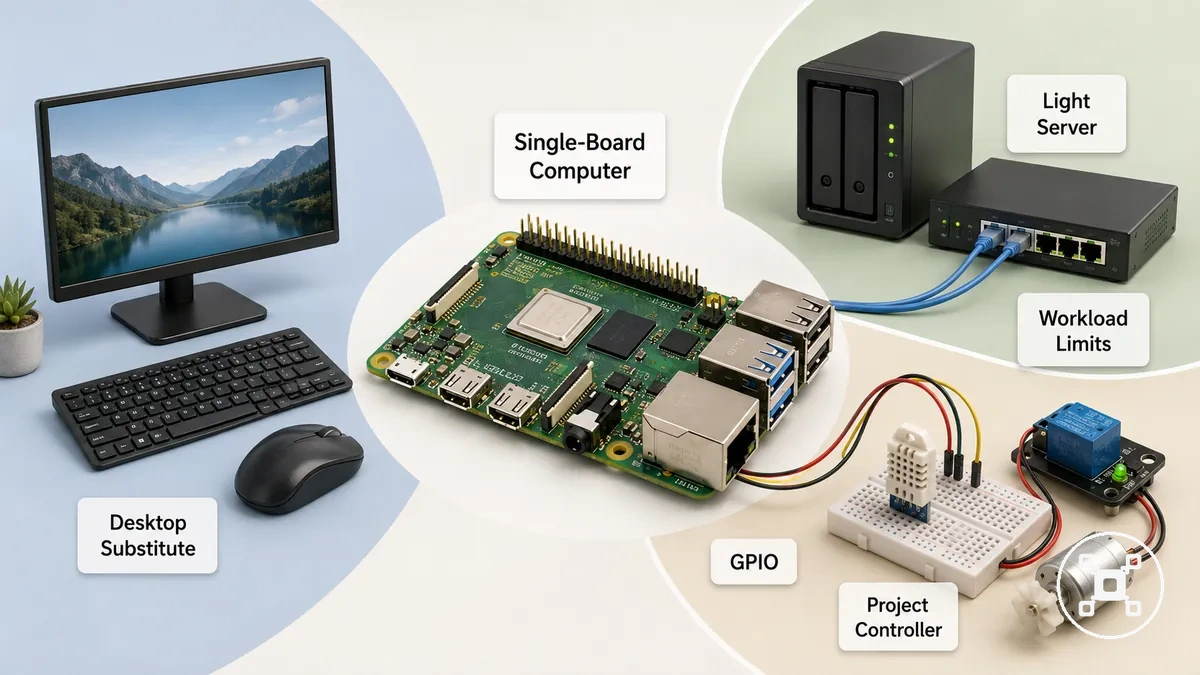
For example, a Raspberry Pi can function as a desktop substitute for light browser and office tasks when the selected model and setup match that workload. The same board can also serve as a small server for network or storage tasks or as a project controller by using its GPIO interface with sensors and automation components in an electronics project. These roles have different workload limits, so the practical fit is desktop-like computing, lightweight server use, or electronics projects rather than every PC or controller workload.
| Role | Works well when | Watch for |
|---|---|---|
| Desktop substitute | Light browser and office task workloads | Performance limits become more noticeable with heavier workloads |
| Project controller | GPIO connects sensors and automation components for an electronics project | General-purpose computing differs from dedicated control hardware |
| Server | Light network or storage services with a suitable setup | Storage, power, and workload affect practical use |
Raspberry Pi model families and their practical roles
Raspberry Pi models are organized into model families that match different workloads, sizes, and project contexts rather than a single universal purpose. Each model family combines a board size, performance level, ports, and connectivity options that influence accessories, power needs, and the workloads it handles. These differences matter because the chosen board family affects practical fit, accessories, and workload.
The image below highlights the main board families and their intended roles.
These Raspberry Pi model families and practical roles are easier to understand when broad board forms are compared instead of individual products. The image below highlights the main board families and their intended roles.
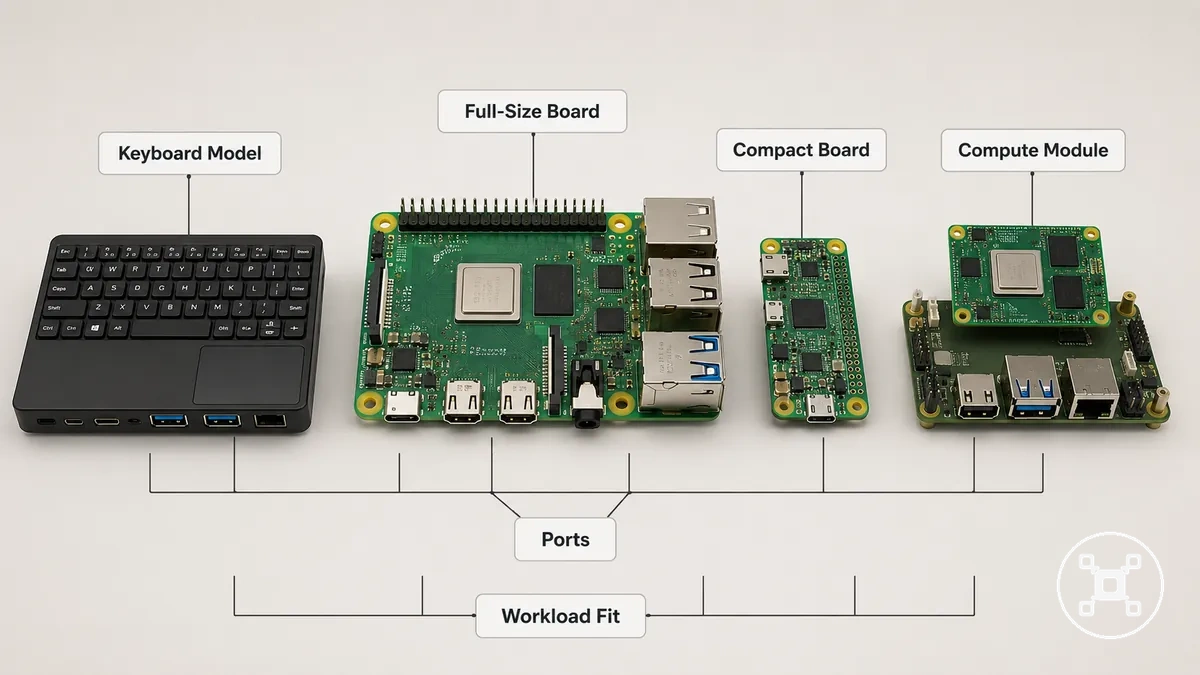
For example, a full-size Raspberry Pi board is commonly suited to desktop-style computing and broader project work, while a compact board family is better suited to space-constrained projects with lighter workloads. Keyboard-style boards combine computing hardware with an integrated keyboard, and compute-module-style boards are intended for embedded designs that require custom integration. Beginners often find a general-purpose board family the easiest starting point, while desktop, compact, and embedded use cases each benefit from a board family chosen for the required performance, size, ports, connectivity, and workload. For a more detailed breakdown, see Raspberry Pi models compared.
| Model family | Practical role | Watch before choosing |
|---|---|---|
| Full-size board | General computing and broad project use | Performance, ports, power, cooling, and accessory needs |
| Compact board | Space-limited projects and lightweight workloads | Smaller size may provide fewer ports and connectivity options |
| Compute module or integrated board | Embedded systems and custom hardware integration | Compatibility with the intended carrier board and project design |
Flagship boards, compact boards, keyboard models, and compute modules
Flagship boards, compact boards, keyboard models, and compute modules are Raspberry Pi board categories defined by their form factor, integration level, ports, and intended project role. Recognizing these board types helps match a Raspberry Pi board to a practical use case without comparing individual models. Each category supports a different project role through its physical design and level of integration.
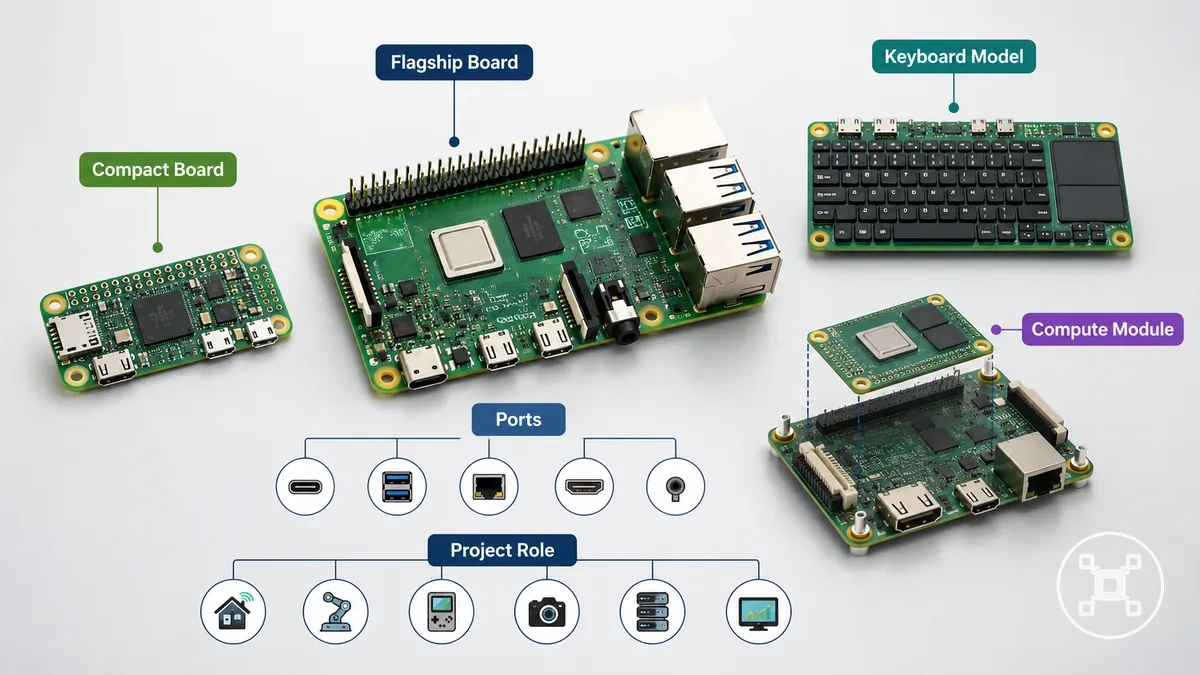
The categories below highlight the main board types and the practical role each one commonly supports.
- Flagship boards: Full-size boards with more ports and broader expansion options, typically used for desktop-style computing and general-purpose projects where higher performance is beneficial.
- Compact boards: Smaller form factor boards with a reduced footprint and lower power focus, commonly chosen for embedded projects or installations where space is limited.
- Keyboard models: Boards integrated into a keyboard enclosure, combining the computer and input device in one form factor that is often suitable for beginner desktop learning.
- Compute modules: Module-style boards intended for integration with a compatible carrier board, commonly used in embedded systems and advanced custom hardware designs.
Performance, memory, ports, size, and power differences
Performance, memory, ports, size, and power differences determine how well a Raspberry Pi board matches a specific workload. These attributes influence application responsiveness, display support, connectivity, cooling requirements, and physical installation rather than making one board universally suitable. Choosing a board that matches these characteristics helps achieve a better fit for the intended use case.
Choosing a board that matches these characteristics helps achieve a better fit for the intended use case.
For example, desktop use and media tasks often benefit from higher performance, more memory, broader display support, and additional ports, while embedded placement may prioritize compact size and lower power draw. Power use and heat output also change with the selected board and workload, so cooling and overall setup reliability should be considered together when planning a project.
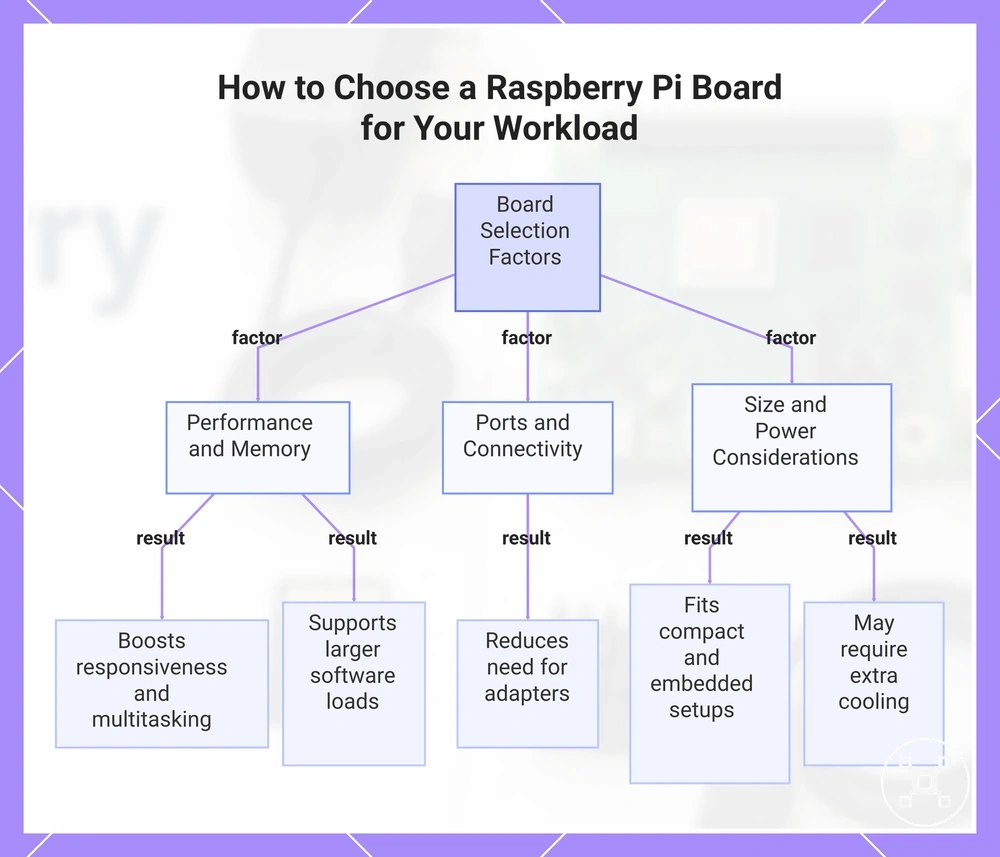
The attributes below show how each characteristic influences practical setup and decision-making.
The attributes below show how each characteristic influences practical setup and decision-making.
- Performance: Higher processing capability for the selected board and workload can improve desktop responsiveness, media handling, and multitasking, while lighter workloads place fewer demands on processing speed.
- Memory: More RAM provides greater working space for applications, which can improve responsiveness during larger software workloads or when multiple programs run together.
- Ports and connectivity: More USB, display support, and network connections reduce the need for adapters when multiple peripherals, displays, or networking devices are part of the setup.
- Size: Smaller board size improves physical fit in compact cases and embedded installations, while larger boards often provide additional I/O and expansion options.
- Power and heat: Higher-performance workloads may increase power draw and thermal load, making additional cooling beneficial for stable operation, while lighter workloads generally require less cooling.
This chart shows the main board attributes that influence workload suitability, including performance, memory, ports, size, and power considerations.
Common Raspberry Pi uses by project type
Choosing a Raspberry Pi project type first makes it easier to identify the board capabilities and accessories that matter for the intended task. Raspberry Pi uses include learning, media, networking, automation, retro gaming, and electronics, but each project type benefits from different combinations of performance, connectivity, storage, and supporting parts. Matching the use case to the board and accessories helps create a more suitable starting point.
The grouped examples below provide decision support rather than step-by-step instructions.
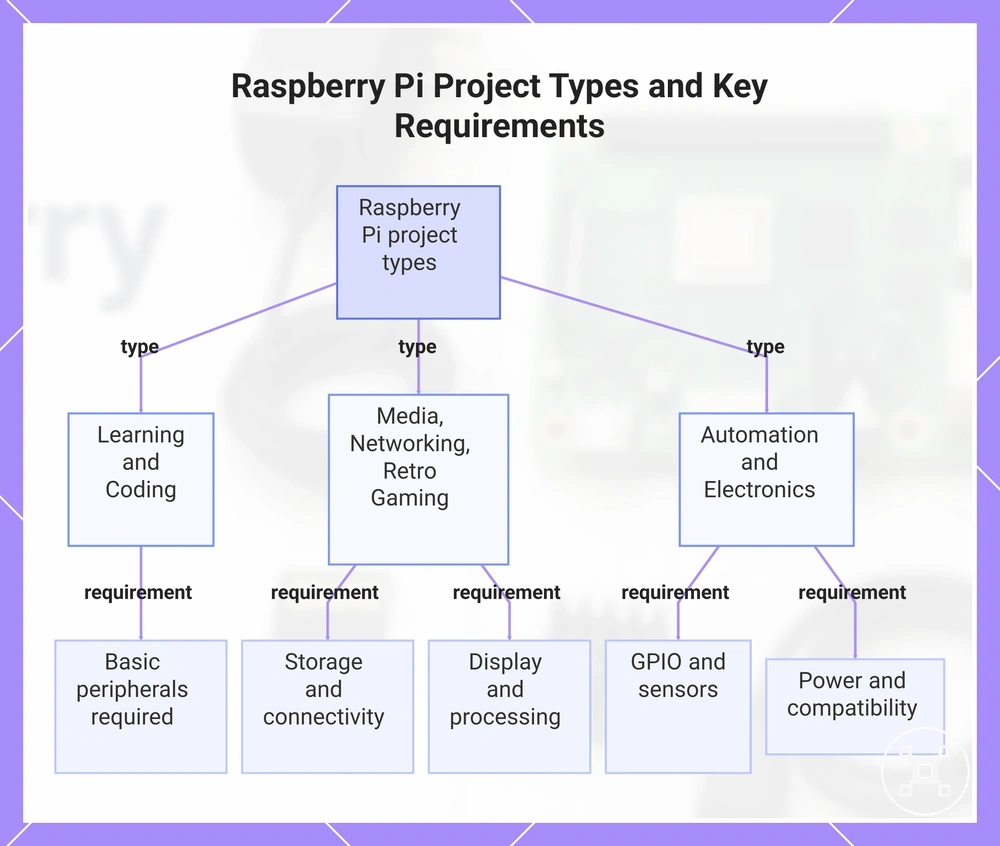
Raspberry Pi projects cover a broad range of practical uses, but suitability changes with the selected board, required accessories, and user experience. A simple coding project may require little more than basic peripherals, while automation or media projects often need additional hardware, storage, sensors, controllers, or networking equipment. The grouped examples below provide decision support rather than step-by-step instructions.
- Learning and coding: Beginner programming and GPIO experiments require a display, input devices, and basic accessories, while electronics activities also need compatible components and careful wiring.
- Media: Media playback and home server projects benefit from suitable display support, reliable storage, and network connectivity, while larger media libraries or higher playback demands may require a more capable board and additional storage.
- Networking: Networking projects such as home server or monitoring tasks rely on stable Ethernet or wireless connectivity, with reliable power and storage improving long-running operation.
- Automation: Automation projects use GPIO, sensors, controller boards, or relays, and successful setup depends on compatible accessories, power planning, and software configuration.
- Retro gaming: Retro gaming requires controllers, storage, display output, and suitable processing capability, while more demanding emulation may benefit from a higher-performance board and improved cooling.
- Electronics: Electronics projects connect sensors, motors, displays, or other components through GPIO, making hardware compatibility, safe power delivery, and programming knowledge important parts of the build.
This chart shows the main Raspberry Pi project categories and their essential requirements to help match the board and accessories to the intended use.
Learning, media, networking, automation, retro gaming, and electronics projects
When selecting a Raspberry Pi project, the intended outcome helps determine the board capability and accessories that are most appropriate. These examples provide compact guidance for choosing a suitable board and supporting hardware rather than acting as project instructions.
- Learning: Learning and coding projects use GPIO, a display, and input devices, while electronics activities also require compatible components and basic wiring skills.
- Media: Media projects need HDMI display support, storage, and reliable connectivity, while larger media collections may benefit from a higher-capability board.
- Networking: Networking or home server projects require stable Ethernet or wireless connectivity, with dependable power improving continuous operation.
- Automation: Automation projects connect sensors, relays, or controller hardware through GPIO, making suitable power and compatible accessories important.
- Retro gaming: Retro gaming projects require controllers, storage, and suitable processing capability, while demanding emulation may benefit from a more capable Raspberry Pi.
- Electronics projects: Electronics projects integrate sensors, displays, or controller boards through GPIO, requiring compatible hardware and careful component selection.
How to choose a Raspberry Pi for the job
Choose a Raspberry Pi by matching the board to the intended use case rather than looking for one model that fits every situation. The right board choice is guided by workload, memory, ports, cooling, accessories, budget, availability, and upgrade room, so the final decision should reflect the job and its practical constraints.
These conditions help narrow the choice to a beginner, desktop, compact-board, or project-focused path.
If the goal is learning or simple projects, a board with the required accessories and GPIO access is usually sufficient. Desktop-style workloads or projects with multiple peripherals may benefit from additional memory, more ports, and suitable cooling, while compact installations often prioritise smaller size over expansion. These conditions help narrow the choice to a beginner, desktop, compact-board, or project-focused path.
If the goal is learning or simple projects, a board with the required accessories and GPIO access is usually sufficient.
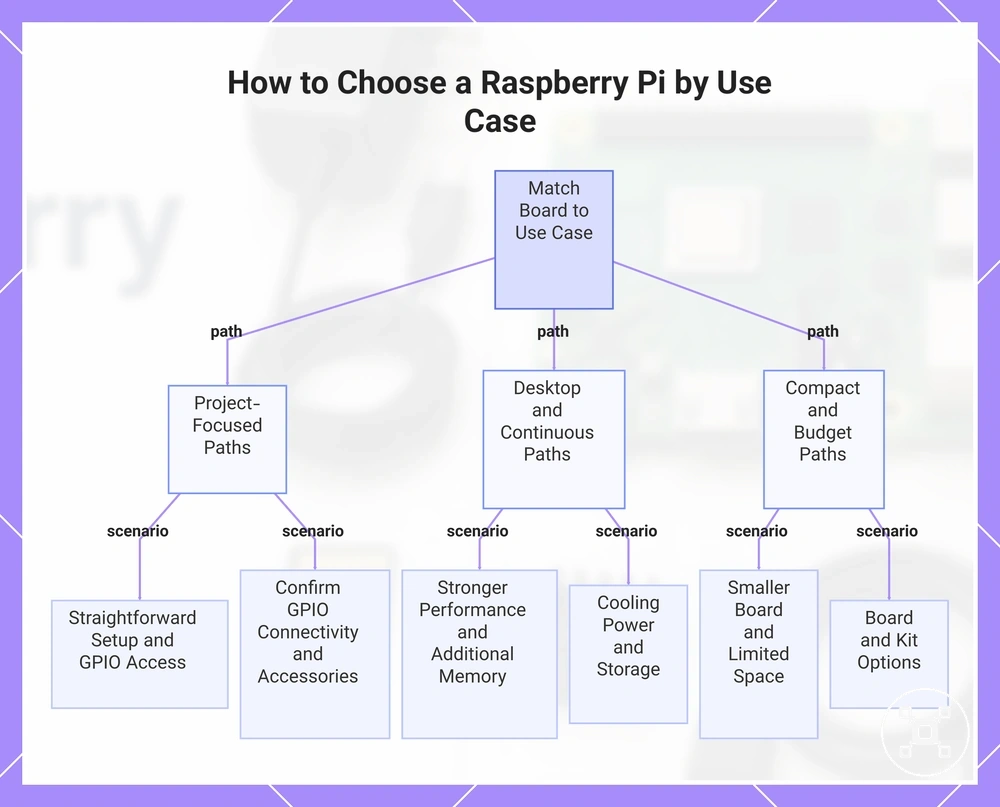
When more than one Raspberry Pi appears suitable, compare the required criteria before making a buying decision instead of searching for a universally better board. To choose a Raspberry Pi confidently, evaluate the use case, hardware requirements, and practical constraints rather than relying on a single recommendation.
- Learning goal: Prioritise straightforward setup, essential memory, and GPIO access when beginner-friendly coding or electronics is the main objective.
- Desktop workload: Select stronger performance, additional memory, and suitable display ports when regular multitasking or desktop applications are expected.
- Compact project: Choose a smaller board when installation space is limited and the available ports satisfy the project requirements.
- Hardware project: Confirm the required GPIO, connectivity, and accessories before selecting a board for sensors, controllers, or external devices.
- Continuous operation: Consider suitable cooling, stable power, and appropriate storage when the Raspberry Pi is intended to run for extended periods.
- Budget decision: Compare board-only and starter kit options according to availability, included accessories, and future upgrade room.
This chart groups the main use case paths for selecting a Raspberry Pi board, showing the key requirements for each scenario.
Beginner fit, project requirements, budget, availability, and upgrade room
Use beginner fit, project requirements, budget, availability, and upgrade room to filter a first Raspberry Pi choice. These criteria reduce the risk of overbuying or underbuying.
- Beginner fit: Choose a learning kit when guided setup matters; avoid extra components that do not improve initial setup confidence.
- Project requirements: Match ports, GPIO, and performance to the workload; missing interfaces or capacity can restrict the intended project.
- Budget: Compare board and accessory costs together; a lower board price may offer less value after required extras are added.
- Availability: Use a substitute only when it meets the same constraints; limited stock should not override essential project requirements.
- Upgrade room: For a headless setup or future expansion, retain suitable connectivity and GPIO to avoid replacing the first board early.
Raspberry Pi 4, Raspberry Pi 5, and Zero-class board trade-offs
Choose the board class by matching the intended workload and setup constraints rather than treating one option as universally preferable. Raspberry Pi 4, Raspberry Pi 5, and a Zero-class board differ in performance, size, heat, ports, and accessory needs, so the practical trade-off depends on performance, size, heat, and accessories.
| Board class | Main strength | Main trade-off | Best-fit situation |
|---|---|---|---|
| Raspberry Pi 4 | Balanced performance with broad accessory support. | Lower performance than Raspberry Pi 5 for heavier workloads. | Desktop, learning, or project use when established accessories reduce setup burden. |
| Raspberry Pi 5 | Higher performance for more demanding workloads. | Higher heat output can increase cooling and accessory requirements. | Performance-focused use cases where added cooling and setup effort are acceptable. |
| Zero-class board | Compact size and lower power requirements. | Fewer ports and lower performance than larger board classes. | Space-limited, lightweight, or embedded projects with modest connectivity needs. |
Essential Raspberry Pi setup parts and compatibility checks
Raspberry Pi setup parts must match the board model and intended use before the system can boot and operate reliably. Compatibility checks should cover the power supply, microSD card, display cable, keyboard, mouse, case, cooling, and any required GPIO accessories. Power and boot storage are first-boot essentials, while display, input, enclosure, cooling, and GPIO parts may be optional for specific setups.
| Component | Compatibility condition | Why it matters | Essential or project-specific |
|---|---|---|---|
| Power supply | Match the board's required voltage, connector, and power capability. | Supports stable booting and operation. | Essential |
| microSD card | Use supported boot storage containing a compatible OS image. | Provides the operating system and startup files. | Essential |
| Display cable | Match the cable connector to the Raspberry Pi video output and display input. | Enables local video output during setup. | Essential for local display setup |
| Keyboard and mouse | Use supported wired or wireless peripherals when local input is required. | Provides direct control during desktop setup. | Essential for local input setup |
| Case and cooling | Choose a case that fits the board and cooling suited to the expected heat and workload. | Protects the board and helps control operating heat. | Model- and workload-specific |
| GPIO accessories | Match each sensor or expansion board to the Raspberry Pi GPIO interface and project requirements. | Prepares the board for project-specific hardware functions. | Project-specific |
If a Raspberry Pi does not boot or display output is missing, check the power supply, microSD card, display cable, and connected peripherals before replacing hardware. Connector type, power capability, enclosure fit, and cooling needs must match the selected board model and workload.
Connector type, power capability, enclosure fit, and cooling needs must match the selected board model and workload.
For a desktop-style first boot, local display and input peripherals are useful, while a headless or electronics project may use a different parts list. See Raspberry Pi accessories needed to clarify which case, cooling, GPIO, sensor, or peripheral additions suit the project.
Power supply, boot storage, display cable, keyboard, mouse, and case needs
A Raspberry Pi needs compatible power, boot storage, and control components to support reliable first boot and basic usability. Display, input, and enclosure needs change according to whether setup uses a monitor or a headless setup.
- Power supply: The connector and power capability must match the Raspberry Pi model; a suitable match supports stable startup and reduces power-related boot interruptions.
- Boot storage: A microSD card used as boot media must contain a compatible OS image and provide suitable storage speed; these conditions support reliable loading and responsive use.
- Display cable: The display cable or HDMI cable must match the board output and monitor input; it supports visible first setup but is unnecessary when a headless setup already provides remote access.
- Keyboard: A compatible keyboard provides local text and command input; remote control can replace it after network access is available in a headless setup.
- Mouse: A compatible mouse provides pointer control for a graphical interface; command-line or remote administration removes this need when no local desktop is used.
- Case: The case must fit the selected board and preserve access to connectors and cooling; suitable enclosure fit improves protection and convenience without blocking normal use.
Cooling, GPIO, adapters, and project-specific accessories
When a Raspberry Pi is used for sustained workloads, electronics projects, or inside a compact enclosure, accessory compatibility should be checked against the board model and intended fit. Cooling, GPIO components, adapters, and other project-specific accessories remain optional because their value depends on the workload and project type.
- Cooling: A fan or heatsink is useful when the board generates sustained heat and the enclosure supports compatible airflow and mounting; lighter workloads may not need additional cooling.
- GPIO: A GPIO kit with jumper wires or sensors is useful when an electronics project connects external hardware to the Raspberry Pi; it is unnecessary for projects that do not use GPIO connections.
- Adapters: HDMI, USB, or cable adapters are useful only when the Raspberry Pi connectors and external devices use different interfaces; matching connectors remove the need for an adapter.
- Project-specific accessories: Each add-on should match the board model, enclosure fit, connector layout, and project purpose; incompatible accessories can limit access to ports, GPIO connections, or cooling space.
Starter kit, board-only, and accessory bundle choices
The right buying path depends on your missing parts, confidence level, and total setup cost. Choosing a Raspberry Pi option that matches the compatible parts you already own can reduce unnecessary purchases, while missing essentials may increase later costs. The three main buying paths are a starter kit, a board-only purchase, and an accessory bundle.
The choice usually comes down to beginner convenience versus upgrader reuse.
If you are a beginner without compatible parts, a starter kit can simplify the first setup by including commonly needed components. If you are an upgrader with existing power, storage, or other compatible parts, a board-only purchase can avoid replacing accessories that remain usable. The choice usually comes down to beginner convenience versus upgrader reuse.
Buying only the board can appear less expensive until missing parts are added later.
Buying only the board can appear less expensive until missing parts are added later. Comparing the included components with your existing accessories helps keep the total setup cost aligned with the value you actually need.
The comparison below summarizes when each buying path is likely to fit.
The comparison below summarizes when each buying path is likely to fit.
| Buying path | Best fit | Main risk | Value signal |
|---|---|---|---|
| Starter kit | Beginner who still needs the main setup components. | May include accessories you already own or do not need. | Higher convenience when many missing parts must be obtained together. |
| Board-only | Upgrader with compatible parts such as power, storage, and peripherals. | Missing components must be checked before setup. | Good value when existing accessories remain compatible. |
| Accessory bundle | User replacing selected missing parts while keeping the current board. | Compatibility should match the board model and existing accessories. | Useful when only specific accessories are needed instead of a full starter kit. |
Total setup cost, missing parts, and value trade-offs
The total setup cost includes the Raspberry Pi board plus any required power, storage, case, cooling, cables, and peripherals. Which categories add cost is determined by the selected board, the compatible parts already available, and the intended setup, so total cost is broader than board price.
- Board, power, and storage: These form the base setup when compatible versions are not already owned; overlooking a required item can create an extra purchase or delay first use.
- Case and cooling: A case adds value when physical protection is needed, while cooling adds value when sustained workload and enclosure conditions create heat; adding either without a clear need can waste budget.
- Cables: Power, display, and connection cables are needed when existing cables do not match the board and attached devices; a connector mismatch creates missing-part risk and setup delay.
- Peripherals: A keyboard, mouse, or display adds cost when local control is required, while a remote setup can make selected peripherals unnecessary.
A board-only purchase can appear lower in cost until missing parts such as compatible power or storage are added. Checking existing accessories against the board model separates reusable parts from extra parts, clarifies the real cost, and reduces the risk of an unexpected purchase or setup delay.
A board-only purchase can appear lower in cost until missing parts such as compatible power or storage are added.
For a beginner without compatible parts, a starter kit may provide stronger setup value through convenience, while an upgrader may gain more value by reusing accessories with a board-only purchase. An accessory bundle can fill selected gaps when only a case, cooling, cables, or peripherals are missing, leaving value trade-offs between convenience, reuse, and unnecessary extras.
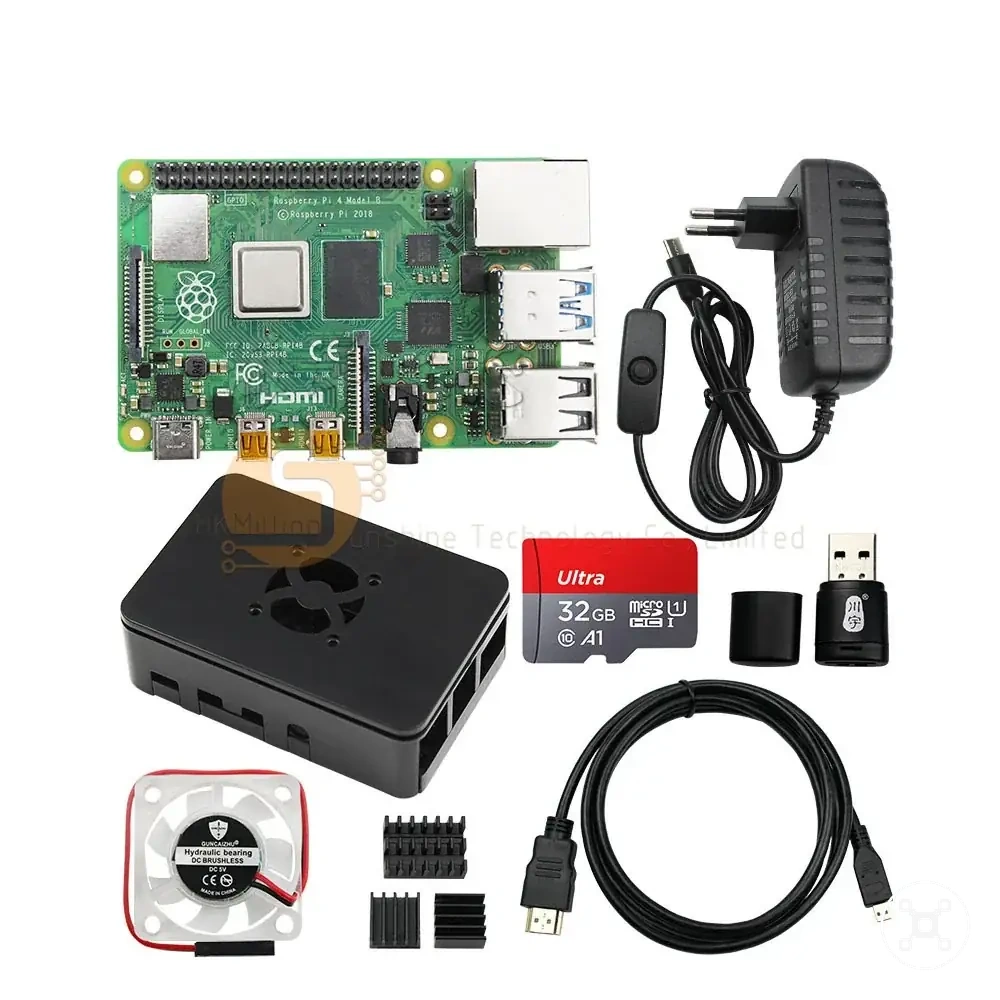
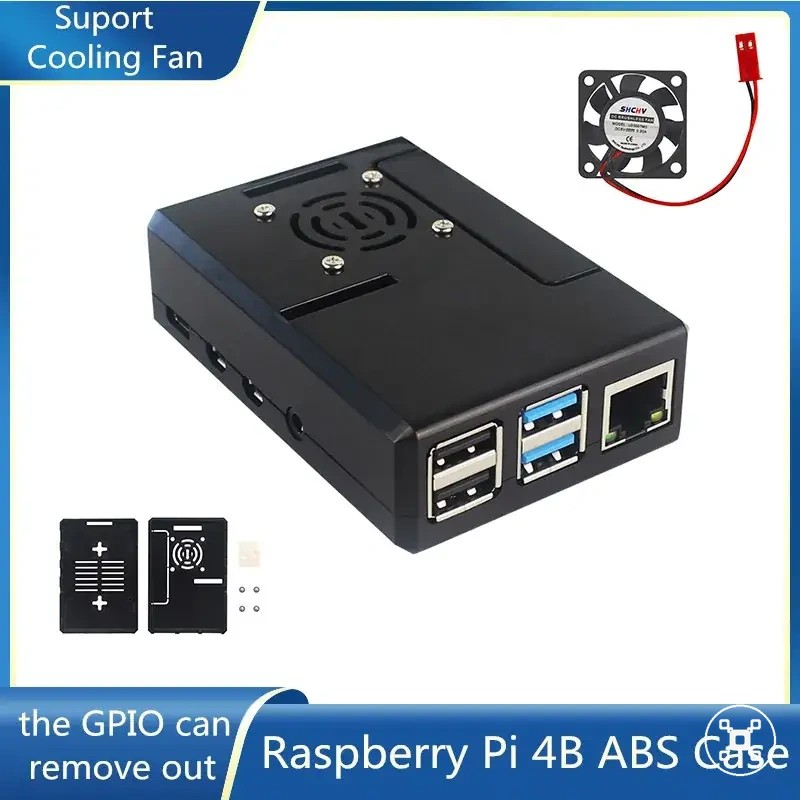
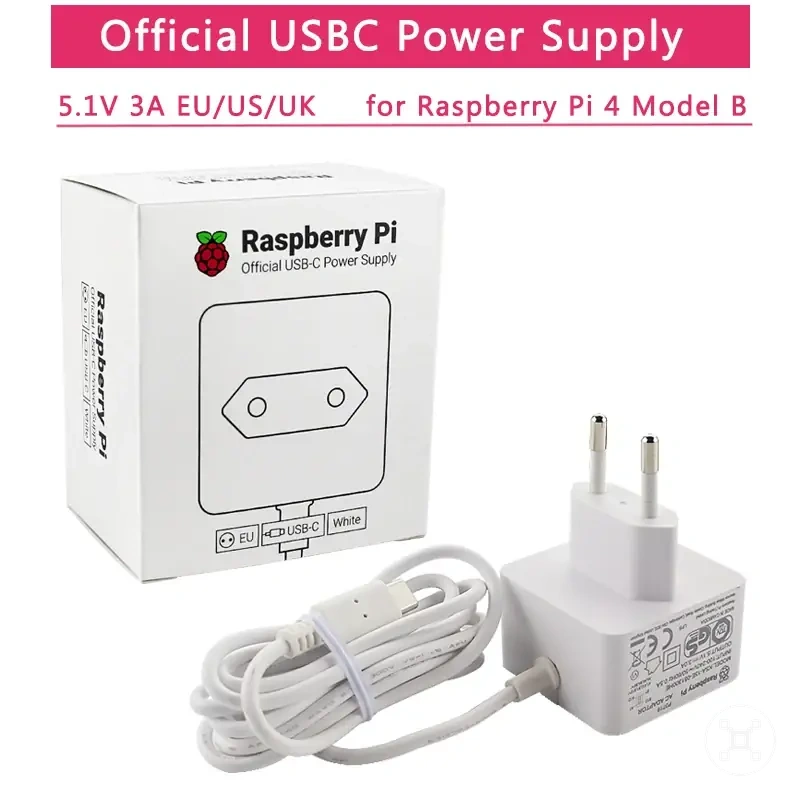
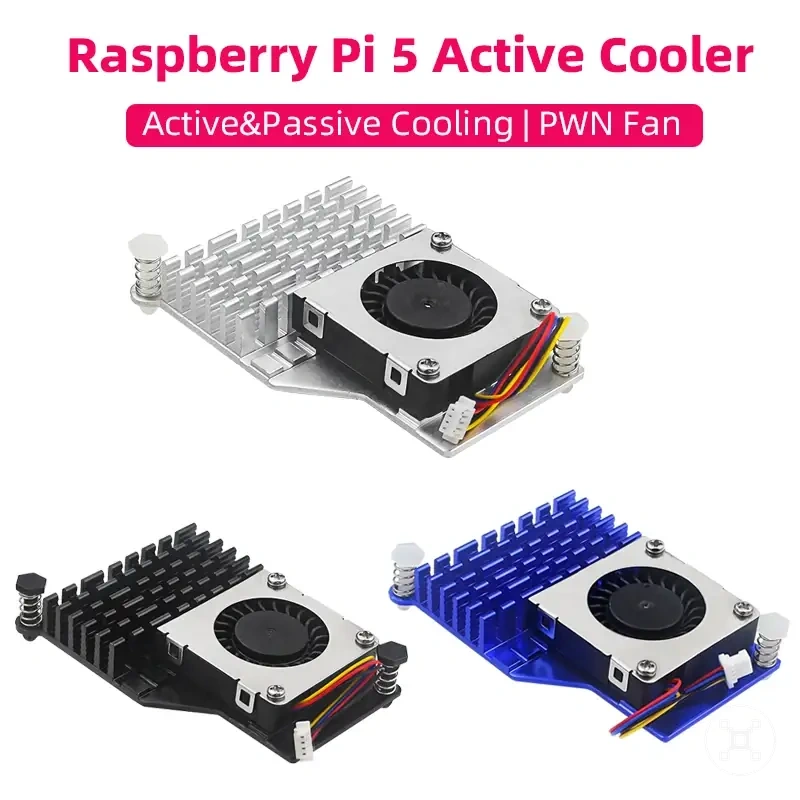
The products below are useful examples for comparing available options.
The products below are useful examples for comparing available options. Before buying, check that the compatibility criteria, key features, and product details match your needs.
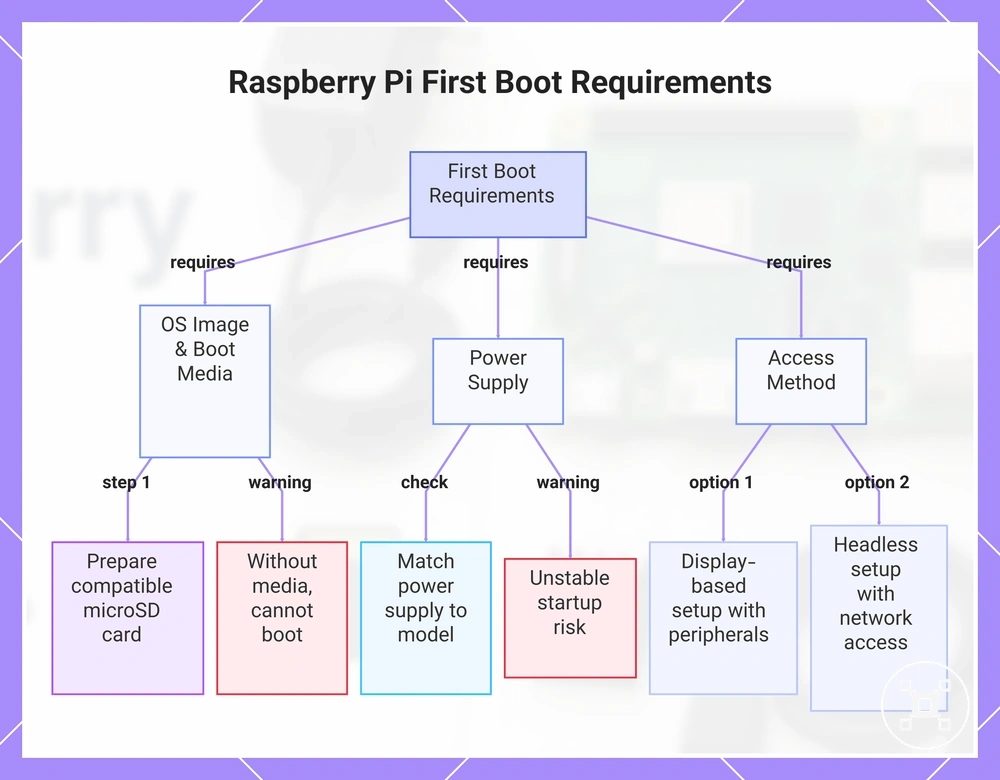
First setup requirements before a Raspberry Pi can boot
A Raspberry Pi can complete its first boot only when the operating system image, boot media, power, and an access method are prepared. The access method can be a connected display with peripherals or configured network access for a headless setup. Boot readiness therefore depends on the operating system image, boot media, power, display or network access, and any required peripherals.
- Operating system image and boot media: The operating system image must be prepared on boot media supported by the selected Raspberry Pi model, such as a compatible microSD card. Without prepared boot media, the Raspberry Pi cannot load the operating system.
- Power: The power supply and connector must match the Raspberry Pi model and support the attached hardware. An unsuitable power arrangement can prevent a successful boot or cause unstable startup.
- Display or network access: A local first setup requires a compatible display connection, while a headless setup requires network access that has been prepared before boot. Without either access path, the Raspberry Pi may start but remain inaccessible for setup.
- Peripherals: A keyboard and mouse are required for local configuration, while a prepared headless setup can proceed without them. Missing required peripherals can delay the first setup.
If the Raspberry Pi does not reach the expected startup state, confirm that the operating system image matches the intended model, the boot media has been prepared correctly, and the storage and power arrangement suit the board. These checks keep the preparation focused on the main power and storage requirements.
For a headless setup, prepare network access before the first boot.
For a display-based setup, prepare the display and required peripherals before powering on the Raspberry Pi. For a headless setup, prepare network access before the first boot. The exact preparation can change with the Raspberry Pi model, operating system image, and storage choice, so this section remains an overview rather than a full setup guide.
For a display-based setup, prepare the display and required peripherals before powering on the Raspberry Pi.
Continue with the dedicated Raspberry Pi setup guide for the complete preparation and configuration process.
Continue with the dedicated Raspberry Pi setup guide for the complete preparation and configuration process.
This chart shows the four main categories of requirements that must be prepared before a Raspberry Pi can boot successfully for the first time.
Operating system image, boot media, peripherals, and first power-on checks
Before the first power-on, confirm that the operating system image, boot media, peripherals, display or network access, and power are ready for the selected Raspberry Pi. These readiness checks confirm that the system is prepared before power is applied.
- Operating system image: Verify that the operating system image is intended for the selected Raspberry Pi model; an unsuitable or missing OS image prevents the board from loading the expected operating system.
- Boot media: Confirm that prepared boot media, such as a compatible microSD card when required by the board, is inserted correctly; missing or unprepared boot media can prevent the first boot.
- Input, display, and peripherals: For a local setup, connect the required display, keyboard, mouse, and other peripherals before the first power-on; missing local input or display access can prevent initial interaction with the Raspberry Pi.
- Network: For a headless setup, prepare network access before the first power-on; without a configured network path, the Raspberry Pi may start but remain unavailable for remote access.
- Power: Check that the power supply and connector are suitable for the Raspberry Pi model and attached hardware before switching on; unstable power or removing power while the boot media is being accessed can interrupt the first boot or damage stored data.
Raspberry Pi compared with mini PCs and nearby alternatives
A Raspberry Pi is the better fit when GPIO access, learning, and hardware projects are more important than desktop-focused performance or the lowest setup burden. A mini PC and a microcontroller board each solve different problems rather than serving as universal replacements for a Raspberry Pi. The better choice depends on the use case.
A common misconception is that these alternatives differ only in performance or price.
A common misconception is that these alternatives differ only in performance or price. In practice, Raspberry Pi combines a general-purpose operating system with project access through GPIO, a mini PC focuses on desktop software and ease of use, and a microcontroller board focuses on direct sensor interaction and real-time control with a simpler software model. These differences separate Raspberry Pi expectations from mini PC and microcontroller board expectations.
| Option | Strong fit | Main limitation | Decision signal |
|---|---|---|---|
| Raspberry Pi | Learning, GPIO projects, automation, and flexible software with direct project access. | Desktop performance and setup burden may be less favourable than a mini PC for conventional computing tasks. | Choose when hardware access and project flexibility are higher priorities than a traditional desktop experience. |
| Mini PC | Desktop software, everyday computing, and workloads that benefit from stronger conventional PC performance. | Project access through GPIO is typically unavailable or more limited than on a Raspberry Pi. | Choose when desktop performance and lower setup burden are more important than electronics projects. |
| Microcontroller board | Real-time control, sensor projects, and focused embedded tasks with a simple execution model. | General-purpose operating system features and desktop-style software are outside its normal role. | Choose when direct hardware control is the primary requirement rather than general computing flexibility. |
If your main goal is a desktop-like experience, compare software support, performance, setup burden, power needs, and project access before choosing a device. For a deeper feature-by-feature evaluation, see Raspberry Pi vs mini PC, while projects centred on sensors or embedded control should also consider whether a microcontroller board better matches the intended use case.
When a Raspberry Pi fits better than a mini PC
A Raspberry Pi is the stronger fit when project access, GPIO connectivity, compact size, lower power use, and learning are more important than desktop-oriented computing. The right choice depends on whether the goal centres on project access and learning rather than a conventional desktop experience.
- Electronics and sensor projects: A Raspberry Pi provides GPIO for connecting supported sensors and hardware, making it the better choice when direct project access is required instead of desktop-focused software alone.
- Compact embedded setup: A Raspberry Pi suits an embedded setup when limited space and lower power use are priorities, provided the selected model and accessories match the intended workload.
- Automation and lightweight services: A Raspberry Pi can be a stronger option for focused automation or lightweight server tasks when GPIO integration and hardware experimentation are part of the same project.
- Learning and experimentation: A Raspberry Pi combines a general-purpose operating system with accessible hardware interfaces, making it a better fit when learning includes programming, GPIO, and practical experimentation rather than desktop software only.
When a mini PC or microcontroller board is the better path
A mini PC or microcontroller board can be the better choice when the project requirement differs from what a Raspberry Pi is intended to prioritise. The most suitable alternative depends on the requirement.
- Desktop performance and existing software: A mini PC is the stronger alternative when the requirement is conventional desktop performance, support for existing software, or integrated storage options, because it is designed for desktop-oriented workloads.
- Real-time control: A microcontroller board is the better path when the requirement is predictable real-time control of sensors or hardware, because it focuses on direct hardware execution instead of a general-purpose operating system.
- Simple dedicated tasks: A microcontroller board is the better alternative when the requirement is simplicity for a focused task, such as reading a sensor or controlling an output, because it avoids the overhead of a full operating environment.
- Established desktop workflow: A mini PC is the stronger choice when the requirement is to continue using familiar desktop software and workflows, because it aligns more closely with conventional PC use than a Raspberry Pi.
Common buying and setup risks to check early
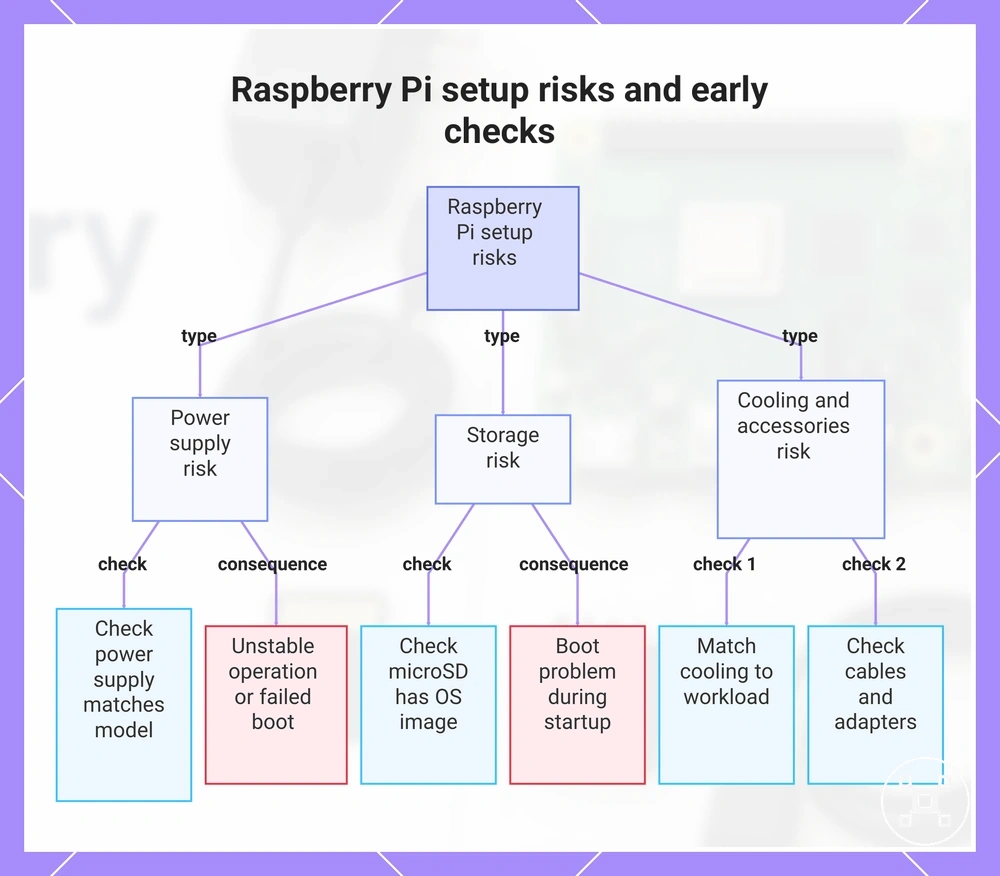
Buying risks and setup risks are easier to prevent than to correct after parts arrive or the Raspberry Pi is powered on. Early checks reduce the risk of a failed boot, overheating, missing accessories, and hardware mismatch.
- Risk: Incorrect power supply or undervoltage | Check: Confirm that the power supply matches the selected Raspberry Pi model | Likely consequence: Unstable operation or a failed boot | Prevention cue: Verify the required power specification before first power-on.
- Risk: Unprepared or incompatible storage | Check: Confirm that the microSD card contains an OS image intended for the selected model | Likely consequence: A boot problem during startup | Prevention cue: Prepare and verify the storage before inserting it.
- Risk: Cooling that does not suit the workload | Check: Match the case and cooling approach to the expected workload | Likely consequence: Overheating or reduced sustained performance | Prevention cue: Include suitable airflow or cooling where the workload produces sustained heat.
- Risk: Missing accessories or cable mismatch | Check: Confirm that the required display cables, peripherals, and adapters are available and compatible | Likely consequence: Setup delay or an incomplete initial configuration | Prevention cue: Check all required cables and accessories before assembly.
Check the power supply, storage, cooling, and cables as one setup set rather than as isolated parts. The selected model and workload should define the acceptable power, storage, heat, and cable conditions.
Check the power supply, storage, cooling, and cables as one setup set rather than as isolated parts.
If parts were selected for another Raspberry Pi model or a required accessory is missing, the mismatch can cause a setup delay or failed boot. Comparing each part with the selected model before power-on helps separate compatibility risks from unrealistic performance expectations.
Use model compatibility, workload, power, cooling, storage, and accessory availability as the final prevention criteria.
Use model compatibility, workload, power, cooling, storage, and accessory availability as the final prevention criteria. If startup problems remain after these checks, see Raspberry Pi not booting for focused troubleshooting before replacing parts.
Before buying, check that the compatibility criteria, key features, and product details match your needs.
The products below are useful examples for comparing available options. Before buying, check that the compatibility criteria, key features, and product details match your needs.
This chart shows the main buying and setup risks for Raspberry Pi, along with the recommended checks and consequences.
Underpowered supplies, weak storage, missing cables, heat, and unrealistic performance expectations
These risk categories help explain why a Raspberry Pi setup may not perform as expected even when the board is functioning correctly. Each risk connects a specific part or expectation to a setup outcome, making early checks easier before troubleshooting begins.
- Underpowered supplies | Weak condition: A power supply that does not meet the selected Raspberry Pi model's requirements or experiences undervoltage | Likely effect: Boot issue or instability | Check: Confirm the power supply matches the intended model before powering on.
- Weak storage | Weak condition: A slow microSD card or an incorrectly prepared OS image | Likely effect: Boot issue or setup delay | Check: Verify that the microSD card is suitable and contains a compatible operating system image.
- Missing cables | Weak condition: Required display, power, or peripheral cables are unavailable or mismatched | Likely effect: Setup delay or an incomplete initial configuration | Check: Confirm that all required cables and peripherals are available before assembly.
- Heat | Weak condition: Cooling or the case does not match the intended workload | Likely effect: Overheating or reduced sustained performance | Check: Match the cooling approach to the expected workload and enclosure.
- Unrealistic performance expectations | Weak condition: The selected model is expected to handle workloads beyond its intended capability | Likely effect: Performance disappointment rather than a hardware fault | Check: Compare the chosen Raspberry Pi model with the planned workload before purchasing.