Raspberry Pi Power Requirements and Power Supply Compatibility
Raspberry Pi power requirements define the compatibility conditions between the Raspberry Pi board, power supply, voltage, current delivery, and connection path required for reliable operation. The power supply provides the electrical input, while the cable, connector, model, and connected load influence whether the board receives suitable power for stable use.
The suitable combination changes when the Raspberry Pi model, connector type, cable condition, or connected devices change.
Raspberry Pi power compatibility requires considering the supply, cable, USB-C connector, board model, and peripherals together. The power supply has a voltage and current capability, the cable transfers that power to the board, and peripherals add load that can affect available headroom and reliability. The suitable combination changes when the Raspberry Pi model, connector type, cable condition, or connected devices change.
Raspberry Pi power compatibility requires considering the supply, cable, USB-C connector, board model, and peripherals together.
Power-related issues such as undervoltage warnings, instability, or unreliable peripheral behavior can be linked to the interaction between the power source, cable, connector, and load. These power requirements provide the foundation for understanding compatibility before moving into detailed setup guidance or broader boot troubleshooting.
Table of Contents
How Raspberry Pi Power Requirements Work
Raspberry Pi power requirements are the electrical conditions required for a Raspberry Pi board to receive a stable DC supply that matches its connected load. The power source, connector, cable, and peripherals form a connected power path, where suitable delivery supports operating stability. A stable DC supply is the core requirement for reliable Raspberry Pi operation.
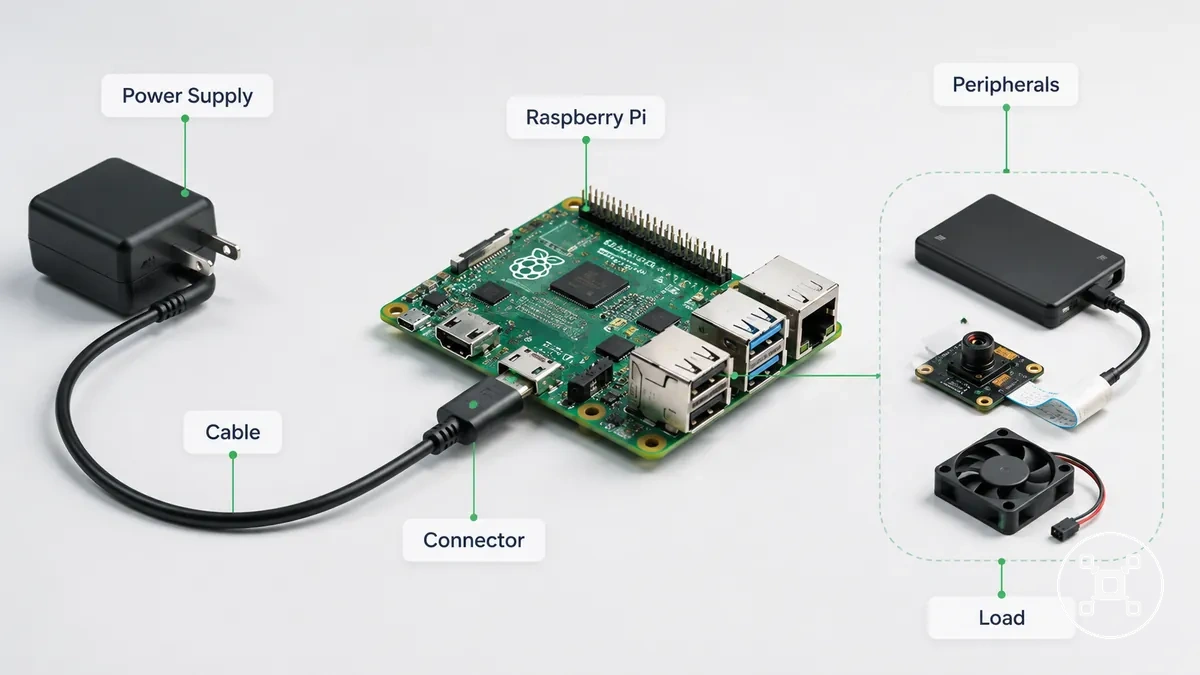
The Raspberry Pi board receives power through a supply connection that includes the power source, connector, and cable. The supply provides electrical capacity, the cable transfers power, and the connector links the source to the board input. Connected peripherals add load to the system, so available headroom and reliability are affected by the overall configuration.
This relationship helps explain why insufficient power delivery can contribute to unstable behavior.
For setup planning, a Raspberry Pi system should be viewed as a combination of board, supply, cable, and connected devices rather than isolated parts. This relationship helps explain why insufficient power delivery can contribute to unstable behavior. Understanding these power requirements supports planning a setup but does not replace the complete Raspberry Pi setup process.
Raspberry Pi Voltage, Current, and Wattage Requirements
Raspberry Pi voltage, current, and wattage requirements are separate electrical attributes used to evaluate whether a power supply is suitable for a Raspberry Pi setup. Voltage describes the electrical input level, current describes available electrical capacity, and wattage represents the relationship between these values. These attributes work together because the Raspberry Pi model, connected load, and operating conditions influence power stability.
Insufficient delivered voltage can contribute to undervoltage warnings and unstable operation.
Voltage describes the electrical level delivered to the Raspberry Pi board through the power input path. A 5V or 5.1V supply category is commonly associated with Raspberry Pi power requirements, while suitability depends on the specific board model, supply capability, and delivery conditions. Insufficient delivered voltage can contribute to undervoltage warnings and unstable operation.
Current describes the available capacity for the Raspberry Pi board and attached peripherals.
Current describes the available capacity for the Raspberry Pi board and attached peripherals. The Raspberry Pi uses part of this capacity, while connected devices increase the overall load and current draw. Current headroom represents the remaining capacity available for the setup, which can influence reliability when additional peripherals are connected.
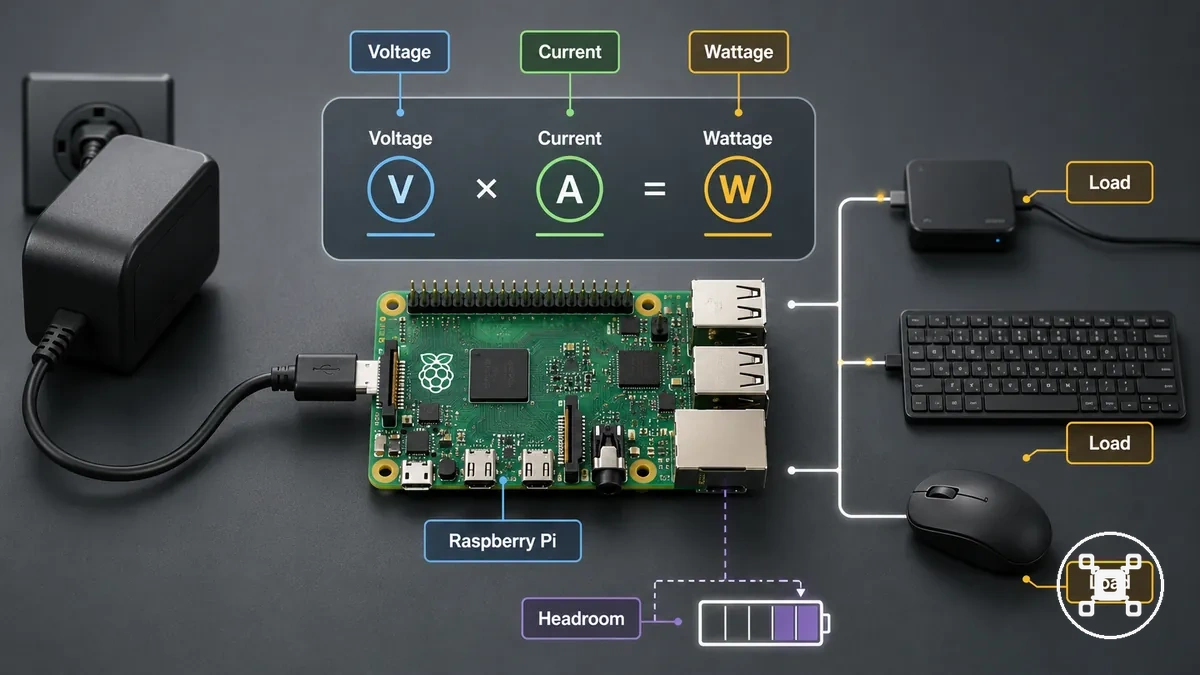
Wattage describes the power relationship between voltage and current and helps evaluate whether a supply rating matches the operating condition. The values used for voltage, current, wattage, and load headroom change with the Raspberry Pi model, connected devices, and configuration. The table organizes these electrical attributes by their practical role.
| Attribute | What it means | Condition that changes it | Effect on the Raspberry Pi |
|---|---|---|---|
| Voltage | The electrical input level supplied to the Raspberry Pi board. | Changes with the power source, cable delivery, and board requirements. | Suitable voltage delivery supports stable operation; low voltage can contribute to undervoltage warnings. |
| Current | The available electrical capacity for the board and connected load. | Changes with peripherals, current draw, and connected devices. | Available headroom supports higher-load configurations with improved reliability. |
| Wattage | The power relationship between voltage and current. | Changes with supply rating and operating load conditions. | Helps compare supply capacity with the needs of the Raspberry Pi setup. |
| Load Headroom | The remaining capacity available after the setup's current requirements are considered. | Changes when peripherals or connected devices are added. | Limited headroom can increase the risk of power-related instability. |
5V and 5.1V Operating Range
A 5V-class supply provides the low-voltage input needed for Raspberry Pi operation, but the delivered voltage at the board is the value that affects stable use. The supply label describes the source voltage, while the voltage reaching the Raspberry Pi input can be influenced by the cable and connected load.
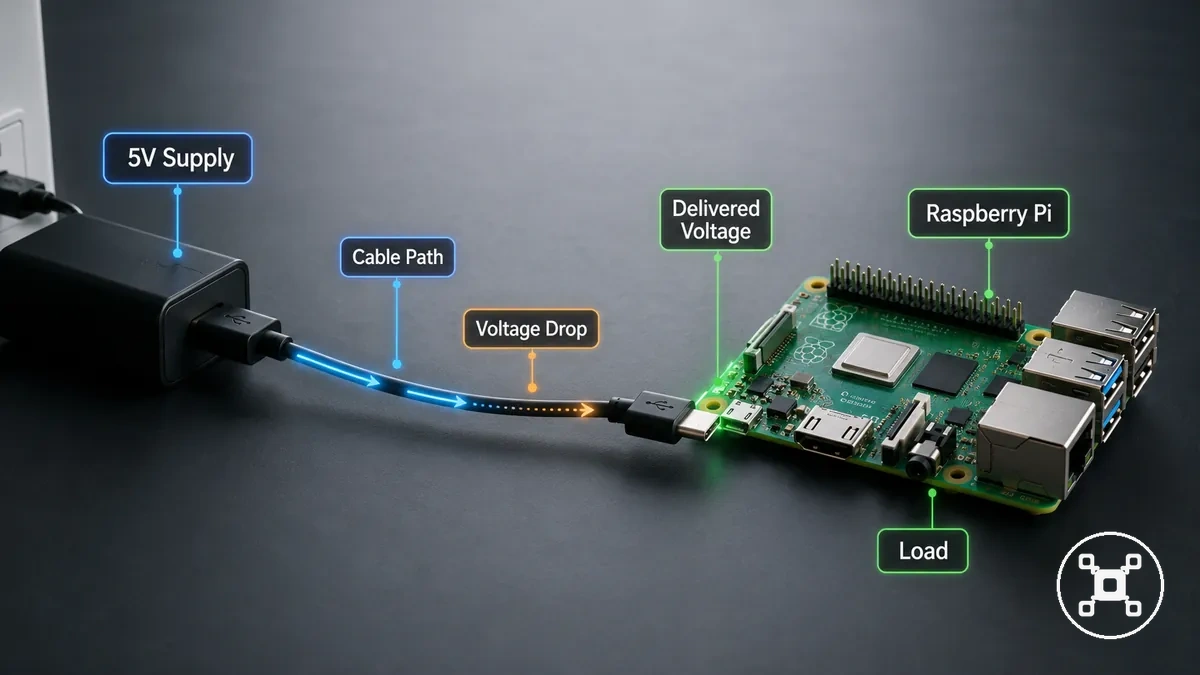
The voltage range between the supply output and the board input can change because of voltage drop in the power path. Cable characteristics, power source capability, and system load influence the delivered voltage available at the Raspberry Pi board. If delivered voltage becomes insufficient, the board may show undervoltage warnings or experience unstable operation.
The voltage range between the supply output and the board input can change because of voltage drop in the power path.
A 5V or 5.1V supply category should therefore be considered together with the complete delivery path rather than the source label alone. The distinction between nominal voltage and delivered voltage helps explain why a labelled input value does not by itself describe the voltage available at the board.
Current Draw by Model and Connected Load
Current draw changes when a Raspberry Pi model is used with different connected load conditions. A board-only setup places less demand on the power path than a desktop-like or peripheral-heavy configuration. The combination of model and attached devices determines the available current headroom needed for reliable operation.
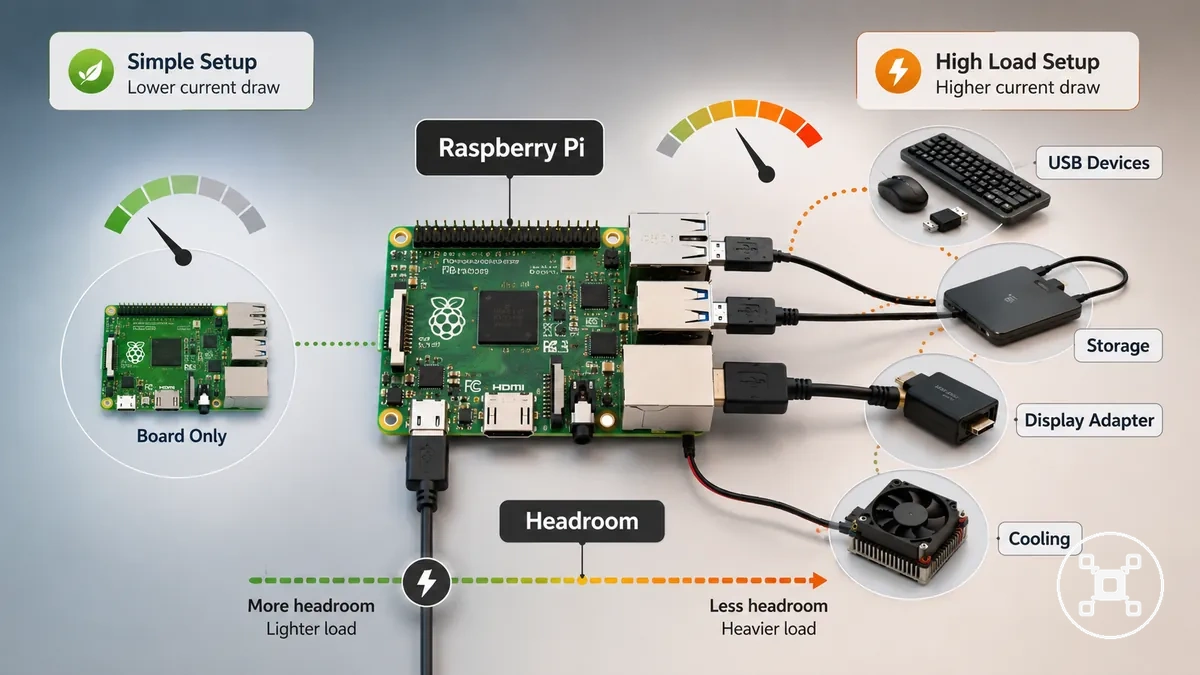
The connected load can be evaluated through the main device categories attached to the Raspberry Pi:
- Board-only load: The Raspberry Pi operates with fewer connected devices, creating a lower peripheral load compared with expanded configurations.
- USB devices: Connected USB devices add current demand and reduce the remaining headroom available for other components.
- Storage: Storage devices add to the connected load and should be included when considering total power demand.
- Display adapter: A display adapter adds another connected device load that can affect available current capacity.
- Cooling accessory: A cooling accessory adds power demand that contributes to the overall load condition.
The effect of current draw depends on the Raspberry Pi model and the attached device combination. Higher-load configurations with multiple peripherals may require additional power capacity or external power support when the connected load exceeds the available headroom.
Raspberry Pi Power Supply Compatibility by Model
Raspberry Pi power supply compatibility depends on the Raspberry Pi model, connector type, and supply behaviour. Matching the model family with the correct power input and supply class helps establish suitable conditions for reliable boot and operation.
It does not replace broader Raspberry Pi model selection guidance.
The comparison below focuses on model-level power input factors, including connector type, power negotiation behaviour, and compatibility conditions. It does not replace broader Raspberry Pi model selection guidance.
| Raspberry Pi model family | Power input | Supply compatibility note | Main risk if mismatched |
|---|---|---|---|
| Earlier Raspberry Pi models | Micro-USB | The power adapter should match the Micro-USB input and provide suitable power delivery conditions for the board. | An unsuitable supply condition can contribute to unreliable boot or unstable operation. |
| Raspberry Pi models using USB-C | USB-C | The power adapter should match the USB-C input and provide compatible power delivery behaviour for the model. | A mismatch between supply behaviour and board requirements can affect reliable operation. |
| Raspberry Pi models using USB-C PD | USB-C with PD negotiation | The supply class should support the required USB-C PD negotiation conditions for the model and connected load. | Incorrect power negotiation conditions can affect power delivery and operating stability. |
The connector type and power negotiation method determine how the Raspberry Pi receives power from the adapter. USB-C, Micro-USB, and USB-C PD represent different power input approaches, so compatibility should be evaluated according to the specific Raspberry Pi model and supply conditions.
For broader model information beyond power supply compatibility, see the Raspberry Pi hub .
For broader model information beyond power supply compatibility, see the Raspberry Pi hub.
Micro-USB, USB-C, and USB-C PD Power Inputs
Raspberry Pi power input types differ across model generations, and each connector defines how the cable and adapter deliver power to the board. Micro-USB, USB-C, and USB-C PD power inputs use different connection and delivery approaches, creating connector-specific power behaviour.
Micro-USB, USB-C, and USB-C PD power inputs use different connection and delivery approaches, creating connector-specific power behaviour.
The main differences between power input types are related to the connector, cable, adapter, and supported power delivery conditions:
| Power input type | Power delivery behaviour |
|---|---|
| Micro-USB | The cable and adapter must match the Micro-USB power input so the Raspberry Pi receives power through the correct connector. |
| USB-C | The cable and adapter must match the USB-C power input and provide suitable power delivery conditions for the Raspberry Pi model. |
| USB-C PD | The adapter and Raspberry Pi model must support compatible USB-C PD negotiation conditions for power delivery. |
USB-C PD negotiation is the process where a compatible adapter and device communicate supported power delivery conditions. Connector shape alone does not confirm compatibility because the Raspberry Pi model, connector, cable, and adapter behaviour must align for successful power delivery.
Raspberry Pi 4, Raspberry Pi 5, and Peripheral Power Headroom
Raspberry Pi 4, Raspberry Pi 5, and peripheral-heavy setups can require different levels of current headroom based on the model and connected devices. The local compatibility factor is the available power margin when peripherals increase the overall load.
The local compatibility factor is the available power margin when peripherals increase the overall load.
Different usage scenarios affect the headroom available for stable operation:
- Board-only setup: A Raspberry Pi with minimal connected devices has a lower load condition and more available headroom for the board.
- Desktop-like setup: A Raspberry Pi with displays, storage, and other connected devices can require more headroom because additional peripherals increase power demand.
- Storage-heavy setup: A setup with connected storage adds accessory load, which can reduce the remaining power margin available for other devices.
- Multi-peripheral setup: A peripheral-heavy setup with multiple connected devices can have reduced headroom, which may contribute to instability or warning conditions when power delivery is insufficient.
Limited power headroom can contribute to instability or warnings, while throttling may also be influenced by other conditions such as heat. For thermal factors beyond power-related headroom, see Raspberry Pi cooling requirements.
Cable, Port, and Adapter Factors That Cause Voltage Drop
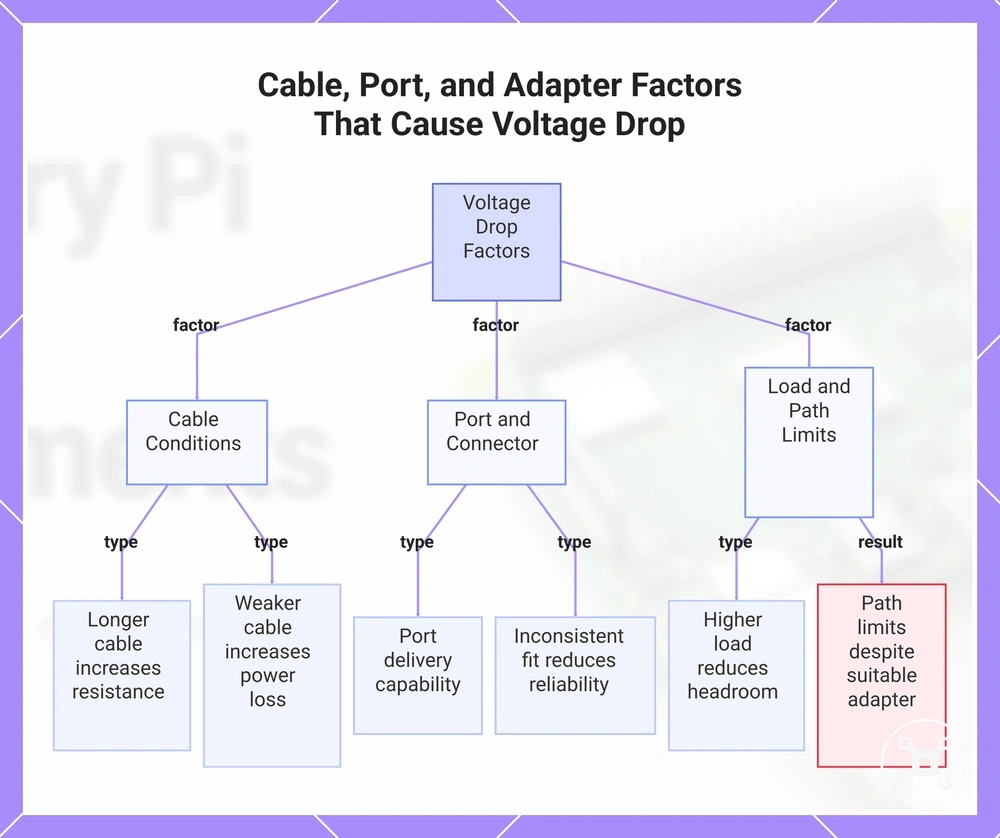
Voltage drop occurs when the power delivered from the adapter does not fully reach the Raspberry Pi board through the connection path. Cable length, cable quality, adapter port, connector fit, and connected load can influence delivered voltage, making voltage drop a key cause to check when undervoltage or instability appears.
Cable and port conditions can affect how efficiently power reaches the board.
Cable and port conditions can affect how efficiently power reaches the board. Cable length can increase resistance in the power path, while cable quality, adapter port condition, and connector fit can influence delivery loss. Higher load conditions can increase demand on the power path and reduce available voltage headroom.
Higher load conditions can increase demand on the power path and reduce available voltage headroom.
The following factors help identify possible voltage drop conditions:
- Cable length: A longer cable can increase resistance, which may contribute to voltage drop between the adapter and the Raspberry Pi board.
- Cable quality: A cable with weaker power delivery characteristics may increase power loss and contribute to undervoltage symptoms.
- Adapter port: The adapter port and its delivery capability influence whether suitable power reaches the connected cable path.
- Connector fit: An inconsistent connector connection may reduce delivery reliability and contribute to unstable power behaviour.
- Load: Additional connected devices increase power demand, which can reduce available headroom and contribute to instability.
A suitable adapter can still show poor delivered power if another part of the connection path limits delivery. For example, an adapter with an appropriate rating may not provide stable board input when a weak cable or unsuitable port condition increases voltage drop.
A suitable adapter can still show poor delivered power if another part of the connection path limits delivery.
This chart identifies the key factors causing voltage drop between the adapter and the Raspberry Pi board, including cable conditions, port and connector issues, and load limitations, with a warning about path limits despite a suitable adapter.
Powered USB Hubs and External Device Power
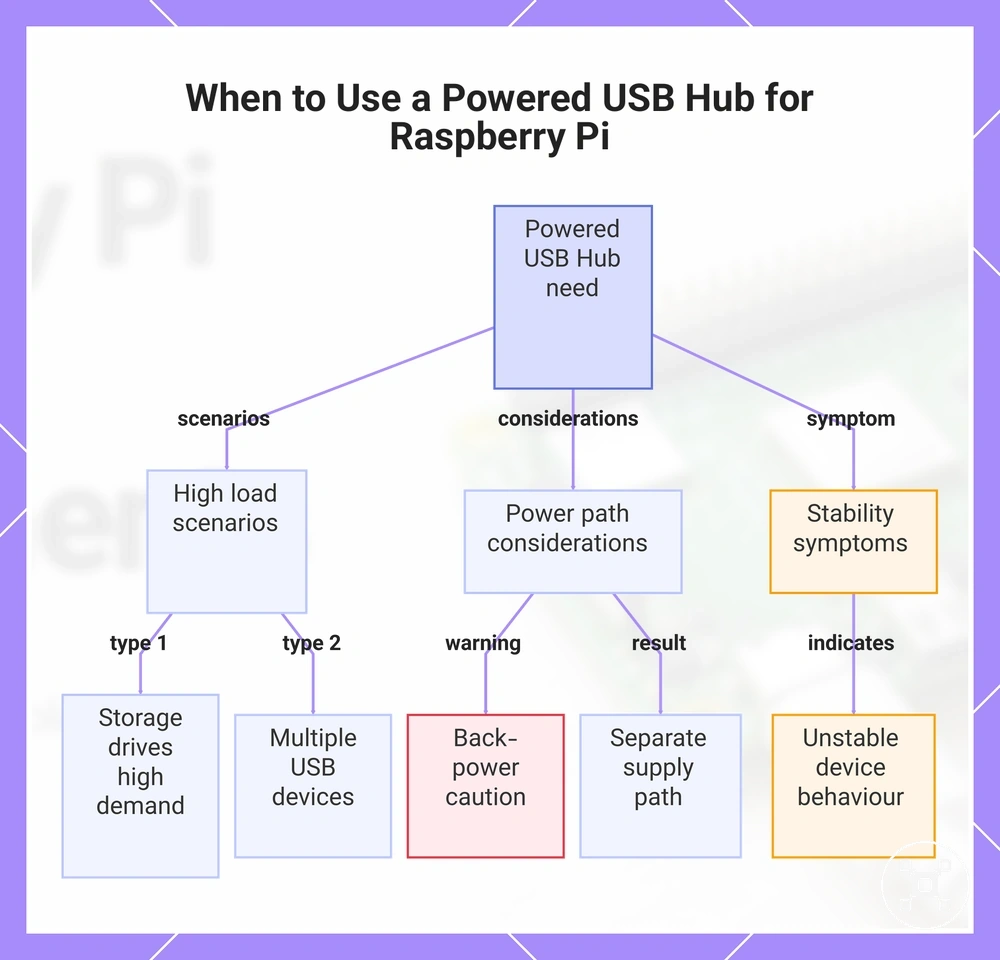
A powered USB hub can be needed when USB devices connected to a Raspberry Pi require external device power instead of drawing all available power through the board. Separating the power path for external devices can help maintain stable operation when storage drives, multiple peripherals, or higher peripheral load conditions reduce available headroom.
USB device power draw varies by device type and connected load.
USB device power draw varies by device type and connected load. Storage drives, multiple USB devices, and other peripherals may require a separate power path when their combined demand affects the Raspberry Pi USB port power conditions or connected device stability.
Storage drives, multiple USB devices, and other peripherals may require a separate power path when their combined demand affects the Raspberry Pi USB port power conditions or connected device stability.
The following criteria help identify when external device power may be relevant:
- Storage drives: A storage drive with higher power demand may require external power support when its load reduces available headroom for stable operation.
- Multiple USB devices: Several connected USB devices increase peripheral load and may require a powered USB hub when combined demand exceeds available power capacity.
- Back-power caution: External power arrangements should be considered carefully because the power path between the hub, USB devices, and Raspberry Pi affects overall behaviour.
- Hub power condition: A powered USB hub uses its own external power source, creating a separate supply path for connected devices.
- Stability symptoms: Unstable device behaviour or connection issues can indicate that the connected load needs a different power arrangement.
A powered USB hub is a relevant accessory when external devices need their own power path rather than relying only on the Raspberry Pi. For broader accessory criteria, see Raspberry Pi power accessories.
For broader accessory criteria, see Raspberry Pi power accessories .
This chart shows the criteria for using a powered USB hub with a Raspberry Pi, including device load scenarios, power path considerations, and stability symptoms.
Power Banks, Batteries, and Non-Standard Power Sources
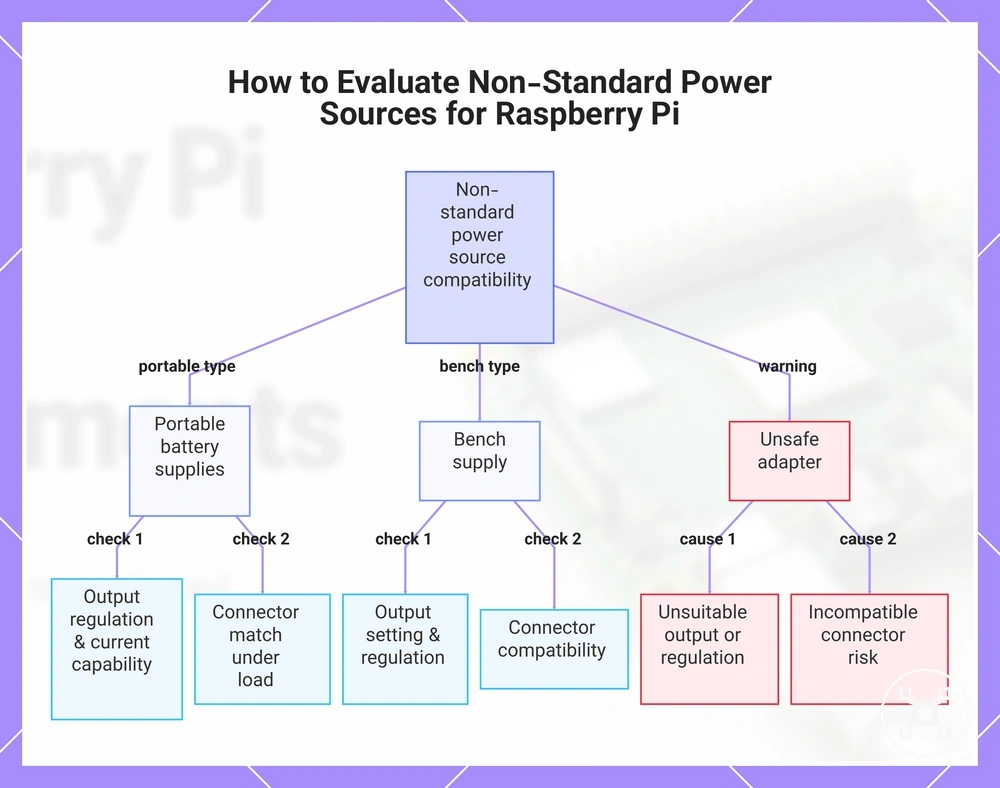
Non-standard power sources can be compatible with a Raspberry Pi only when their output, regulation, and connector conditions match the board requirements. A power bank, battery pack, or bench supply must provide suitable 5V output behaviour and stable current delivery because output regulation affects reliable operation.
Non-standard power sources can be compatible with a Raspberry Pi only when their output, regulation, and connector conditions match the board requirements.
The source type changes how power delivery should be evaluated:
- Power bank: A power bank can be suitable when its output regulation, current capability, and connector match the Raspberry Pi power requirements under the connected load.
- Battery pack: A battery pack requires a compatible output stage that provides regulated power delivery for the Raspberry Pi input conditions.
- Bench supply: A bench supply can provide controlled output conditions, but the output setting, regulation, and connector compatibility must match the Raspberry Pi requirements.
- Unsafe adapter: An adapter with unsuitable output, poor regulation, or an incompatible connector can create a damage risk for the board.
Non-standard power sources require stricter verification than ordinary approved-style adapters because compatibility depends on the source output, regulation, connector, and load conditions. A portable supply should be evaluated by its complete delivery behaviour rather than its source type alone.
A portable supply should be evaluated by its complete delivery behaviour rather than its source type alone.
This chart shows the main types of non-standard power sources and the key checks needed to ensure compatibility with a Raspberry Pi board.
Battery Packs and Portable 5V Power
A battery pack or power bank can provide portable 5V power for a Raspberry Pi only when the output remains stable under the board and accessory load. The key compatibility condition is sustained output, because unstable delivery can contribute to undervoltage during operation.
The key compatibility condition is sustained output, because unstable delivery can contribute to undervoltage during operation.
The following checks help evaluate portable power suitability:
- Sustained output: The battery pack or power bank should maintain stable output conditions when the Raspberry Pi and connected load require power.
- Cable quality: The cable affects delivered power, so a weaker connection path can contribute to power loss and undervoltage symptoms.
- Load: Connected devices increase power demand, which can reduce available margin and affect portable supply stability.
- Sleep or auto-off behaviour: Some power banks may change output behaviour during low-load periods, which can affect continuous Raspberry Pi operation.
- Runtime qualification: Runtime depends on factors such as capacity, efficiency, Raspberry Pi model, and connected load, so it cannot be determined from the battery type alone.
A portable 5V power source should therefore be evaluated by its sustained output and delivery conditions rather than its portable design alone. A battery pack or power bank that does not maintain suitable output under load may result in undervoltage or unstable behaviour.
Why 9V and 12V Supplies Are Not Direct Replacements
9V and 12V supplies are not direct replacements for Raspberry Pi power input requirements. A higher-voltage supply requires suitable regulated conversion before it can provide the required 5V input conditions, and an unsafe adapter can create a damage risk.
9V and 12V supplies are not direct replacements for Raspberry Pi power input requirements.
The difference between a correct power input and a higher-voltage source can be understood through the regulation condition:
- 5V input: A compatible Raspberry Pi power source provides the required input condition through the correct connector and supply behaviour.
- 9V or 12V source: A higher-voltage supply does not directly match the Raspberry Pi input requirement and can create a voltage mismatch risk.
- Regulated conversion: A higher-voltage source requires appropriate regulated conversion before it can be considered for a compatible 5V input condition.
- Unsafe adapter: An adapter with unsuitable voltage output or missing regulation can introduce a damage risk to the Raspberry Pi board.
Connector fit alone does not make a 9V or 12V supply compatible. Higher-voltage sources require stricter verification because voltage mismatch and unsuitable conversion conditions can affect Raspberry Pi safety.
Common Raspberry Pi Power Problems and Undervoltage Warnings
Raspberry Pi power problems can appear as undervoltage warning signals, low voltage indicators, instability, or boot-related symptoms. These warning signs help identify possible power issues, but the same symptoms can also involve storage, software, or heat, so the visible sign should be separated from the underlying cause.
Raspberry Pi power problems can appear as undervoltage warning signals, low voltage indicators, instability, or boot-related symptoms.
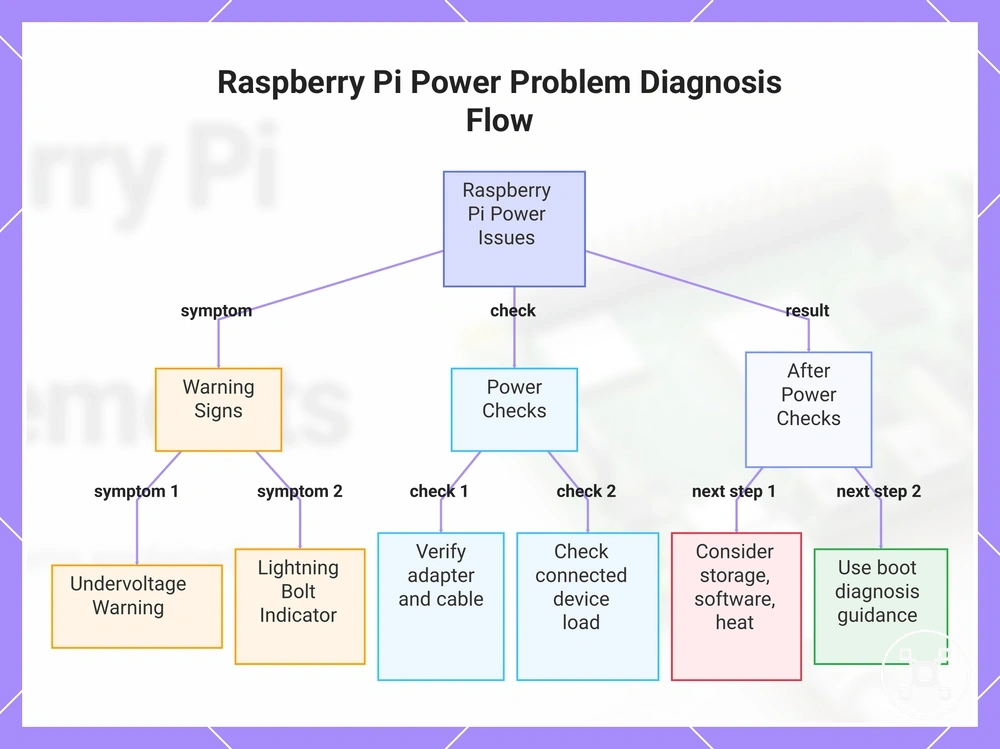
Common warning signs can be reviewed through this power-focused diagnostic flow:
- Undervoltage warning: An undervoltage warning indicates a low voltage condition, so the supply and delivery path should be checked because insufficient delivered power may affect operation.
- Lightning bolt: A lightning bolt indicator can point to a power-related warning, making the supply and cable connection important checks before moving to broader causes.
- Supply check: An unsuitable supply may contribute to low voltage symptoms, so the adapter compatibility and power delivery condition should be reviewed.
- Cable check: A cable issue can contribute to voltage drop, so the cable condition and connection path should be checked when undervoltage appears.
- Load check: A higher load from connected devices can reduce available power margin and may contribute to instability or USB dropout.
A diagnostic flow starts with the symptom, then checks the related power attribute and condition. If power checks do not explain the issue, boot failure, throttling, or instability may involve other causes such as storage, software, or heat.
A diagnostic flow starts with the symptom, then checks the related power attribute and condition.
For symptoms that remain after power checks, continue with broader boot diagnosis using Raspberry Pi not booting guidance, because boot failure is not always caused by power delivery.
This chart shows the diagnostic flow for Raspberry Pi power issues, starting from warning signs, through power checks, to next steps if problems persist.
This chart shows the diagnostic flow for Raspberry Pi power issues, starting from warning signs, through power checks, to next steps if problems persist.
Lightning Bolt and Low-Voltage Messages
A lightning bolt, low-voltage message, or undervoltage warning on a Raspberry Pi usually indicates that the board has detected a low voltage condition. The warning signal points to a possible power delivery issue, but the exact cause can depend on the supply, cable, and load conditions.
The warning signal points to a possible power delivery issue, but the exact cause can depend on the supply, cable, and load conditions.
The warning can be understood through these immediate checks:
- Warning meaning: A lightning bolt or warning icon usually indicates that the Raspberry Pi has detected a voltage condition below the expected level.
- Likely triggers: A supply, cable, or connected load condition can contribute to a low-voltage message when delivered power is reduced.
- Immediate check: Check the supply and cable first because the power path affects the voltage reaching the Raspberry Pi.
- What not to assume: A voltage warning does not prove that every system issue has the same cause, because other conditions can also affect Raspberry Pi behaviour.
Boot, Stability, and Throttling Symptoms Caused by Power
Weak power can resemble boot failure, random resets, USB dropouts, or throttling symptoms on a Raspberry Pi. These behaviours can overlap with other system conditions, but power is one possible cause when the supply cannot maintain suitable delivery under load.
Weak power can resemble boot failure, random resets, USB dropouts, or throttling symptoms on a Raspberry Pi.
The symptoms below separate possible power conditions from competing non-power causes:
| Observed behavior | Possible power condition | Competing cause | Next check |
|---|---|---|---|
| Boot failure | Weak power may affect startup stability when the supply cannot maintain delivery during operation. | Storage or software issues can also prevent successful boot. | Check power delivery first, then consider storage and software causes. |
| Random resets | Weak power may contribute to instability when the load changes and available power is limited. | Software faults or other system conditions can also cause restarts. | Review the supply path and connected load before broader diagnosis. |
| USB dropouts | Weak power may affect USB stability when connected devices increase the load. | USB device issues or software conditions can also interrupt connections. | Check the connected devices and power conditions. |
| Throttling | Power conditions may contribute to slowdown symptoms in some situations. | Heat is another possible cause when thermal limits affect operation. | Separate power checks from heat-related checks. |
These symptoms should not be treated as proof of a single cause because power, storage, software, and heat can create similar behaviour. If throttling symptoms overlap with thermal conditions, see Raspberry Pi cooling requirements to understand the cooling boundary.
Choosing a Safe Raspberry Pi Power Setup
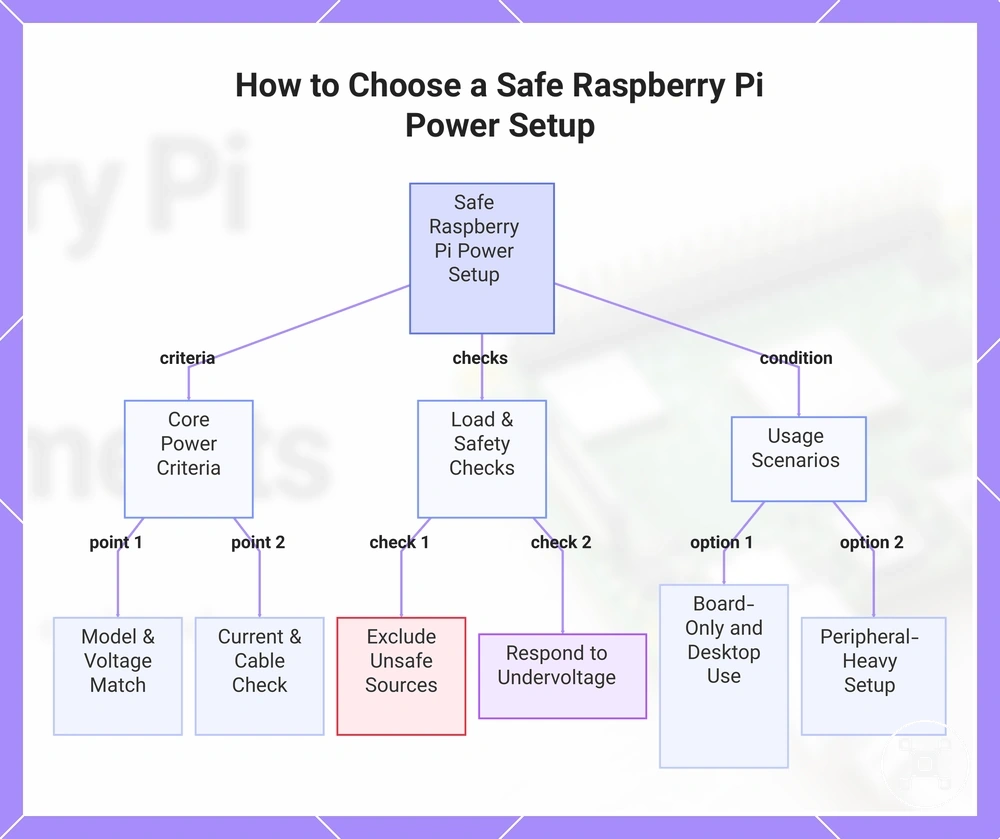
A safe power setup for a Raspberry Pi is chosen by matching the model, voltage, current headroom, connector, cable, and connected load requirements rather than selecting a power source by appearance alone. A suitable power supply supports stable operation when these criteria align, which makes criteria-based selection the safer decision.
The Raspberry Pi model should be the starting point for evaluating a power setup.
The Raspberry Pi model should be the starting point for evaluating a power setup. The power supply should match the required voltage class, provide suitable current headroom, and use a compatible connector, while the cable condition should support reliable delivery and reduce the risk of voltage drop.
External devices add another selection factor because storage devices, USB devices, and other peripherals increase accessory load.
External devices add another selection factor because storage devices, USB devices, and other peripherals increase accessory load. When external devices require a separate power path, a powered USB hub may be relevant; see Raspberry Pi power accessories for broader accessory criteria.
After the power criteria are considered, continue with Raspberry Pi setup planning to prepare the complete system environment.
The final decision depends on how the Raspberry Pi will be used, such as board-only operation, desktop-style use, or peripheral-heavy setups. After the power criteria are considered, continue with Raspberry Pi setup planning to prepare the complete system environment.
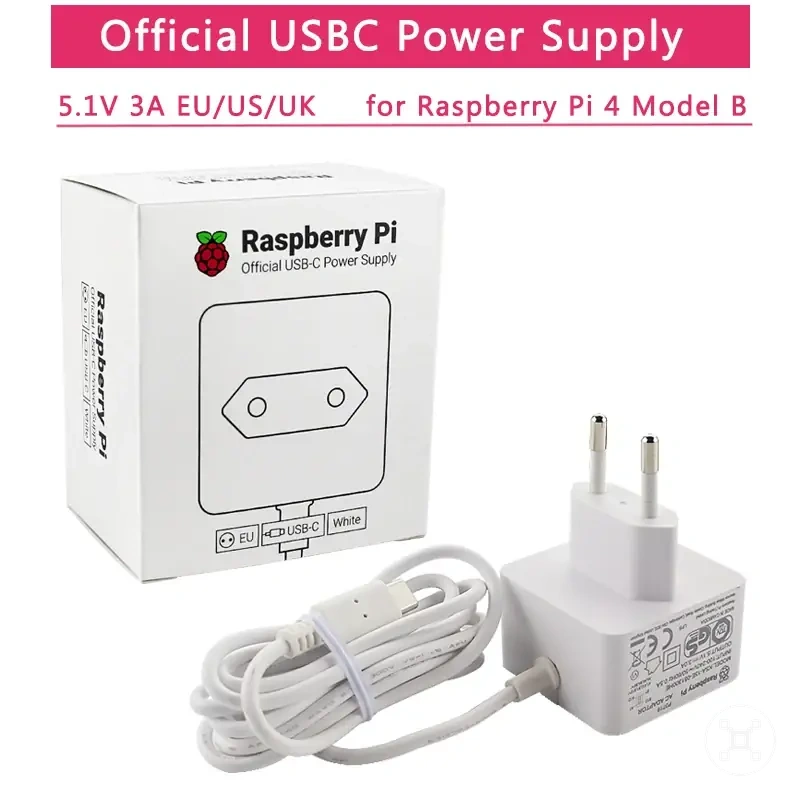
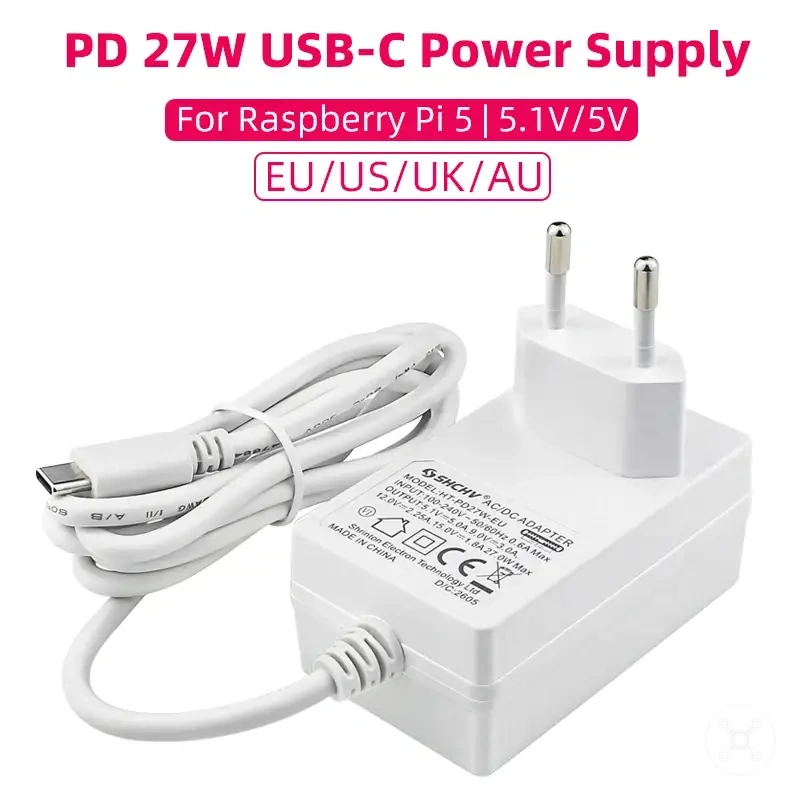
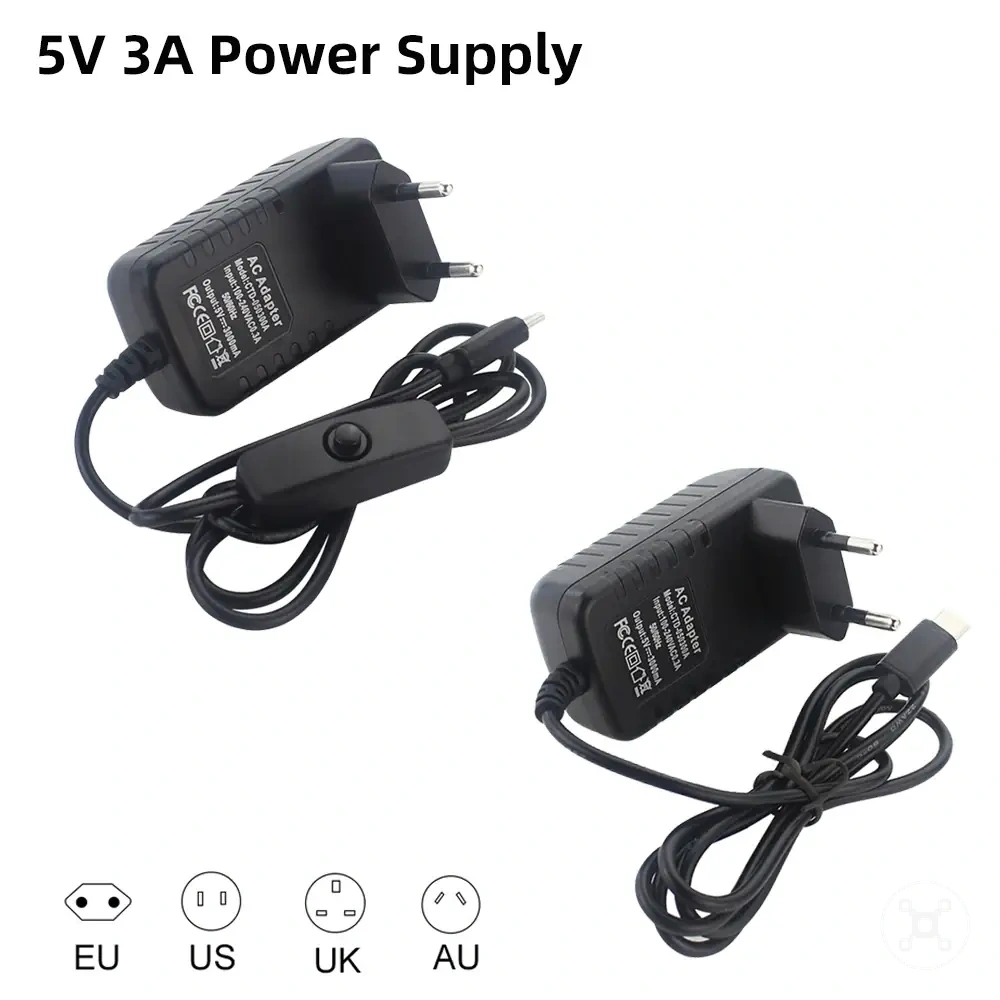
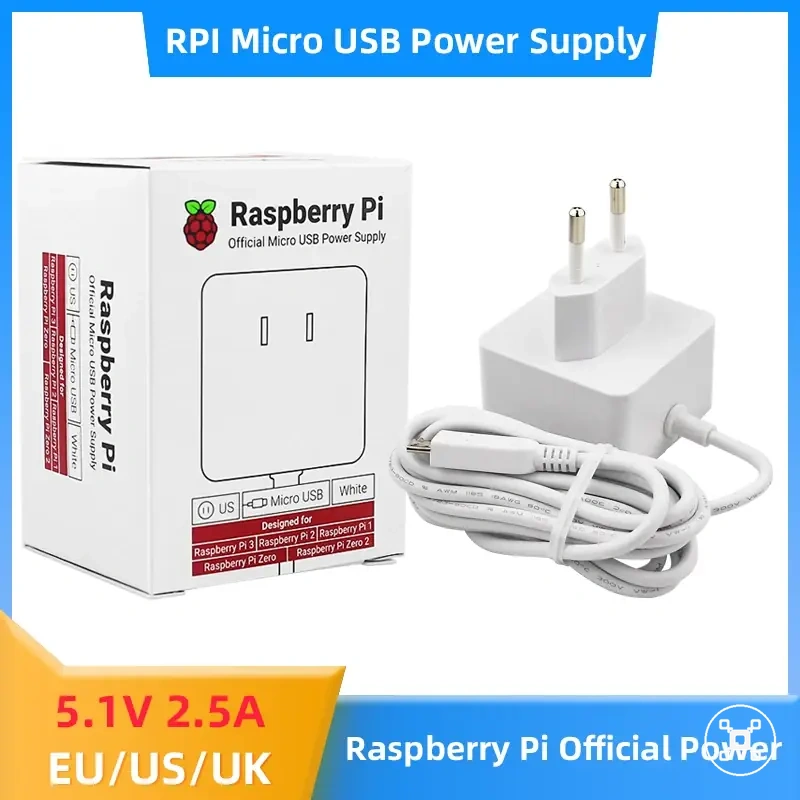
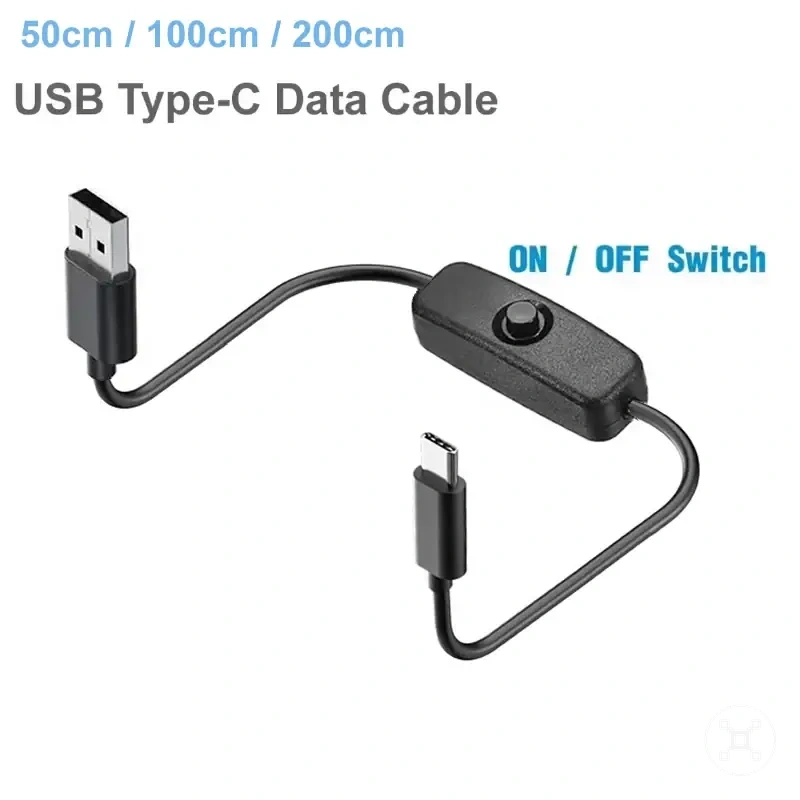
Here are product examples that may make comparison easier.
Here are product examples that may make comparison easier. Before buying, always review the compatibility criteria, essential features, and product details.
Use these criteria to evaluate a safe power setup:
- Model: Match the power setup to the Raspberry Pi model and its required power input conditions.
- Voltage class: Use a compatible voltage level and avoid unsafe high-voltage direct sources that do not provide suitable input conditions.
- Current headroom: Consider the remaining power capacity after the Raspberry Pi and connected devices are included.
- Connector: Match the connector type to the Raspberry Pi power input for a suitable connection path.
- Cable quality: Consider cable condition because voltage drop can affect delivery stability.
- Peripheral power: Include external devices and powered USB hub requirements when accessory load increases.
- Unsafe exclusions: Exclude unsuitable high-voltage direct replacements that do not provide regulated input conditions.
- Warning response: If undervoltage or instability appears, review the supply, cable, and load conditions before changing the setup.
This chart shows the key criteria and checks for selecting a safe power setup for a Raspberry Pi, including core power requirements, load and safety considerations, and usage scenarios.