Raspberry Pi Security Basics for Connected Projects
Raspberry Pi security is the basic protection of accounts, network access, data, and system reliability in connected projects. These security basics reduce common risks but do not guarantee protection in every configuration or environment. Once a Raspberry Pi joins a network, the project also creates security responsibilities.
A Raspberry Pi may begin as a local controller, sensor hub, or home automation device.
A Raspberry Pi may begin as a local controller, sensor hub, or home automation device. Adding remote access allows the system to receive connections beyond the immediate workspace. Weak passwords, unnecessary open ports, or exposed services can then increase network exposure and create practical risk.
Adding remote access allows the system to receive connections beyond the immediate workspace.
Practical protection treats security controls as connected safety measures rather than isolated tasks. Account permissions and strong passwords limit unauthorized login, secure SSH authentication protects remote access, and a firewall restricts unwanted inbound connections. Updates support software maintenance, while a stable physical setup, backup, and recovery planning support reliability after a fault or storage failure.
The aim is to reduce avoidable exposure while keeping the project dependable and recoverable.
This scope covers basic safety for connected Raspberry Pi projects rather than advanced server hardening. The aim is to reduce avoidable exposure while keeping the project dependable and recoverable.
Table of Contents
Why connected Raspberry Pi projects need security controls
A Raspberry Pi connected project needs security controls because joining a network changes who can reach or affect the device. A Raspberry Pi used only for local tasks has a narrower exposure boundary than one connected through a local network or other reachable network path. As soon as network connectivity is added, connection status changes who can interact with the device and how it can be affected.
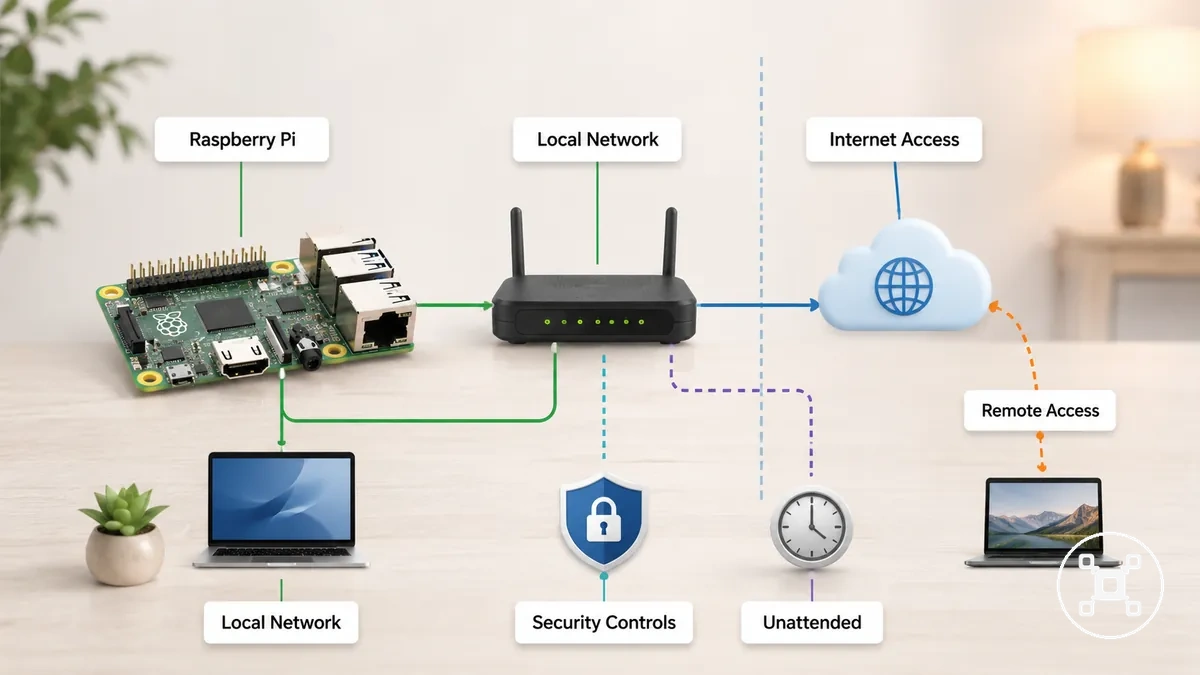
A connected project on a local network is normally reachable only by devices on that network, while a service that is intentionally made internet-facing may also be reachable from outside the home network, depending on router settings, remote administration choices, and service configuration. An unattended or always-on project also has a longer operating period during which reliability or security issues can affect normal operation. In contrast, a Raspberry Pi used only for local processing and without reachable services has a smaller practical exposure boundary.
A solid Raspberry Pi setup provides the foundation for applying those controls appropriately.
Security controls reduce unnecessary exposure by matching protection to how the Raspberry Pi connected project is used instead of assuming every connected setup has the same level of risk. This section explains practical connected-project risk rather than full enterprise hardening, and later sections cover individual protection measures in more detail. A solid Raspberry Pi setup provides the foundation for applying those controls appropriately.
Security risks from internet exposure and open services
Internet exposure and open services create different security risk categories because reachability changes according to the service, access path, and configuration. A Raspberry Pi becomes more exposed when a service is intentionally reachable beyond its local network instead of remaining available only to nearby devices. Security risks from internet exposure and open services are best understood by examining how each service is reached.
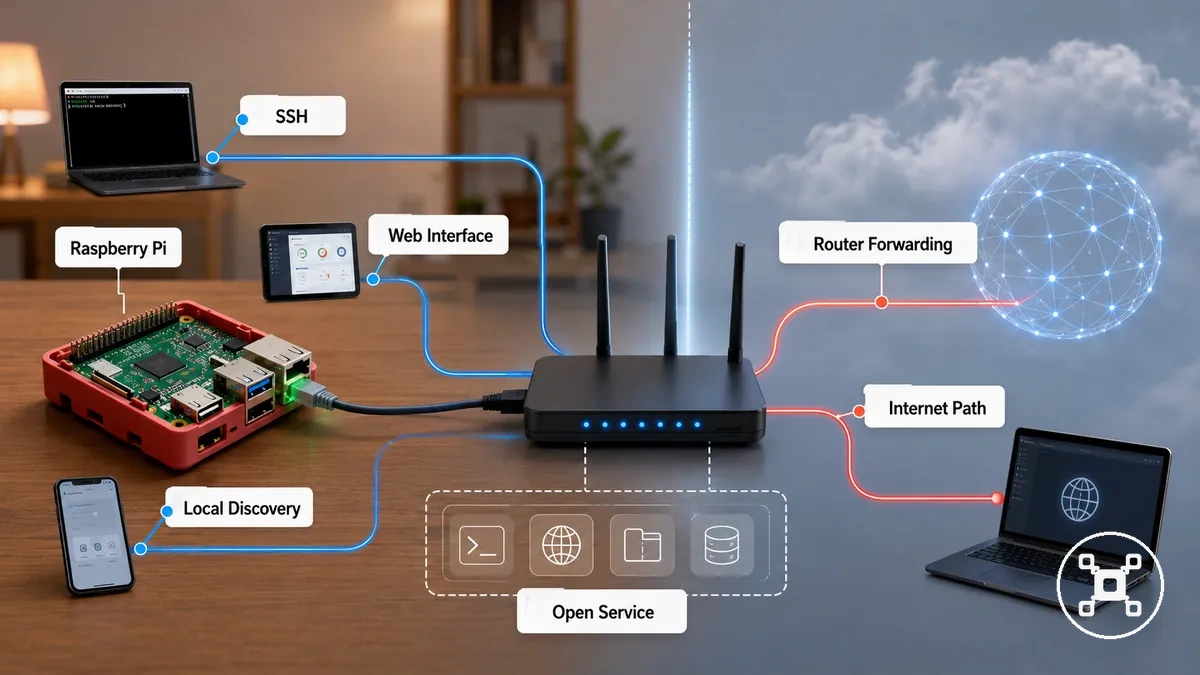
A Raspberry Pi running SSH or a web interface only on a local network has a different risk category from the same service exposed through a public IP or router forwarding. If remote access is intentionally enabled and a service is reachable from the internet, the main risk becomes unauthorized access when authentication or configuration is weak. Local service discovery increases device visibility within the same network, while internet exposure requires an internet-facing access path. This distinction separates local reachability from internet reachability.
This distinction separates local reachability from internet reachability.
Security decisions become clearer when each reachable service is evaluated by its access path and exposure condition rather than treating every open port as equally risky. Publicly reachable services require more attention than services limited to the intended local network boundary because the access path is broader. The table below summarizes common service types, exposure conditions, and practical handling approaches.
| Service or path | Exposure condition | Main risk | Safer handling |
|---|---|---|---|
| SSH | Publicly reachable through a public IP or router forwarding | Unauthorized access when authentication is weak | Limit exposure and use strong authentication |
| Web interface | Internet-facing administrative page | Unauthorized administrative access | Restrict access to intended users |
| File-sharing or admin service | Reachable outside the intended network boundary | Unintended access to shared resources | Expose only when required and review access settings |
| Public port forwarding | Router forwards external traffic to the Raspberry Pi | Direct internet exposure of the selected service | Forward only required services with appropriate access controls |
| Local-only service discovery | Limited to the local network | Device visibility within the local network | Keep discovery limited to the intended local network |
Public servers, port forwarding, and home network access
Public servers, port forwarding, and home network access change who can reach a Raspberry Pi service by changing its reachability from private to public. A Raspberry Pi service that remains local-only is normally reachable only by devices on the home network, while a service exposed through port forwarding can become internet-reachable when router and service settings allow external connections. This reachability change defines the exposure boundary.
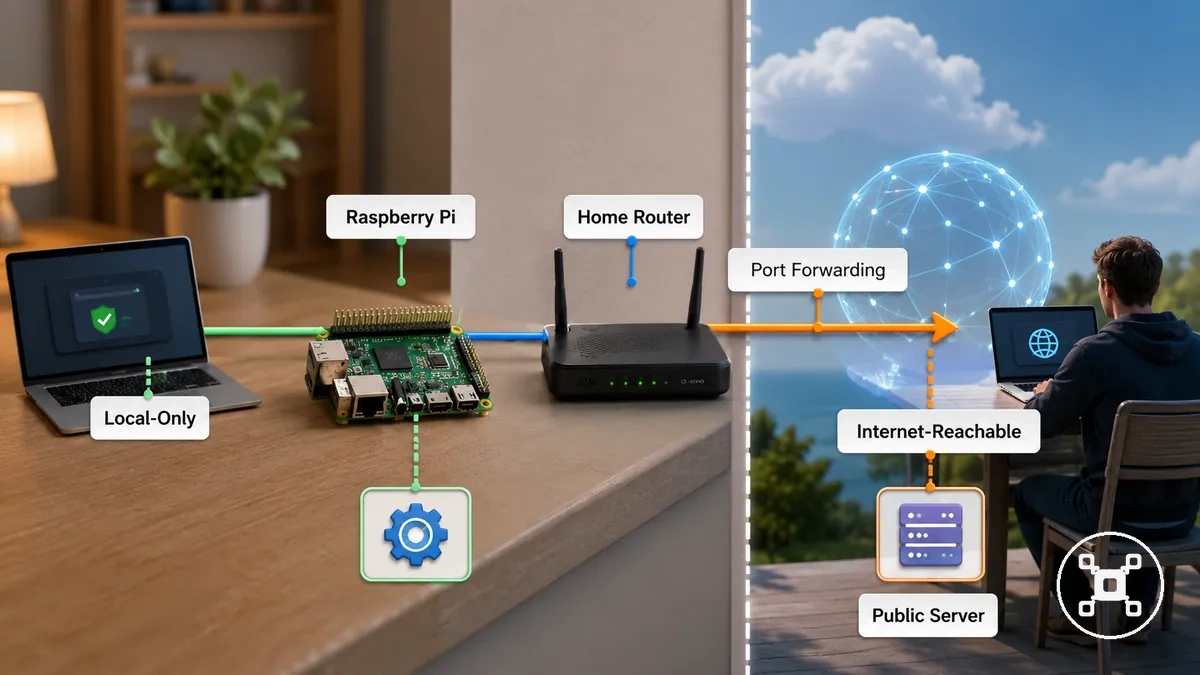
A Raspberry Pi service used only within a home network remains private until a router forwards outside traffic to that service. If a forwarded port makes the service internet-reachable, public access becomes possible and appropriate authentication becomes more important because the reachable audience expands beyond local devices. The contrast below summarizes the most common exposure paths. In many home networks, router settings determine whether a Raspberry Pi service stays local-only or becomes internet-reachable.
- Local-only service: Reachable only by devices on the home network, limiting external access.
- Port forwarding: A router forwards outside traffic to a Raspberry Pi service, making that service internet-reachable while the forwarding rule remains active.
- Public server: A Raspberry Pi service intentionally available through public access requires appropriate authentication because it is reachable beyond the private network.
- Home router: Router configuration determines whether a Raspberry Pi service remains private within the home network or becomes reachable from the internet.
Remote access tools and connection boundaries
Remote access tools should be evaluated by the connection boundary they create, the authentication they require, and the resulting exposure level. A Raspberry Pi reached through a local or VPN-like boundary has a more limited exposure condition than one reachable through a public connection, although the final exposure also depends on the chosen configuration. The connection boundary matters as much as the remote access tool.
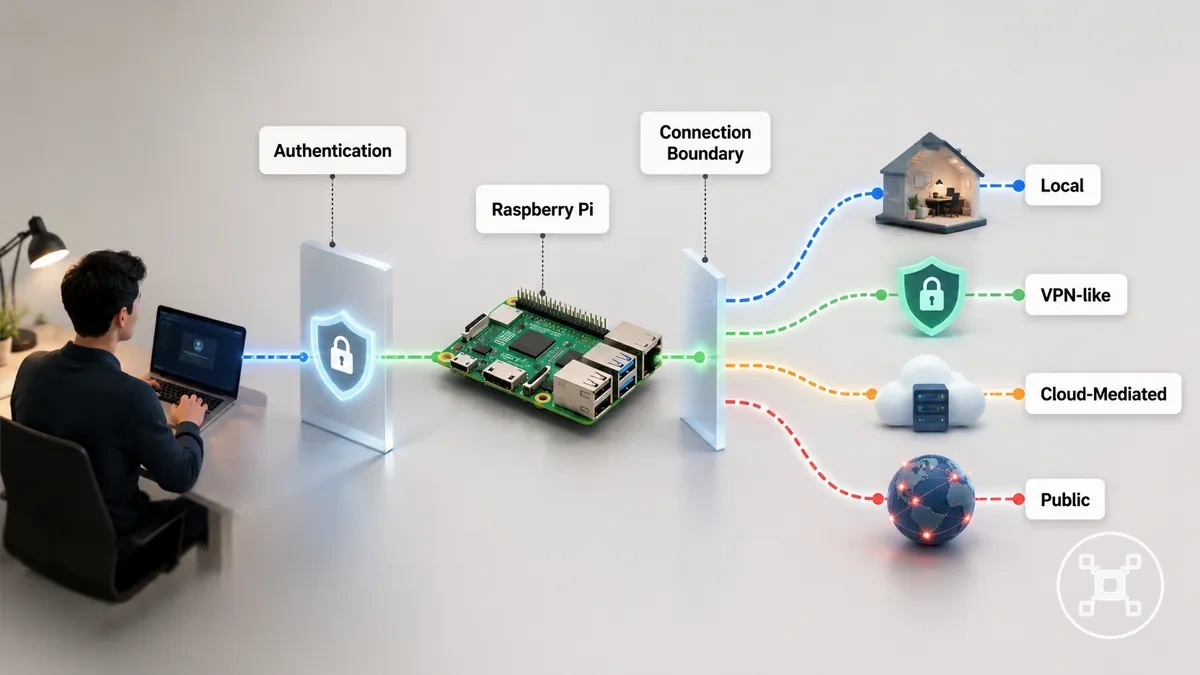
Convenient remote access can increase exposure when the connection boundary is unclear or broader than intended. A cloud-mediated or public connection may allow more external users to reach the login point than a local connection, making authentication an important control for limiting access to authorised users. Instead of choosing one remote access method for every project, evaluate the connection boundary, authentication, and exposure level together. Authentication and exposure are the primary checks before enabling remote access.
- Connection boundary: Identify whether the Raspberry Pi is reachable through a local, VPN-like, cloud-mediated, or public connection.
- Authentication: Verify that remote login requires user authentication before access is granted.
- Exposure level: Check whether access is limited to intended users or reachable by a broader internet audience.
- Project context: Select a remote access method that matches the required connection boundary instead of assuming one approach suits every deployment.
User accounts, passwords, and login permissions
User accounts, passwords, and login permissions reduce the chance of unauthorised use by limiting who can sign in and what each user account is allowed to do on a Raspberry Pi. A strong password, limited login permissions, and restricted sudo privileges provide separate layers of access control. Weak credentials or broad permissions increase login risk, especially when the device is shared, unattended, or remotely reachable.
Limiting sudo access reduces the number of accounts able to perform administrative actions.
A default user with a weak or reused password creates a less controlled login path, while shared credentials reduce accountability because multiple people use the same identity. Separate user accounts with permission scopes matched to each user role provide clearer control on shared or headless projects. Limiting sudo access reduces the number of accounts able to perform administrative actions. Password strength controls authentication, while permission scope controls what an authenticated user can change.
Password strength controls authentication, while permission scope controls what an authenticated user can change.
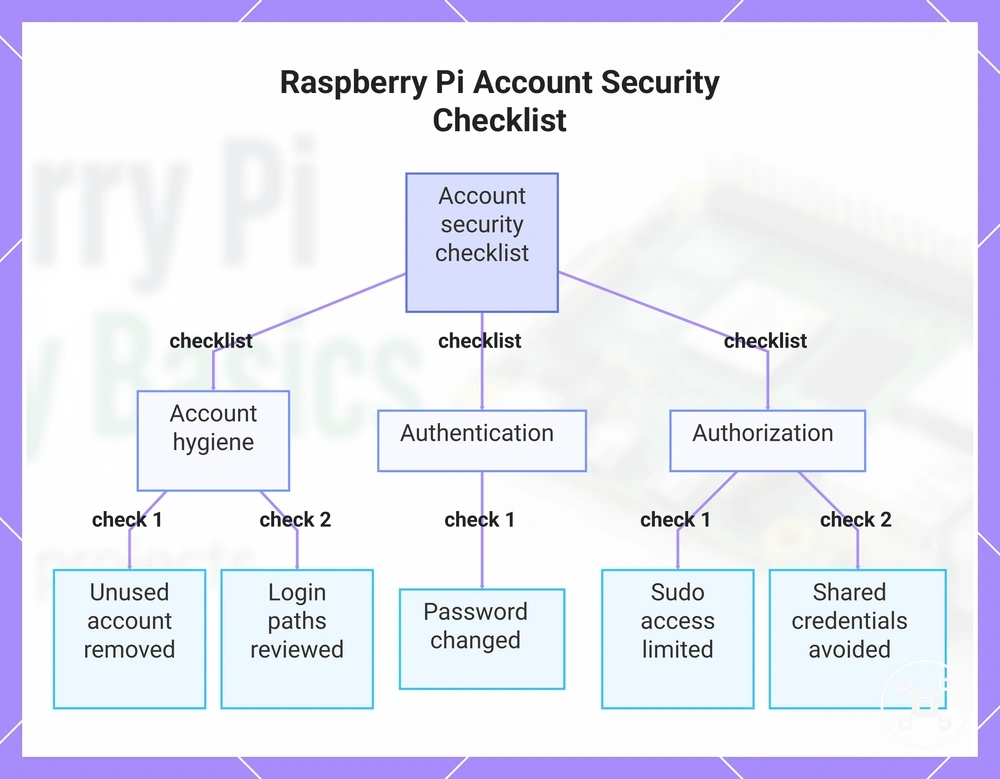
For a Raspberry Pi that is shared, left unattended, or reachable through remote login, account settings should be reviewed as part of routine maintenance. An unused account adds an unnecessary login path, and shared credentials make administrative actions harder to attribute to one user. Account safety protects login paths but does not replace network controls, so use the following checklist to verify the main account conditions.
- Password changed: Confirm each active account uses a strong, unique credential rather than an initial or reused password.
- Unused account: Review and disable or remove user accounts that are no longer required.
- Sudo access: Limit administrative privilege to accounts that need it for the project.
- Shared credentials: Use separate user accounts instead of one login shared by multiple people.
- Login paths: Identify which user accounts can sign in and which access methods expose those accounts.
This chart shows the key account security checks for a Raspberry Pi, covering account hygiene, authentication, and authorization.
Default users, changed passwords, and sudo access
Default users, changed passwords, and sudo access should be reviewed separately because credentials and privileges affect different parts of Raspberry Pi security. A changed password reduces the risk of login through known or reused credentials, while broad sudo access increases the impact of an account after authentication. Credentials identify the account, whereas privileges determine its administrative access.
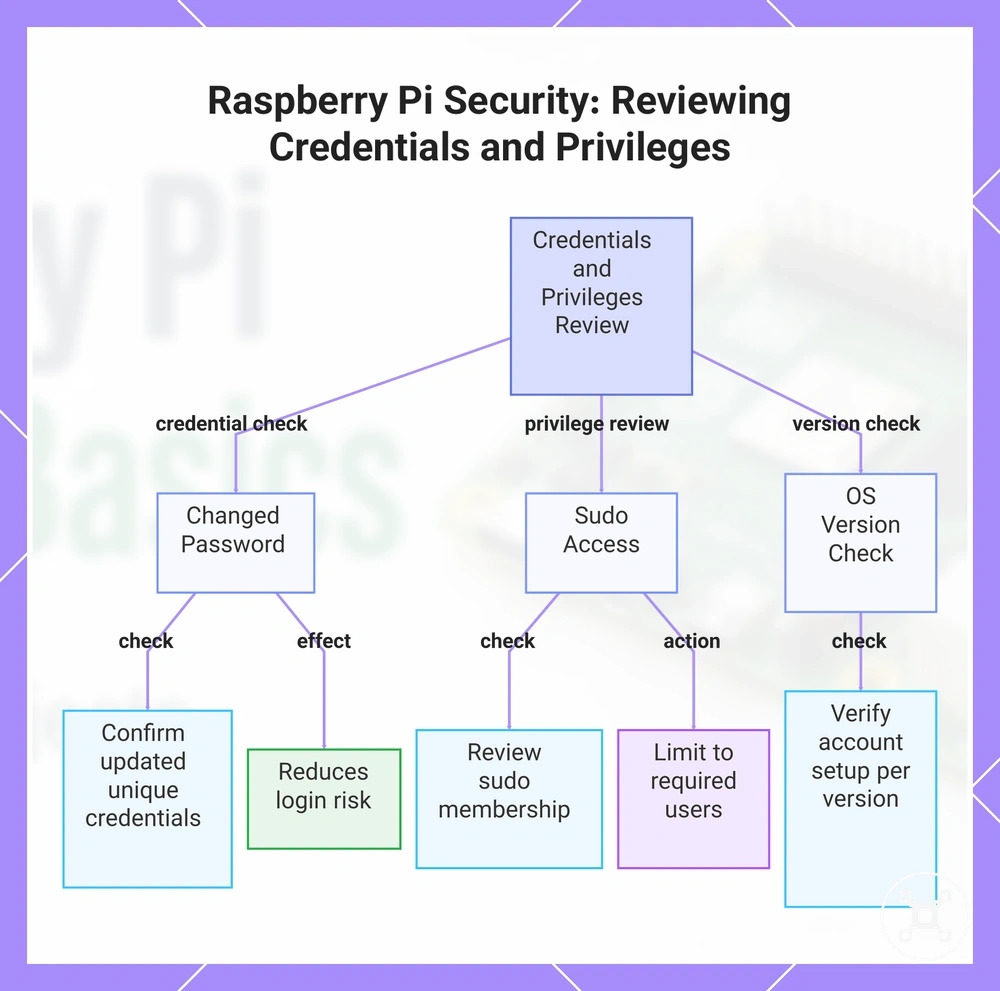
Use the checks below to verify both credential and privilege settings.
Raspberry Pi OS installations can differ, so account names and default user behaviour should be confirmed for the installed version instead of assuming one universal setup. If an account has sudo access, limit that privilege to users who require administrative tasks rather than granting elevated rights to every account. For example, changing a password reduces credential risk, while removing unnecessary sudo access reduces the impact of account misuse after login. Use the checks below to verify both credential and privilege settings.
- Changed password: Confirm active accounts use updated, unique credentials instead of default-style passwords.
- Sudo membership: Review which accounts have sudo access and keep administrative access limited to required users.
- Administrative rights: Remove unnecessary elevated privileges from accounts that do not need them.
- Raspberry Pi OS: Verify the account setup for the installed version instead of assuming one default user configuration.
This chart shows the key areas to review when securing Raspberry Pi accounts: password changes, sudo access, and OS version-specific setup.
Unnecessary users and permission exposure
Unnecessary users and permission exposure create avoidable security risk because accounts and file permissions expand access beyond what a Raspberry Pi requires. Keeping only necessary users and limiting file permissions to the required access scope reduces opportunities for misuse and simplifies maintenance. Unnecessary access is avoidable exposure.
Use the checks below to confirm that access remains appropriate for the current project device.
When a project device is shared by multiple people, separate accounts with access rights matched to each role provide better accountability than shared credentials. Broad file permissions should be reserved only for users or services that require them, because wider access increases exposure to project data or settings. Access needs can differ by user role, service, and device purpose, so review them periodically instead of leaving unnecessary users or permissions unchanged. Use the checks below to confirm that access remains appropriate for the current project device.
Broad file permissions should be reserved only for users or services that require them, because wider access increases exposure to project data or settings.
Review these points as part of routine account hygiene:
- Needed users: Keep only accounts required for the current Raspberry Pi project.
- Shared credentials: Use separate accounts instead of one shared login when multiple people need access.
- File permissions: Check that broad file access is limited to users or services that require it.
- Review cadence: Periodically review service accounts and remove unnecessary users or permissions.
SSH security for Raspberry Pi remote administration
SSH enables remote administration of a Raspberry Pi, but it also creates a remote login path that requires careful access control. SSH risk is shaped by authentication, network reachability, and configuration rather than by the SSH service alone. Because SSH can provide administrative access, it deserves separate handling within the broader security plan.
SSH risk is reduced when authentication and exposure controls are applied together.
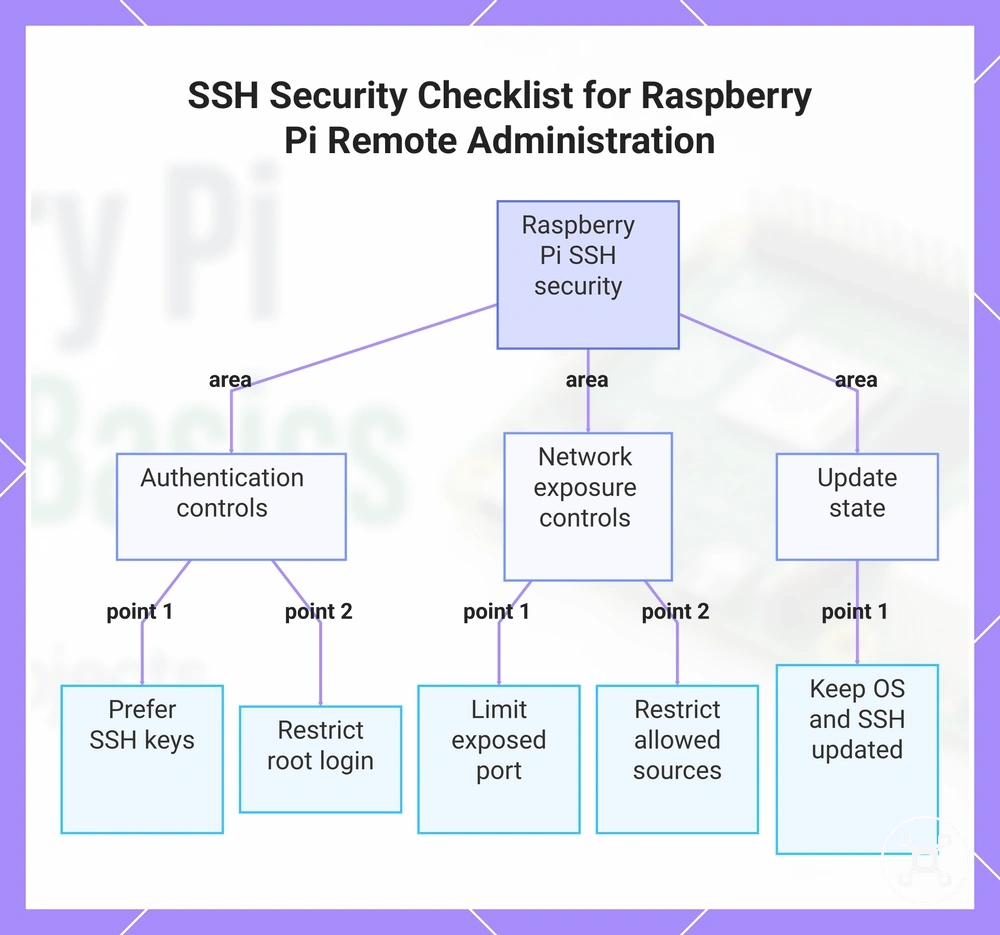
Enabling SSH improves remote administration convenience, while making the service reachable increases the importance of controlling who can connect and how each login attempt is authenticated. Using SSH keys instead of relying only on password authentication reduces dependence on reusable credentials, while restricting root login limits direct access to the most privileged account. An exposed port reachable from untrusted networks increases the SSH service's exposure and should be limited through appropriate inbound access controls. SSH risk is reduced when authentication and exposure controls are applied together.
Use the checklist below to prioritise those SSH configuration areas.
SSH is neither inherently unsafe nor fully protected by one configuration change. Safer use depends on reviewing the login method, root access, service reachability, allowed connection sources, and update state together. Use the checklist below to prioritise those SSH configuration areas.
SSH is neither inherently unsafe nor fully protected by one configuration change.
Review these settings before exposing SSH for remote administration:
- Authentication method: Prefer SSH keys where appropriate instead of relying only on password authentication.
- Root login: Restrict root login unless a justified administrative requirement makes direct root access necessary.
- Exposed port: Confirm whether the SSH service is reachable from untrusted networks and limit unnecessary exposure.
- Allowed sources: Restrict remote login to trusted users, devices, or network locations where the project permits it.
- Update state: Keep Raspberry Pi OS and the SSH service updated as part of routine maintenance.
This chart shows the three main configuration areas to check when securing SSH for remote Raspberry Pi administration, including authentication, network exposure, and maintenance.
SSH keys and password authentication
SSH keys reduce password-guessing risk because a Raspberry Pi login is authenticated with a public key and matching private key instead of relying only on a password. Password authentication can still support setup access, but it requires a strong, unique password and controlled login exposure. The benefit of key-based login depends on secure private-key storage and authorised device access.
Safe handling of the selected credential method is the deciding factor.
Choosing between SSH keys and password authentication involves a trade-off between authentication method and handling. A poorly stored private key can weaken key-based login, while weak or reused passwords increase password-guessing risk. During initial setup access, temporary password authentication may be used until SSH keys are configured and verified, after which password login should be reviewed if it is no longer required. Safe handling of the selected credential method is the deciding factor.
The comparison below shows how authentication strength changes with the selected method and its handling.
The comparison below shows how authentication strength changes with the selected method and its handling.
| Authentication method | Main advantage | Main risk | Safer handling |
|---|---|---|---|
| Password authentication | Provides straightforward login and setup access. | Weak or reused passwords increase password-guessing risk. | Use a strong, unique password and remove password login when it is no longer required. |
| SSH keys | Reduces reliance on passwords by using a public key and matching private key. | A copied or poorly stored private key can permit unauthorised login. | Store the private key securely and place the public key only on authorised systems. |
| Temporary setup access | Allows initial Raspberry Pi configuration before key-based login is ready. | Password authentication can remain available longer than the setup requires. | Configure and verify SSH keys, then review whether continued password authentication is necessary. |
Root login and exposed SSH ports
Root login and an exposed SSH port increase access risk in different ways within an SSH configuration. Root login gives a successful login identity immediate administrative privilege, while an exposed SSH port makes the Raspberry Pi reachable for more login attempts. Reachability affects the likelihood of an access attempt, whereas root access increases the impact of successful authentication.
A common misconception is that a port change secures SSH by itself.
A common misconception is that a port change secures SSH by itself. Changing the port may reduce automated scan noise, but it does not strengthen authentication or replace restricted access. Restricting root login reduces the privilege available after a compromised login, while stronger authentication controls who can sign in. Port changes and authentication protection therefore address separate parts of SSH risk.
Review these SSH configuration checks:
- Root login: Restrict root login unless direct administrative access is specifically required.
- Allowed users: Limit login identity to authorised users instead of permitting unrestricted administrative access.
- Exposed SSH port: Confirm whether the SSH service requires public reachability and avoid unnecessary exposure.
- Authentication strength: Use strong authentication because a port change alone does not protect login credentials.
Firewall and network access control for Raspberry Pi projects
A firewall and network access control limit which inbound connections can reach a Raspberry Pi. Access rules allow or block project traffic according to the required service, the connection source, and the project's function rather than treating every request the same. Firewalls control reachability, but they do not provide full protection on their own.
Firewalls control reachability, but they do not provide full protection on their own.
Allowing unnecessary inbound connections increases exposure, while blocking required project traffic prevents the intended service from working. A firewall rule should match both the service that needs access and the source that is expected to connect. The appropriate allow-or-block decision depends on the service, the source, and the project's operational need. Effective network access control therefore ties each rule to a specific service and source.
The table below summarises common access-control decisions.
A Raspberry Pi project may require inbound access for remote administration or a web interface, while services intended only for local use should remain unavailable to external connections. Firewall decisions depend on the service, the source, and whether the traffic is necessary for the project. The table below summarises common access-control decisions.
| Service | Source or port condition | Allow or block decision | Security effect |
|---|---|---|---|
| SSH | Trusted source requires remote administration through the SSH service port. | Allow only for authorised sources when remote access is required. | Limits inbound connections to expected administration traffic. |
| Project web interface | Required users need access to the web service port. | Allow only for the intended users or networks. | Supports project access while reducing unnecessary exposure. |
| Local-only service | Service is intended only for the Raspberry Pi or the local network. | Block external inbound connections. | Maintains the intended network boundary. |
| Unnecessary inbound traffic | No project function requires the connection or service. | Block. | Reduces avoidable access risk by preventing unnecessary connections. |
Blocking unnecessary inbound connections
Inbound connections should be allowed only when they support a required service for a Raspberry Pi project. Connections without a clear project function should be blocked or limited so they cannot reach unnecessary services. Unnecessary inbound connections are requests for services that no authorised user or project function requires.
Use the checklist below to verify that every allowed connection supports a real project need.
Blocking every inbound connection could interrupt required services, while allowing unnecessary access increases exposure. Each firewall rule should classify a required service as allowed, limited, or blocked according to who needs access and why. This guidance applies to inbound access only, because outbound update traffic and normal local traffic have different purposes and risks. Use the checklist below to verify that every allowed connection supports a real project need.
Blocking every inbound connection could interrupt required services, while allowing unnecessary access increases exposure.
Review each inbound service before changing its access:
- SSH: Allow only when remote administration is a required service, and limit access to authorised users or trusted sources.
- Project web interface: Allow when users need the service, and limit access to the intended network or audience.
- Local-only service: Block external inbound access when the service is intended only for the Raspberry Pi or the local network.
- Unused service: Block when no project function depends on the service and no authorised user needs to reach it.
- Special-purpose service: Limit rather than block access completely when controlled inbound connectivity is necessary for continued project operation.
Wi-Fi, Ethernet, and router-level exposure
A Raspberry Pi project is exposed according to its network placement and router settings rather than by using Wi-Fi or Ethernet alone. Wi-Fi provides wireless convenience, while Ethernet offers a wired connection with stable network access, but neither connection type is inherently more secure in every situation. Connection medium and router placement together determine the reachable surface of the Raspberry Pi.
The comparison below highlights these exposure differences.
A Raspberry Pi connected to a trusted network remains reachable by authorised local devices whether it uses Wi-Fi or Ethernet. Router-level exposure changes when a router setting forwards a service for public access, while an isolated network limits reachability to approved devices within that boundary. The security implication therefore depends on network placement, router behaviour, and the project's intended use rather than on the connection medium alone. The comparison below highlights these exposure differences.
A Raspberry Pi connected to a trusted network remains reachable by authorised local devices whether it uses Wi-Fi or Ethernet.
Network medium and router behaviour affect exposure in different ways:
| Connection or setting | Exposure condition | Security implication | Practical check |
|---|---|---|---|
| Wi-Fi | Connected to a trusted network or shared wireless network segment. | Wireless convenience is appropriate when access remains limited to authorised devices unless router settings provide public access. | Confirm that only the intended trusted devices can reach the Raspberry Pi. |
| Ethernet | Connected through a wired connection to a trusted or shared network. | Wired stability improves connection consistency but does not prevent access from other reachable devices on the same network. | Verify which network segment the Ethernet connection joins. |
| Router forwarding | A router setting forwards a Raspberry Pi service to public access. | The forwarded service becomes reachable from outside the local network and requires appropriate access controls. | Confirm that every forwarded service supports a necessary project function. |
| Isolated network placement | The Raspberry Pi operates on an isolated network separated from general devices. | Access remains limited to permitted devices inside the defined network boundary. | Check that required project devices can still communicate without expanding unnecessary exposure. |
System updates and software security maintenance
System updates and software maintenance help reduce known vulnerabilities on a Raspberry Pi by keeping supported software current. They improve software security, but they do not make a Raspberry Pi risk-free because configuration, exposed services, and project design also influence security outcomes. Keeping software current reduces known software risk.
Keeping software current reduces known software risk.
Outdated software can leave known vulnerabilities unpatched, while current software receives available security patches and maintenance improvements. The operating system, packages, services, and project software should each be checked because an outdated, unsupported, or unverified component can increase vulnerability or affect stability. Different Raspberry Pi operating systems have their own maintenance cycles, so selecting a supported operating system provides an appropriate maintenance context. Effective software maintenance therefore includes the operating system, packages, services, and project software.
Effective software maintenance therefore includes the operating system, packages, services, and project software.
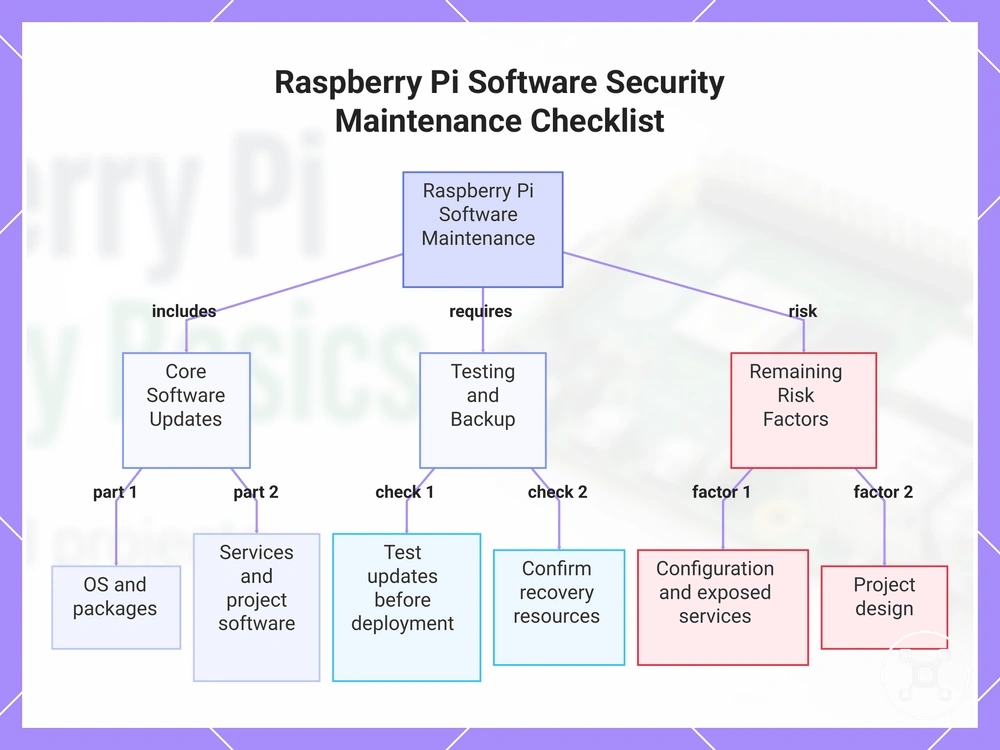
For an important or unattended Raspberry Pi project, testing updates before routine deployment can reduce the chance of compatibility or stability problems affecting project operation. Update timing should consider project dependencies rather than assuming every update should be applied immediately. The checklist below summarises practical maintenance checks, while complete recovery planning is covered in Raspberry Pi updates and backup.
Update timing should consider project dependencies rather than assuming every update should be applied immediately.
Review these maintenance items regularly:
- Operating system: Confirm the operating system is current and supported to reduce exposure to known vulnerabilities.
- Packages: Check package updates so outdated packages are replaced with current supported versions where appropriate.
- Services: Review exposed services and update, disable, or remove outdated or unnecessary services.
- Project software: Verify project software and dependencies remain current, supported, and suitable for the intended deployment.
- Testing: Test updates on important or dependency-sensitive projects before unattended use to confirm expected operation.
- Backup awareness: Confirm recovery resources are available before significant maintenance changes.
This chart shows the main components to update, testing and backup requirements, and remaining risk factors for effective software maintenance on a Raspberry Pi.
Physical reliability and recovery safeguards
Physical reliability supports Raspberry Pi security by reducing avoidable failures, data loss, and unsafe unattended operation. Stable hardware conditions and practical recovery safeguards help a project remain available or return to service after a fault. Physical reliability therefore supports security continuity.
Physical reliability therefore supports security continuity.
In a long-running connected project, unstable power, weak cooling, an unsuitable enclosure, or failing storage can interrupt services and make the Raspberry Pi unavailable when remote access or monitoring is required. An overheated or unstable system can stop writing data correctly or shut down before a task completes, while adequate physical support promotes more stable operation. Recovery readiness becomes important when a failure affects configuration files, application data, or service availability. The main support areas are power, cooling, enclosure, storage, and recovery readiness.
The main support areas are power, cooling, enclosure, storage, and recovery readiness.
Physical safeguards should match the project load, environment, runtime, and consequences of interruption rather than product-ranking criteria. A backup is recoverable only when it includes the required data and the restore process is suitable for the intended recovery scenario. The table connects each support area with its reliability condition, failure risk, and safer decision.
| Support area | Reliability condition | Risk if weak | Safer decision |
|---|---|---|---|
| Power | Adequate and stable for the Raspberry Pi and attached components during the intended workload. | Unstable power can cause interruption, unexpected shutdown, or incomplete storage writes. | Use a power source suited to the complete project load and check for instability during normal operation. |
| Cooling | Adequate for the processing load, enclosure airflow, environment, and runtime. | Weak cooling can allow overheating, reduced stability, or interruption during sustained operation. | Choose cooling that supports stable operation under the project’s expected long-running workload. |
| Enclosure | Protective without restricting required airflow or exposing connections to avoidable physical disturbance. | An unsuitable enclosure can trap heat, permit accidental contact, or leave components vulnerable to damage. | Match the enclosure to the environment, cooling method, cable access, and unattended operation needs. |
| Storage | Healthy, adequately sized, and monitored for errors or unexpected loss of writable capacity. | Weak or failing storage can cause data loss, corrupted files, or unavailable project software. | Check storage condition and preserve important configuration and project data outside the active device. |
| Backup or restore readiness | Recoverable when the backup contains required data and the restore method has been verified for the project. | An unverified backup can delay recovery or leave essential settings and data unavailable. | Maintain an appropriate backup and test that the required files or system state can be restored before unattended use. |
Power, cooling, and enclosure conditions
Power stability, adequate cooling, and a suitable enclosure support safe Raspberry Pi operation. An insufficient power supply can contribute to rebooting or interruption, while trapped heat and weak ventilation can reduce stability under sustained load. These physical conditions directly affect uptime and reliability.
These physical conditions directly affect uptime and reliability.
For an always-on project, stable power should support the Raspberry Pi and its connected components throughout the intended workload. Cooling should remove enough heat for the project load and environment, while the enclosure should provide physical protection without trapping heat or blocking airflow. Higher-load connected uses and installations in enclosed spaces require closer checks because sustained activity and restricted ventilation can increase the risk of throttling, interruption, or failure. Use these practical checks:
- Stable power: Confirm that the power supply remains stable while the Raspberry Pi and attached components operate under the expected load.
- Adequate cooling: Use cooling that supports stable operation during sustained activity rather than relying on idle conditions alone.
- Airflow: Keep ventilation paths open so heat can leave the enclosure and warm air does not remain concentrated around components.
- Enclosure fit: Use a case that protects the Raspberry Pi while preserving the airflow, cable access, and cooling method required by the project.
- Higher-load or enclosed use: Recheck power stability and heat control when an always-on project runs heavier workloads or operates in a confined or warm environment.
Backup storage and restore readiness
Backup storage supports Raspberry Pi recovery after storage failure, a bad update, or misconfiguration. A current and complete backup can preserve project data, an OS image, and configuration files, while a missing or outdated backup copy reduces recoverability. Restore readiness means the required backup exists, remains accessible, and has been tested for the intended recovery task.
For detailed maintenance planning beyond this subsection, see Raspberry Pi updates and backup .
For a headless or unattended Raspberry Pi, recovery can be harder when local access, credentials, or replacement storage are not available at the device location. The storage medium should keep a current backup copy that remains accessible through the planned restore method rather than relying on a single storage solution for every project. A tested backup improves restore confidence because it confirms that the required files or system state can be recovered before a failure occurs. For detailed maintenance planning beyond this subsection, see Raspberry Pi updates and backup.
A tested backup improves restore confidence because it confirms that the required files or system state can be recovered before a failure occurs.
Use this mini-checklist to confirm restore readiness:
- Project data: Keep a current backup of files, databases, and other project data required to resume operation.
- OS image: Maintain a current OS image when restoring the operating environment is part of the recovery plan.
- Configuration files: Preserve current service, network, and application configuration files needed to rebuild the project correctly.
- Restore test: Verify a tested backup by confirming the recovery process completes successfully before a real failure occurs.
- Headless access: Confirm that the restore method remains available for headless or unattended devices when physical access is limited.
Raspberry Pi security checklist before a project stays online
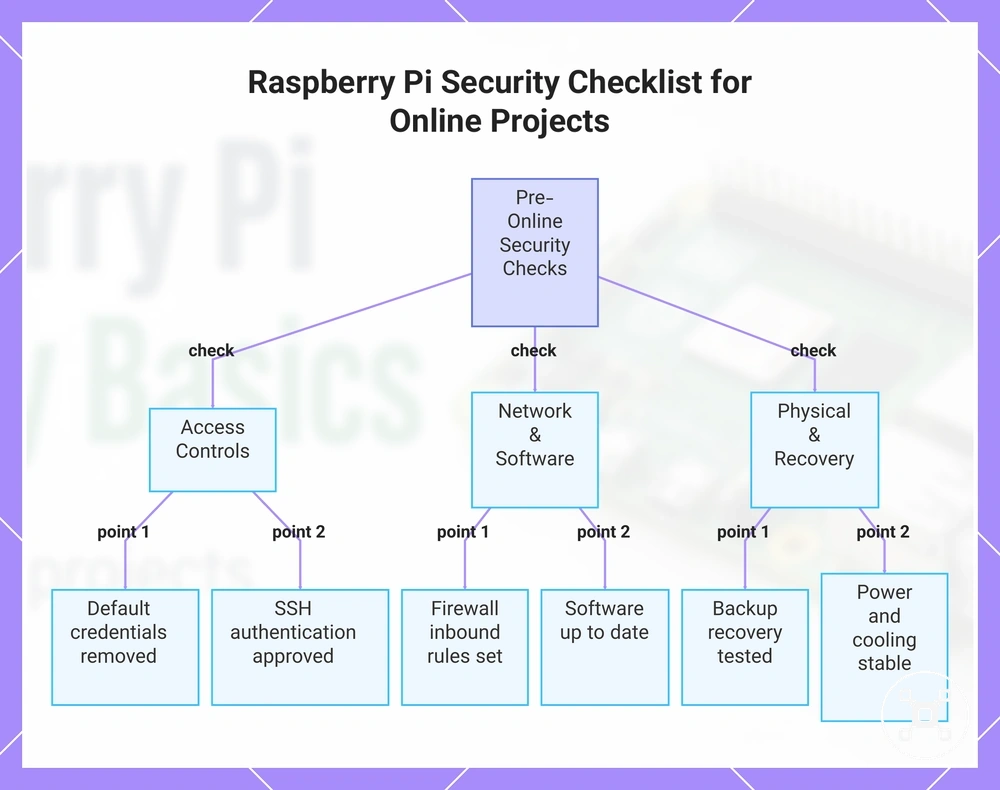
A Raspberry Pi security checklist helps verify whether a connected project is ready to stay online or unattended. Each control should be marked as pass, incomplete, or needs review according to whether it reduces the intended security or reliability risk. Use this as the final pre-online verification step.
Use this as the final pre-online verification step.
An online project can remain exposed when account access, SSH, firewall rules, updates, backup readiness, or physical reliability controls are incomplete. A pass means the control is configured and appropriate for the project context, while incomplete means a required safeguard is absent and needs review means the condition has not been verified. If a missing control could expose access, interrupt maintenance, or prevent recovery, keep the project local-only until the condition is resolved. Review the following checklist before leaving the Raspberry Pi connected:
- Account — password and permissions: Pass when default or weak credentials are not in use and account permissions match the required tasks; this reduces unauthorised access and unnecessary privilege.
- Account — unused access: Pass when unnecessary accounts or login paths are disabled or removed; this reduces avoidable entry points.
- SSH — authentication: Pass when SSH access uses an approved authentication method and only intended users can connect; this reduces unauthorised remote access.
- SSH — exposed port and reachability: Pass when SSH is reachable only from the networks or systems that require it; broader exposure needs review because it increases remote access risk.
- Firewall — inbound connections: Pass when required services are allowed and unnecessary inbound connections are blocked; this reduces access to unused services.
- Updates — maintenance state: Pass when the operating system and installed software are current for the project’s maintenance plan; outdated software needs review because known weaknesses may remain unaddressed.
- Backup — recovery readiness: Pass when current project data, configuration files, or an OS image are backed up as required and the restore method has been tested; this reduces recovery uncertainty after failure or misconfiguration.
- Power and cooling — physical reliability: Pass when the power supply remains stable and cooling supports the expected workload; unstable power or trapped heat can contribute to rebooting, throttling, or interruption.
- Enclosure and unattended use: Pass when the enclosure provides ventilation, physical protection, and suitable maintenance access; an enclosed or unattended installation needs review when heat, restricted access, or environmental conditions could affect reliability.
A connected project is ready for online use when its high-risk controls pass and each needs-review item has a documented reason and acceptable boundary. Keep the Raspberry Pi local-only when account access, remote exposure, update status, firewall rules, or recovery readiness remain incomplete because those gaps can increase security or continuity risk. For broader setup and project guidance, continue through the Raspberry Pi hub.
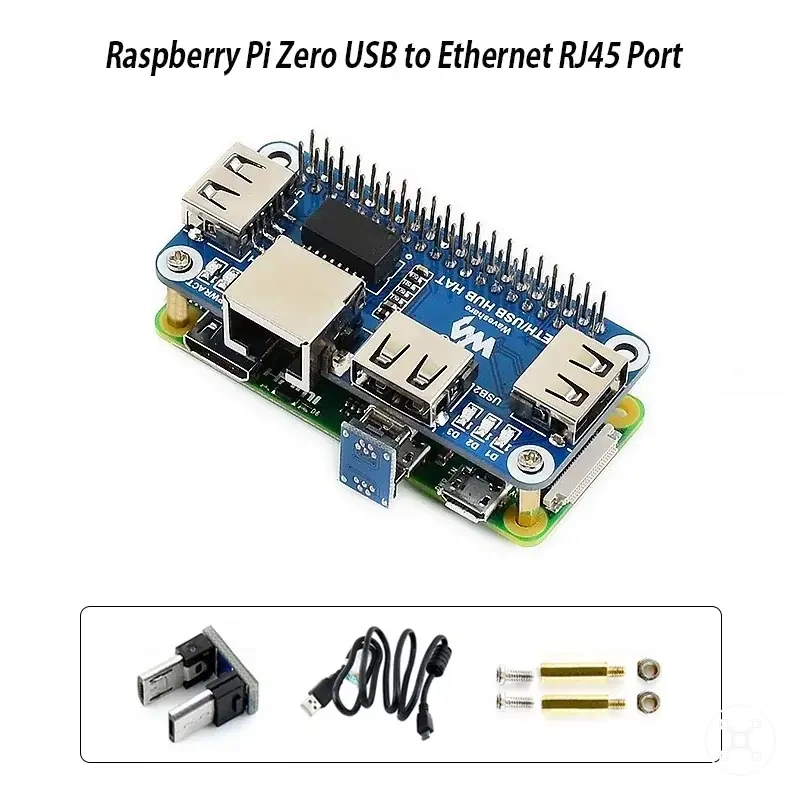
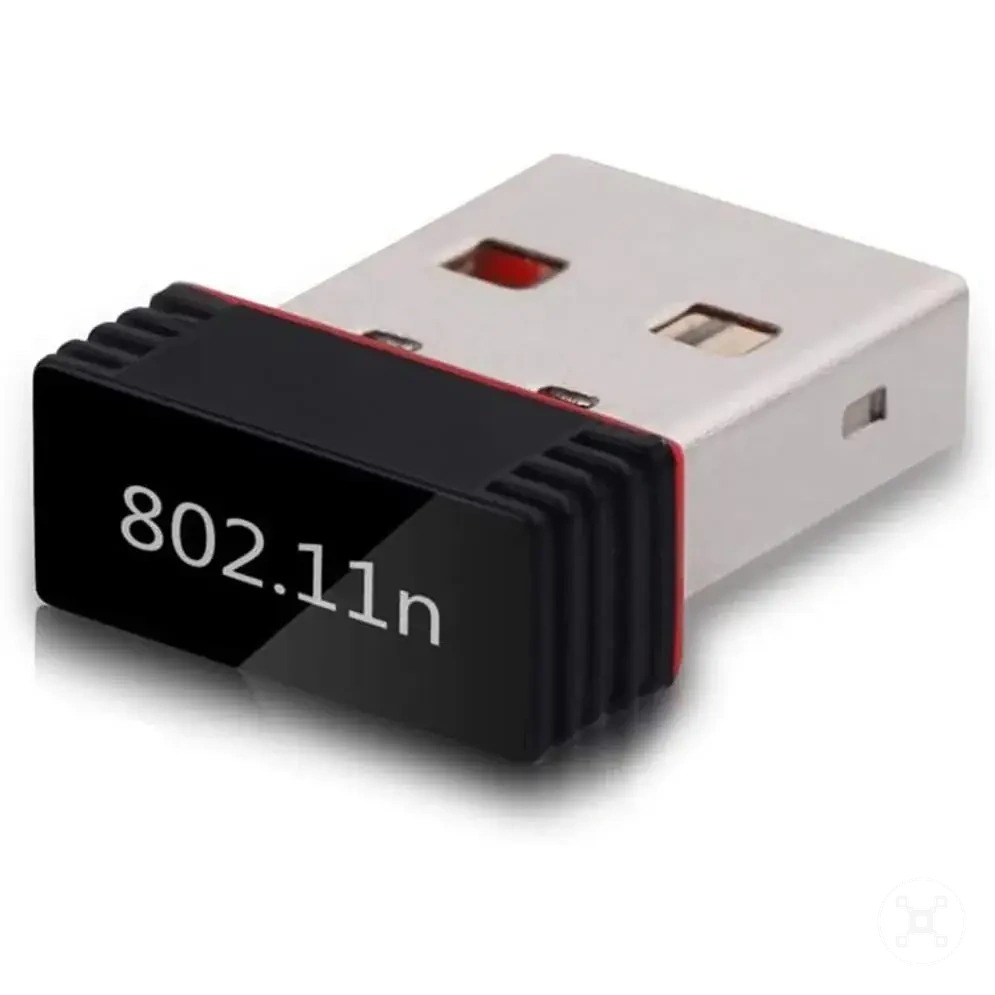
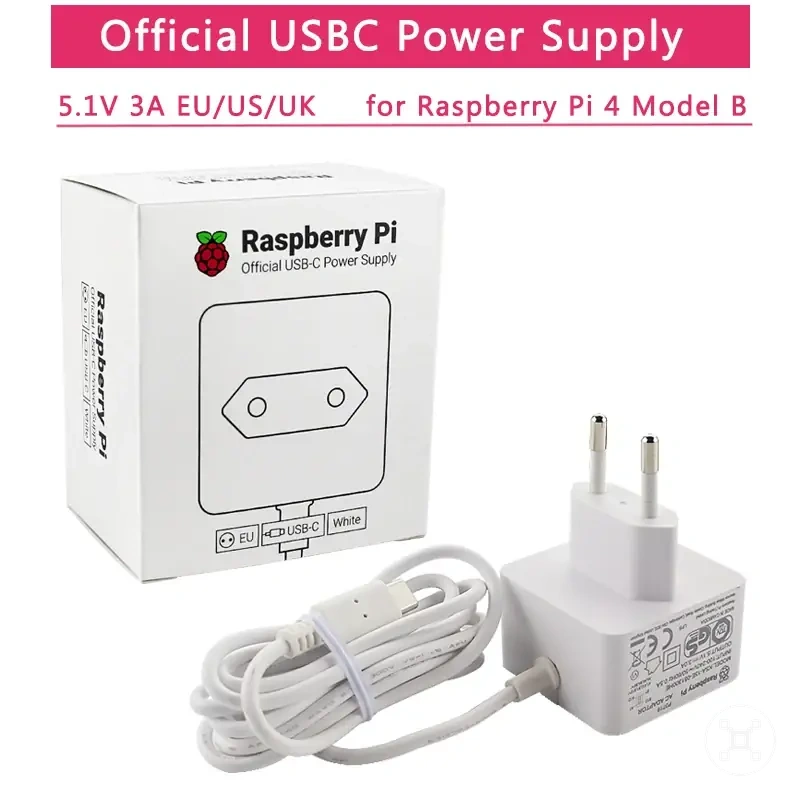
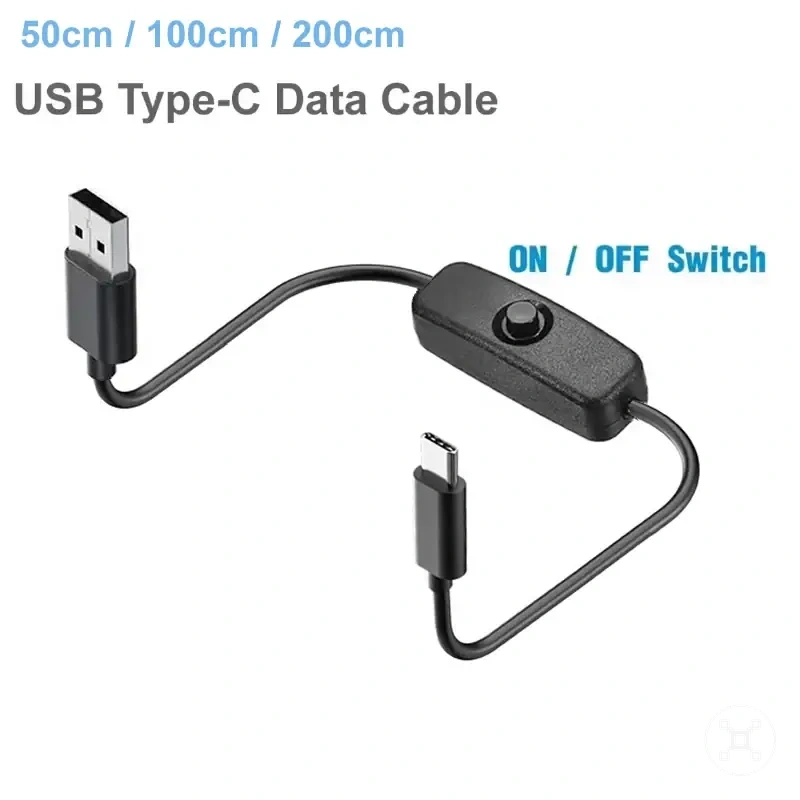
Here are product examples that may make comparison easier.
Here are product examples that may make comparison easier. Before buying, always review the compatibility criteria, essential features, and product details.

This chart shows the key security checks to verify before a Raspberry Pi project is left online or unattended.