
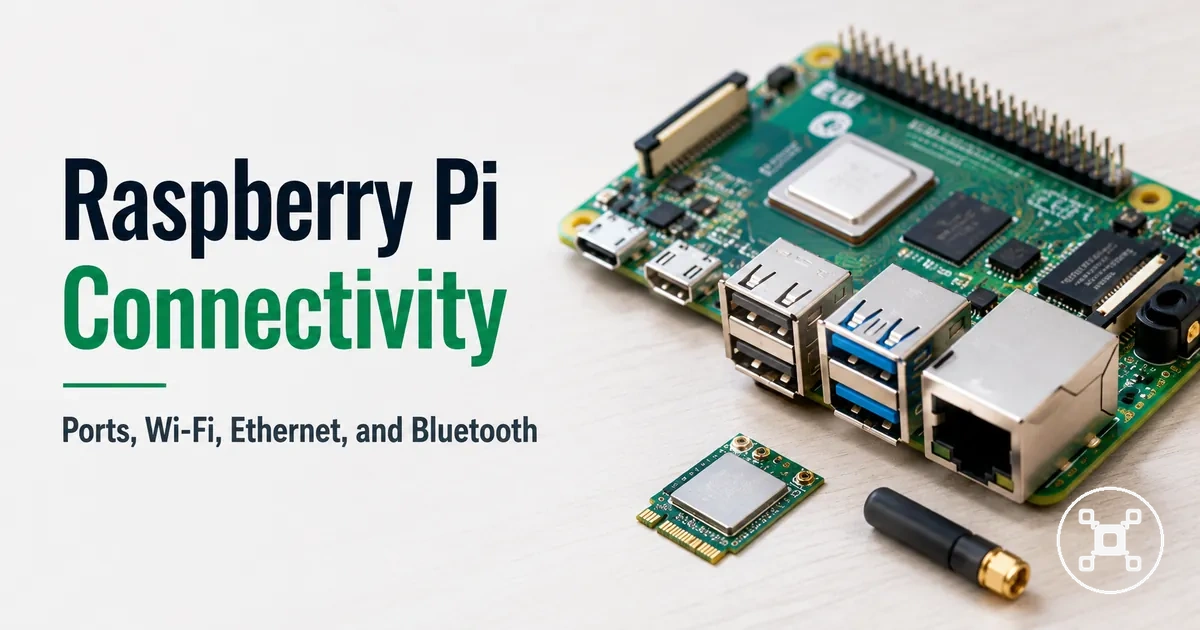
Raspberry Pi connectivity and ports for displays, networks, and peripherals
Raspberry Pi connectivity is the compatibility layer that determines how a Raspberry Pi board connects with displays, networks, peripherals, and adapters. The main connection categories include HDMI for display output, USB for peripherals, Ethernet for wired networking, Wi-Fi for wireless networking, and Bluetooth for paired devices. Compatibility is determined by matching the board interface, cable or adapter type, connected device, and configuration conditions.

Raspberry Pi ports provide physical connection options, while Wi-Fi and Bluetooth provide wireless connection options for network access and nearby devices. HDMI compatibility relates to the display connector, cable or adapter fit, and display input. USB compatibility relates to the connected peripheral type, hub use, and available power conditions. Ethernet compatibility relates to the network cable, router connection, and wired networking requirements.
HDMI compatibility relates to the display connector, cable or adapter fit, and display input.
The available connectivity options are shaped by the Raspberry Pi model, installed interfaces, accessory requirements, and surrounding conditions such as signal quality, power availability, and software configuration. Checking these compatibility factors helps users evaluate whether displays, networks, peripherals, or adapters match their Raspberry Pi use case without turning connectivity into a full setup or buying guide.
Table of Contents
What Raspberry Pi connectivity includes and what belongs elsewhere
Raspberry Pi connectivity is the board-level system of physical ports and wireless interfaces used to connect displays, networks, peripherals, and nearby devices. It includes connection options such as HDMI, USB, Ethernet, Wi-Fi, and Bluetooth, with each interface serving a specific connection role. The scope of Raspberry Pi connectivity is understanding how these interfaces create compatibility between a Raspberry Pi board and connected devices.
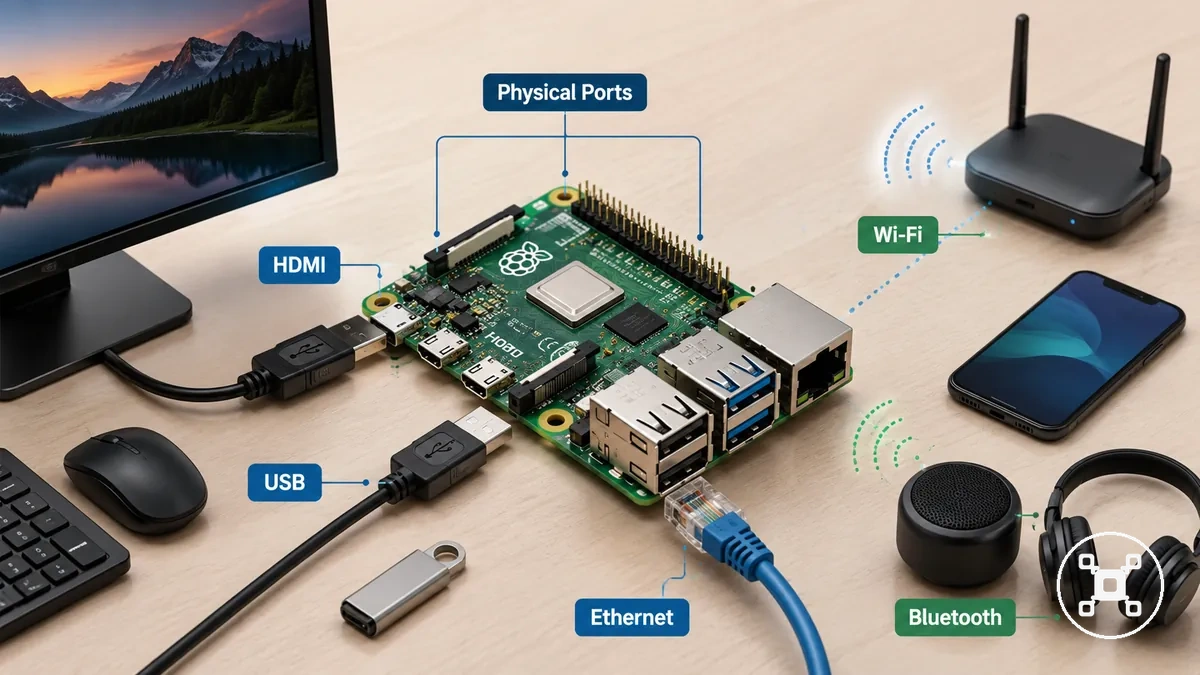
Raspberry Pi connectivity covers physical ports, wireless interfaces, adapter requirements, and connection conditions that affect displays, networks, and peripherals. The Raspberry Pi hub provides the wider topic context, while this section focuses on the connection layer rather than complete setup processes, power decisions, or operating system configuration. These boundaries help separate choosing and understanding interfaces from preparing the entire device.
These boundaries help separate choosing and understanding interfaces from preparing the entire device.
The GPIO boundary separates connectivity from hardware interaction because Raspberry Pi GPIO pins focus on electronic connections and component control rather than general display, network, and peripheral access. The setup boundary separates connectivity from the first-time preparation process, keeping installation and configuration as adjacent topics rather than the main focus of this page.
Raspberry Pi physical ports and the connections they support
Raspberry Pi ports support different connection types based on the board model, connector type, cable fit, adapter requirements, and connected device. Physical ports act as connection points for displays, peripherals, and networks, where each interface has a specific purpose and compatibility condition.
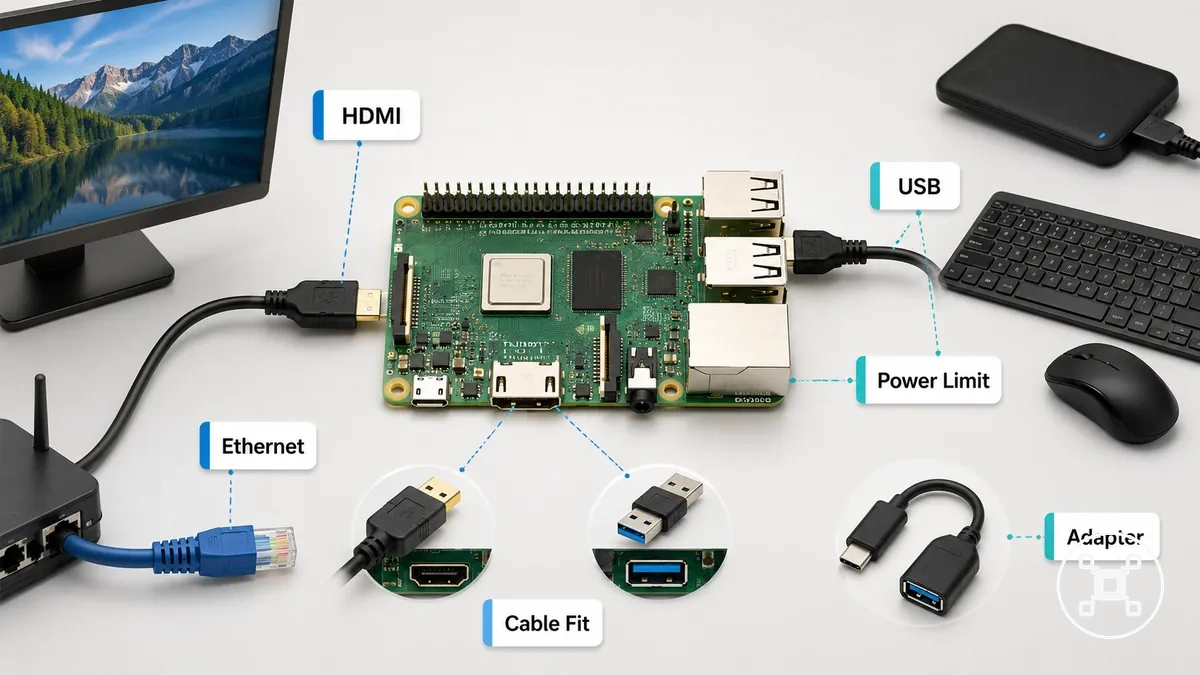
HDMI supports display output when the connector type, cable fit, adapter, and display input match the required connection path. USB supports peripherals and adapters, where peripheral class, power limit, and device requirements influence connection behaviour. Ethernet provides wired network access through a network port, where cable fit, router link, and network conditions affect the resulting connection.
HDMI supports display output when the connector type, cable fit, adapter, and display input match the required connection path.
The main Raspberry Pi ports can be compared by connection purpose and compatibility condition rather than as a complete specifications list. Raspberry Pi specifications provide broader hardware details, while this section focuses on how ports, connectors, adapters, and connected devices interact.
| Port or interface | Connection supported | Compatibility condition | What to check |
|---|---|---|---|
| HDMI | Display output | Connector type and display input must match | Cable fit and adapter requirement |
| USB | Peripherals and adapters | Peripheral class and power limit affect device behaviour | Device support and power requirements |
| Ethernet | Wired network access | Network port, cable, and router connection must align | Cable fit and network conditions |
| Adapter-dependent ports | Additional connection options | Adapter type must match the required interface | Adapter fit and connected device requirements |
HDMI ports for display output and cable fit
The HDMI port supports display output when the Raspberry Pi connector type, HDMI cable or adapter fit, monitor input, and configuration settings match the connection requirements. HDMI connectivity depends on the relationship between the board port, the display input, and the connection path used between them.
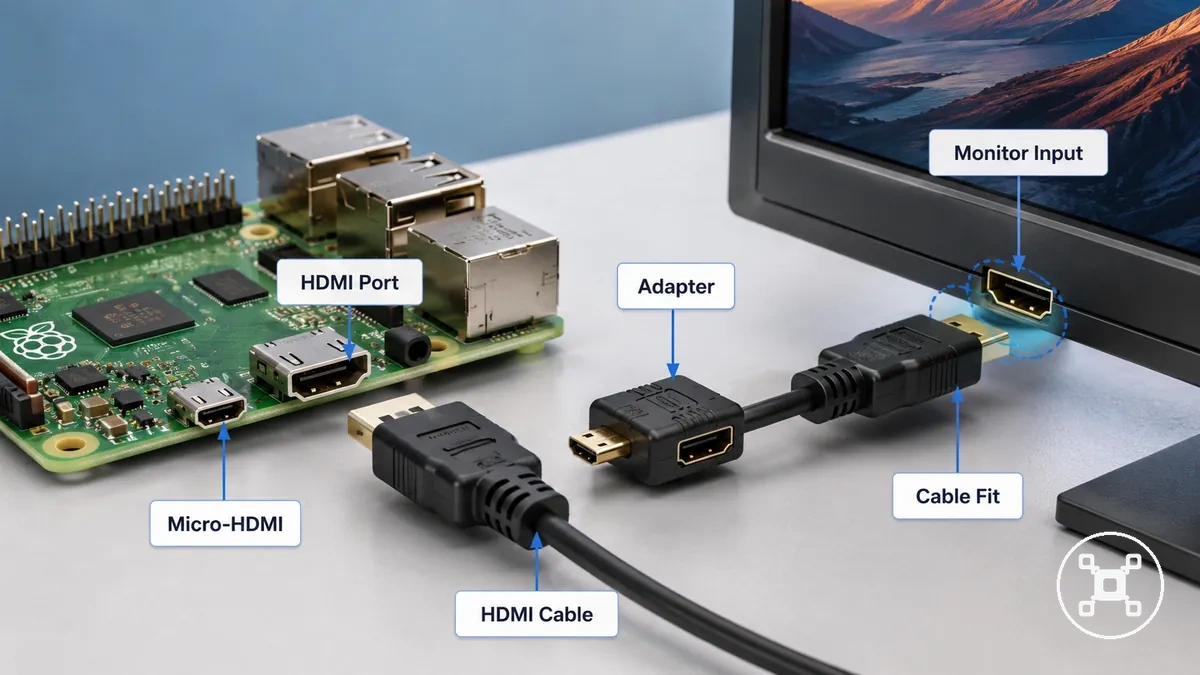
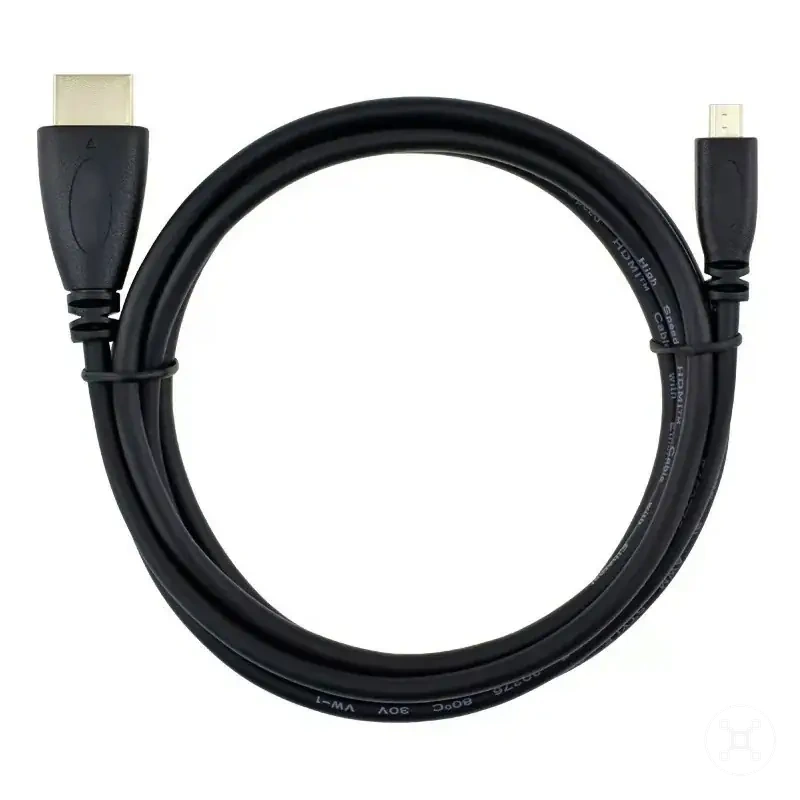
A Raspberry Pi with a micro-HDMI connector requires an HDMI cable or adapter that matches the board connector and the monitor input. A direct HDMI cable connection reduces the number of connection points, while an adapter adds another fit condition that must match the required interface.
A Raspberry Pi with a micro-HDMI connector requires an HDMI cable or adapter that matches the board connector and the monitor input.
Display output can be affected by cable fit, adapter compatibility, monitor input selection, resolution settings, and configuration. Checking the HDMI port type, HDMI cable, adapter, and display settings helps identify connection limitations without assuming every screen connection uses the same setup.
USB ports for keyboards, storage devices, hubs, and adapters
USB ports provide a local connection path for keyboards, mice, storage devices, hubs, adapters, and other USB peripherals when the device type, power requirements, and support conditions match the Raspberry Pi connection. A USB port provides a physical connection point, but compatibility also depends on device recognition, power draw, bandwidth availability, and driver support.
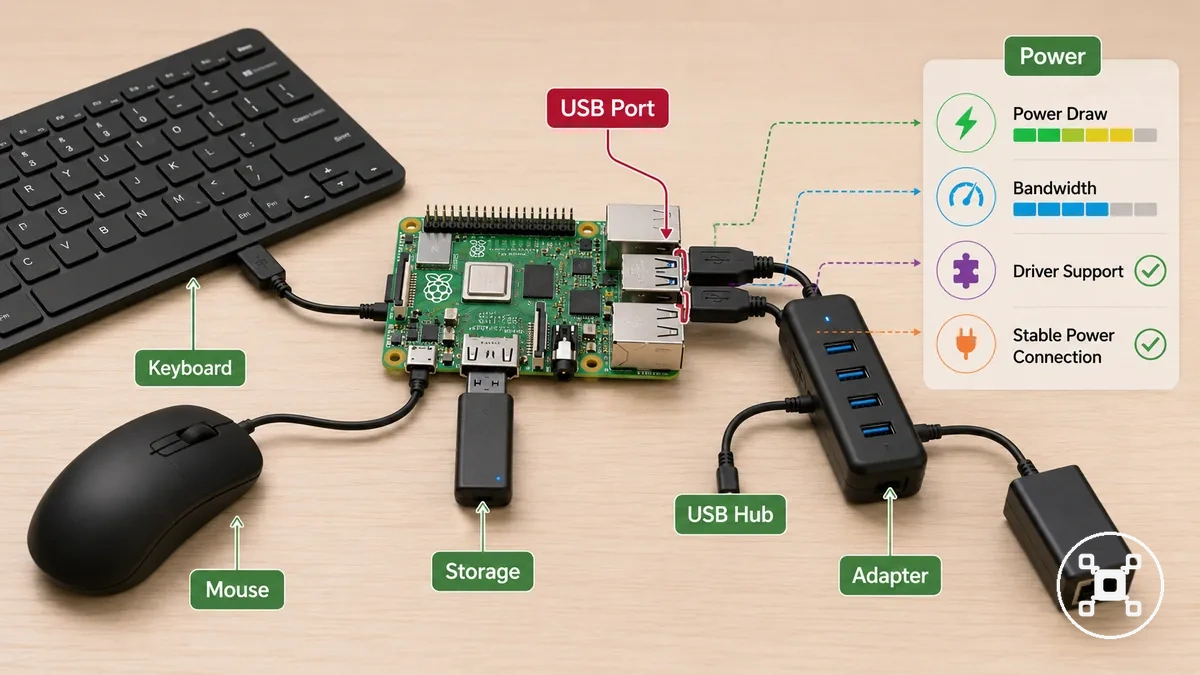
USB device compatibility can be checked by grouping connected devices by their connection requirements:
- Keyboard and mouse: Input devices require USB recognition and compatible peripheral support for normal operation.
- Storage device: USB storage devices require supported recognition, available bandwidth, and sufficient power for the connected device.
- USB hub: A USB hub expands connection options, while hub stability depends on the connected load and available power conditions.
- Adapter: USB adapters require compatible device support, suitable bandwidth, and driver support for the intended connection function.
Ethernet ports for wired network access
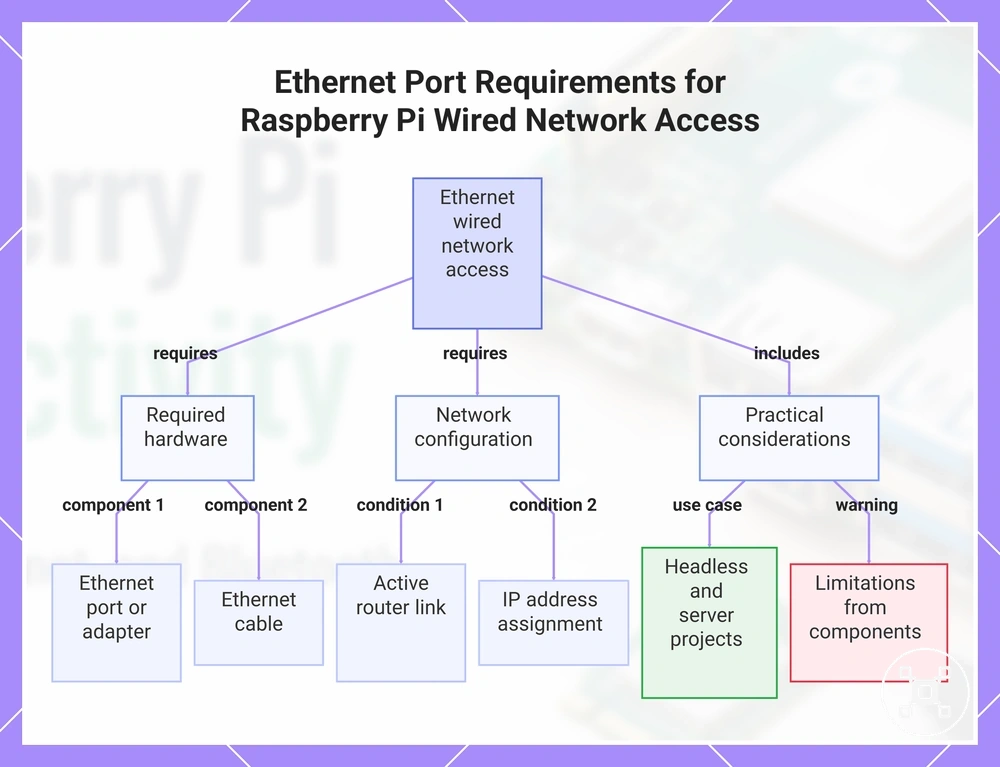
The Ethernet port provides a wired network path when the Raspberry Pi board includes the port or uses a supported adapter. Ethernet connectivity requires a matching Ethernet port or adapter, Ethernet cable, router connection, and network configuration so the Raspberry Pi can establish a wired network link.
The Ethernet port provides a wired network path when the Raspberry Pi board includes the port or uses a supported adapter.
Ethernet connection conditions can be checked through the following compatibility factors:
- Port presence: The Raspberry Pi needs an available Ethernet port or a supported adapter to create a wired network connection.
- Ethernet cable: The Ethernet cable must match the connection ports and link the Raspberry Pi with the router or local network equipment.
- Router connection: The router must provide an active network link for the connected Ethernet cable.
- IP address: The network configuration must assign an IP address for the Raspberry Pi to communicate on the local network.
Ethernet can be useful for headless access, server-style projects, or situations where wired network stability is preferred over wireless conditions. The connection result can still be limited by the adapter, cable, router, and network configuration.
The connection result can still be limited by the adapter, cable, router, and network configuration.
This chart shows the hardware and network requirements for establishing a wired Ethernet connection on a Raspberry Pi, along with practical use cases and limitations.
Wireless connectivity on Raspberry Pi boards
Wireless connectivity on Raspberry Pi boards is model-dependent and includes Wi-Fi for network access and Bluetooth for device pairing. Raspberry Pi boards may provide onboard wireless interfaces or require a USB adapter, with compatibility affected by the board model, operating system support, signal quality, and interference conditions.
Wi-Fi and Bluetooth provide different wireless connection roles.
Wi-Fi and Bluetooth provide different wireless connection roles. Wi-Fi supports network access through a router and wireless signal, while Bluetooth supports pairing with compatible peripherals and nearby devices. Onboard wireless availability, USB adapter support, operating system support, signal quality, and interference conditions influence how these wireless options function.
Wi-Fi supports network access through a router and wireless signal, while Bluetooth supports pairing with compatible peripherals and nearby devices.
The main wireless options can be compared by their connection purpose and compatibility conditions:
| Wireless option | Primary use | Compatibility condition | Common limitation |
|---|---|---|---|
| Wi-Fi | Network access | Requires supported onboard wireless capability or a compatible USB adapter | Signal quality and interference can affect connection conditions |
| Bluetooth | Device pairing | Requires supported Bluetooth capability and compatible paired devices | Pairing behaviour can be affected by device support and interference |
Wi-Fi support and network setup conditions
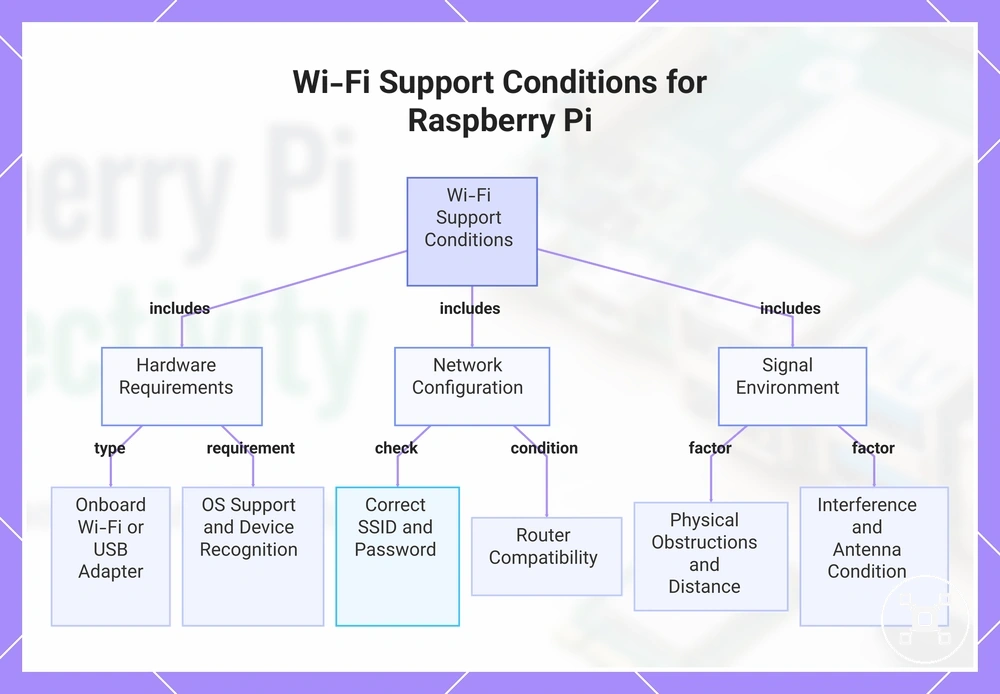
Wi-Fi support depends on the Raspberry Pi board capability, network setup conditions, signal quality, and router compatibility. A Raspberry Pi with onboard Wi-Fi can connect through its supported wireless interface, while a board without onboard support may require a USB Wi-Fi adapter. The connection result depends on configuration, operating system support, signal quality, interference, and the compatibility between the wireless device and network.
Wi-Fi support depends on the Raspberry Pi board capability, network setup conditions, signal quality, and router compatibility.
Wi-Fi network compatibility can be checked through these conditions:
- Onboard Wi-Fi: The Raspberry Pi model must provide supported onboard Wi-Fi capability or use a compatible USB Wi-Fi adapter for a wireless network connection.
- SSID and password: The Wi-Fi configuration requires the correct SSID and password values for the selected router network.
- Router compatibility: The router must support the wireless connection requirements of the Raspberry Pi Wi-Fi capability or USB Wi-Fi adapter.
- Signal quality: Case materials, antenna conditions, distance, and interference can affect signal quality and wireless connection conditions.
- Adapter recognition: A USB Wi-Fi adapter requires operating system support and device recognition before it can provide Wi-Fi access.
Wi-Fi compatibility conditions are separate from the broader Raspberry Pi setup process. This section focuses on the factors that affect wireless connection compatibility rather than a complete setup walkthrough.
Wi-Fi compatibility conditions are separate from the broader Raspberry Pi setup process.
This chart shows the main conditions that affect Wi-Fi support on a Raspberry Pi, including hardware requirements, network configuration, and signal environment.
Bluetooth support for paired peripherals and nearby devices
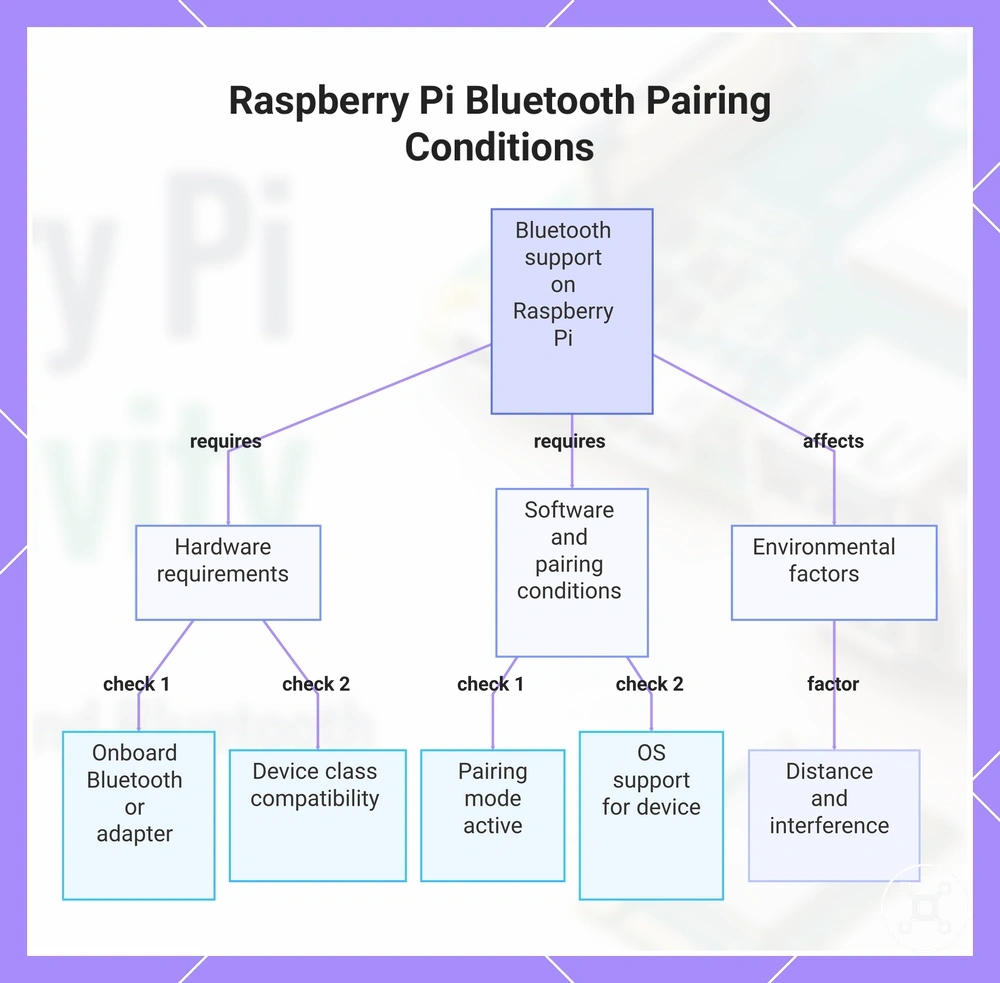
Bluetooth support depends on the Raspberry Pi board, Bluetooth adapter availability, device class, and software conditions. A Raspberry Pi with onboard Bluetooth can pair compatible peripherals and nearby devices, while a board without onboard support may require a Bluetooth adapter. Bluetooth pairing depends on operating system support, pairing mode, distance, interference, and the compatibility of the paired device.
Bluetooth support depends on the Raspberry Pi board, Bluetooth adapter availability, device class, and software conditions.
Bluetooth pairing readiness can be checked through these conditions:
- Onboard Bluetooth: The Raspberry Pi model must include supported onboard Bluetooth capability or use a compatible Bluetooth adapter for a Bluetooth connection.
- Pairing mode: The paired peripheral must enter a compatible pairing mode before the Raspberry Pi can detect and connect to it.
- Device class: Bluetooth keyboards, controllers, and other wireless peripherals require compatible device support rather than relying only on Bluetooth detection.
- Operating system support: The operating system must support the Bluetooth device and required connection functions.
- Distance and interference: Distance, interference, and device conditions can affect Bluetooth connection reliability.
Bluetooth and USB provide different connection paths. A Bluetooth keyboard or controller uses wireless pairing conditions, while a USB alternative uses a direct peripheral connection path with different compatibility requirements.
Bluetooth and USB provide different connection paths.
This chart shows the main conditions affecting Bluetooth support and pairing on a Raspberry Pi, including hardware, software, and environmental factors.
Model differences that change Raspberry Pi port compatibility
Model differences change Raspberry Pi port compatibility by affecting port presence, connector type, wireless support, adapter need, cable fit, and accessory fit. The same accessory may not match every board because each model family can use different connection options and physical interfaces.
Raspberry Pi models vary in how they support display connectors, USB availability, Ethernet presence, and wireless support.
Raspberry Pi models vary in how they support display connectors, USB availability, Ethernet presence, and wireless support. These differences affect whether a cable, hub, adapter, or case can connect correctly, making exact model verification important before selecting accessories.
These differences affect whether a cable, hub, adapter, or case can connect correctly, making exact model verification important before selecting accessories.
The following comparison highlights the compatibility checks that matter when comparing board models:
| Model or model family | Port or wireless difference | Compatibility effect | What to verify |
|---|---|---|---|
| Board model | Port presence and connector type can vary by model | Accessories may require different connection methods | Exact board model and connector type |
| Display connection | Display connector type affects screen connection options | Cable fit and adapter need depend on the connector available | Display cable and adapter compatibility |
| USB and Ethernet | USB availability and Ethernet presence can differ | Peripheral and network accessories may use different connection paths | USB ports, Ethernet support, and adapter need |
| Wireless support | Wireless capability can vary by board model | Wireless accessories may require onboard support or an adapter | Wi-Fi and Bluetooth support for the specific model |
HDMI, USB, Ethernet, Wi-Fi, and Bluetooth differences across common models
Common models can differ in HDMI, USB, Ethernet, Wi-Fi, and Bluetooth support, which changes port compatibility, connector type, adapter need, and accessory fit. These connectivity differences affect display output, peripheral support, wired networking, and wireless connections across different Raspberry Pi board revisions.
For a broader comparison of computing platforms, see Raspberry Pi vs mini PC .
Model family differences can change the available port layout and the connection path required for accessories. Checking the exact board revision before selecting cables, hubs, adapters, or cases helps verify connector type, cable fit, wireless support, and the expected connection consequence. For a broader comparison of computing platforms, see Raspberry Pi vs mini PC.
| Connection area | What can differ | Compatibility effect | What to check |
|---|---|---|---|
| HDMI | Display connector type and display output options | Cable fit and adapter need can change the screen connection path | Connector type and display cable compatibility |
| USB | USB layout and available peripheral connections | Peripheral support and device behaviour can depend on available ports and power conditions | USB ports and connected device requirements |
| Ethernet | Ethernet presence and wired network options | Network accessories may require a supported port or adapter | Ethernet support and adapter need |
| Wi-Fi and Bluetooth | Wireless availability and onboard support | Wireless accessories may require onboard capability or an adapter | Wireless support for the specific board revision |
Cable and adapter choices for Raspberry Pi connections
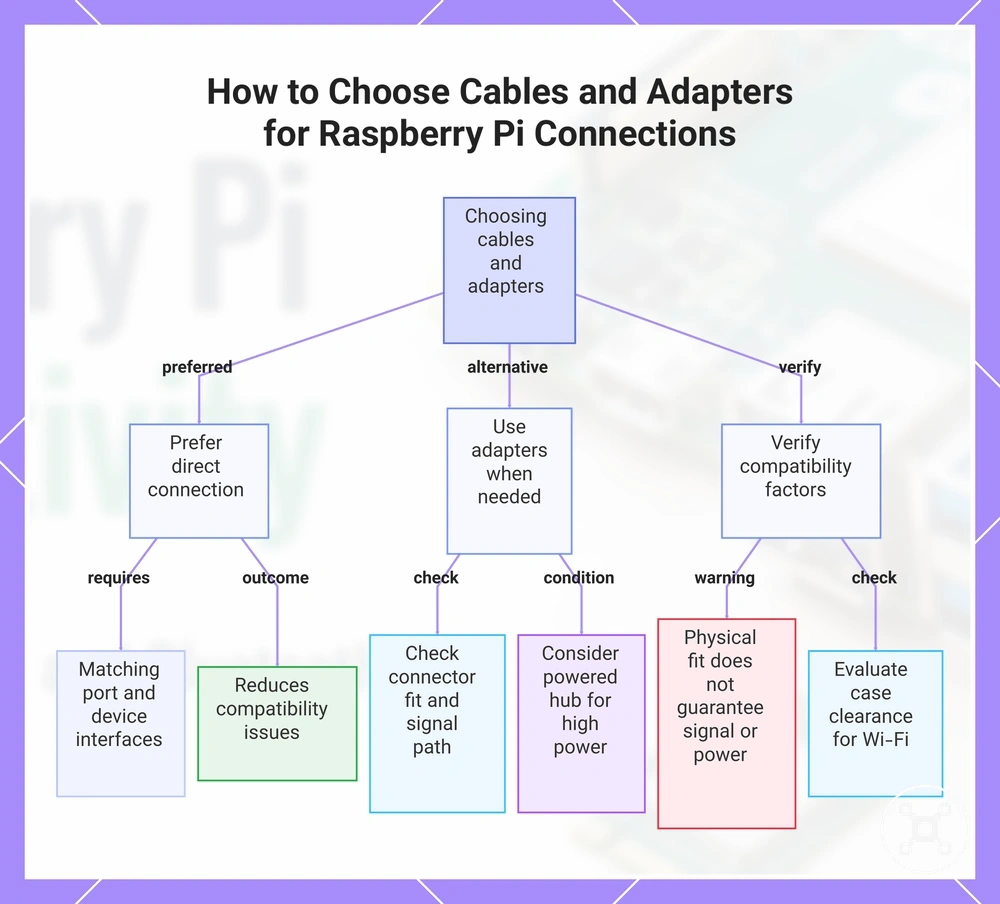
Cable and adapter choices for Raspberry Pi connections should match the Raspberry Pi port, connected device, connector fit, signal type, power need, and use-case condition. A direct connection is the preferred starting point when the port and device interfaces already match, while an adapter or hub is used when the connection requirements need an additional compatibility step.
Cable and adapter choices for Raspberry Pi connections should match the Raspberry Pi port, connected device, connector fit, signal type, power need, and use-case condition.
Each connection accessory can be evaluated by its compatibility condition and expected outcome:
- HDMI adapter: An HDMI adapter requires matching the Raspberry Pi display port and the connected display input. The adapter need should be verified when connector types differ to reduce cable fit issues.
- Ethernet cable: An Ethernet cable requires compatible Ethernet ports on the Raspberry Pi and network equipment. The connection outcome depends on matching ports and the intended wired network use.
- USB hub: A USB hub expands available USB connections, while a powered hub can be considered when connected device power load is higher. Hub selection should account for peripheral stability and power conditions.
- Bluetooth adapter: A Bluetooth adapter requires supported software and compatible paired devices. Adapter recognition and device support should be checked before relying on a Bluetooth connection.
- Wi-Fi antenna case: A Wi-Fi antenna case can affect wireless conditions when case clearance changes antenna placement or signal conditions. Case compatibility should be checked before expecting the same wireless behaviour.
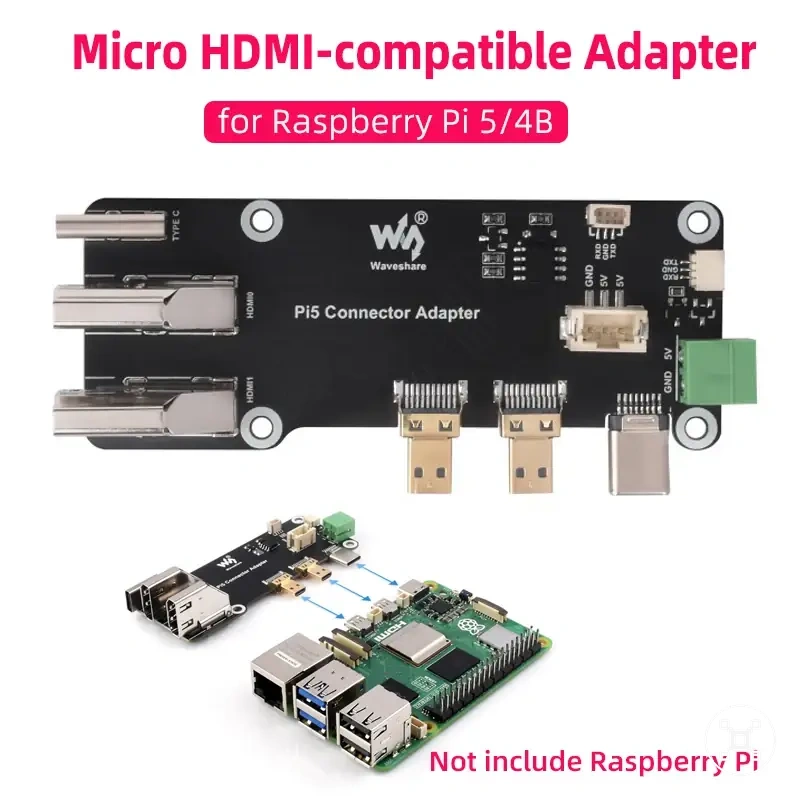
- Port adapter: A port adapter requires a matching Raspberry Pi port and connected device interface. Adding an adapter introduces another connection point that should match the required signal path.
Checking connector fit first, using adapters only when required, and considering powered hubs or case clearance where relevant helps reduce compatibility issues. Physical fit alone does not confirm signal support, power availability, or reliable device behaviour.
Physical fit alone does not confirm signal support, power availability, or reliable device behaviour.
This chart shows the main decision factors and checks for selecting cables and adapters for Raspberry Pi connections, including when to use direct connections, adapters, and key compatibility checks.
Network connection choices for wired, wireless, and direct access
Network connection choices on Raspberry Pi depend on whether Ethernet, Wi-Fi, or direct access best matches the project condition. Ethernet provides a wired connection path, Wi-Fi supports wireless network access, and direct access provides a local connection method when a network path is not the main requirement.
Direct access can support local communication or setup contexts where a separate network connection is not the main requirement.
The choice between these connection paths depends on reliability needs, mobility, cable access, board support, and configuration effort. Ethernet suits projects where a cable connection to a router or local network is practical, while Wi-Fi supports projects where mobility and reduced cabling are more important. Direct access can support local communication or setup contexts where a separate network connection is not the main requirement.
Different project scenarios can change which network connection option is suitable.
Different project scenarios can change which network connection option is suitable. Desktop use may favour convenient network access, headless setup may require a dependable connection path, server-style use may prioritize local network reliability, and portable projects may prioritize wireless flexibility.
The selection criteria for Ethernet, Wi-Fi, and direct access depend on the required reliability, setup context, and project conditions before choosing a connection method.
The selection criteria for Ethernet, Wi-Fi, and direct access depend on the required reliability, setup context, and project conditions before choosing a connection method.
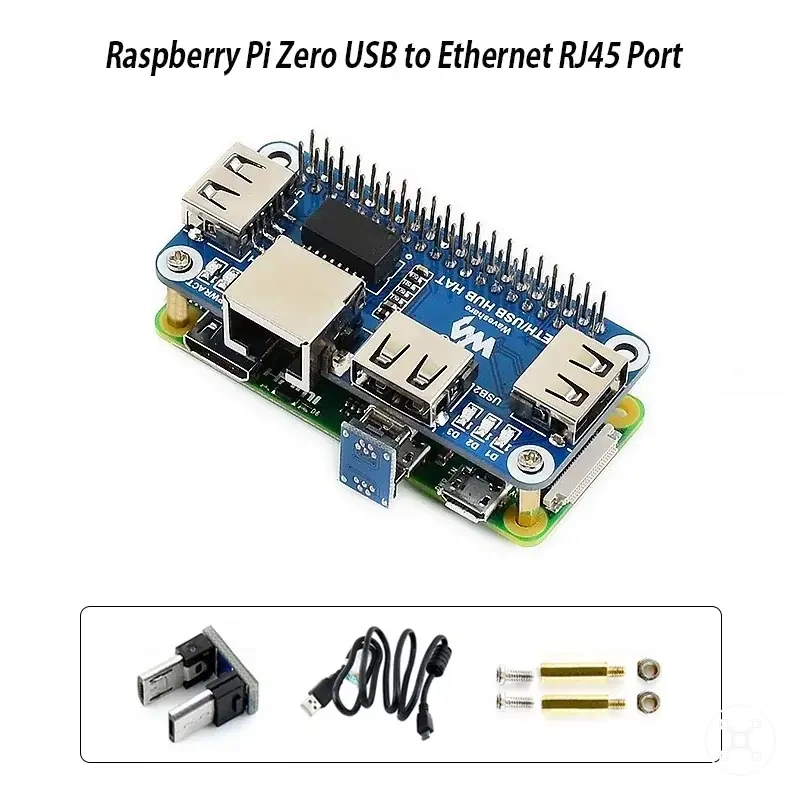
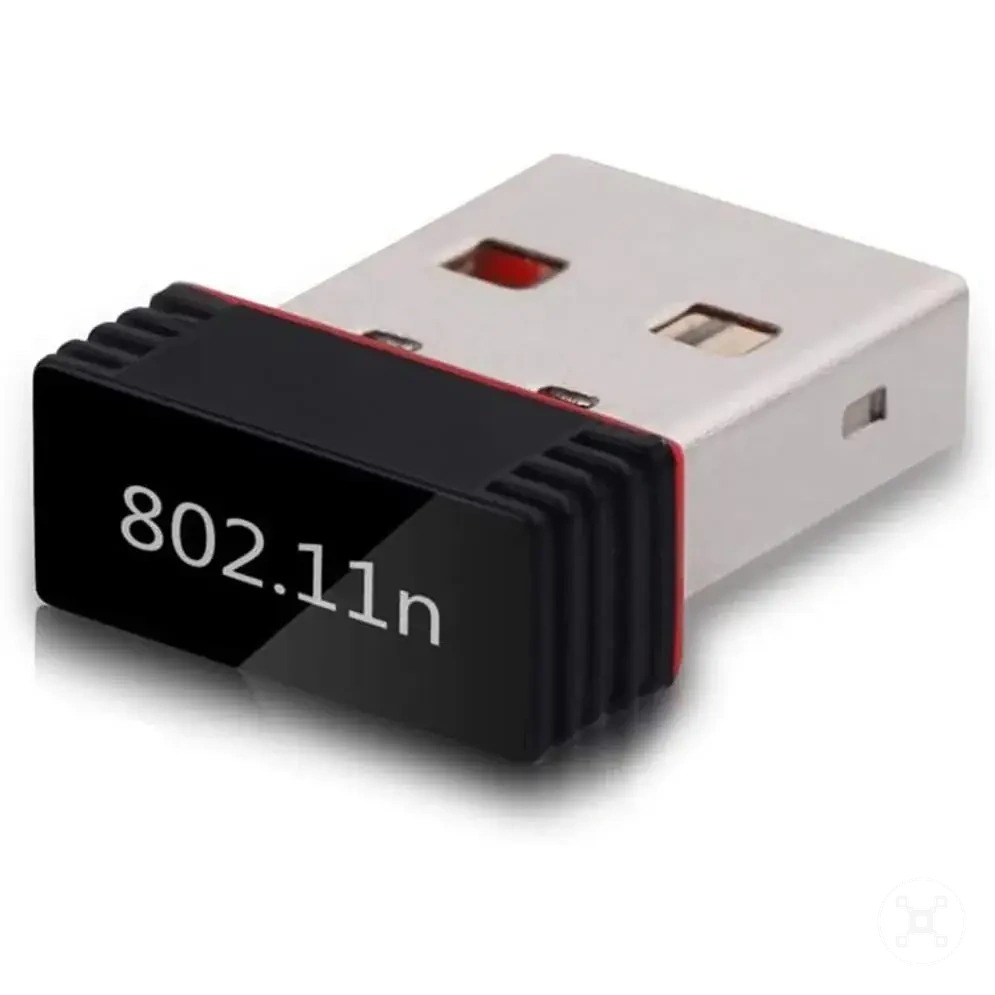
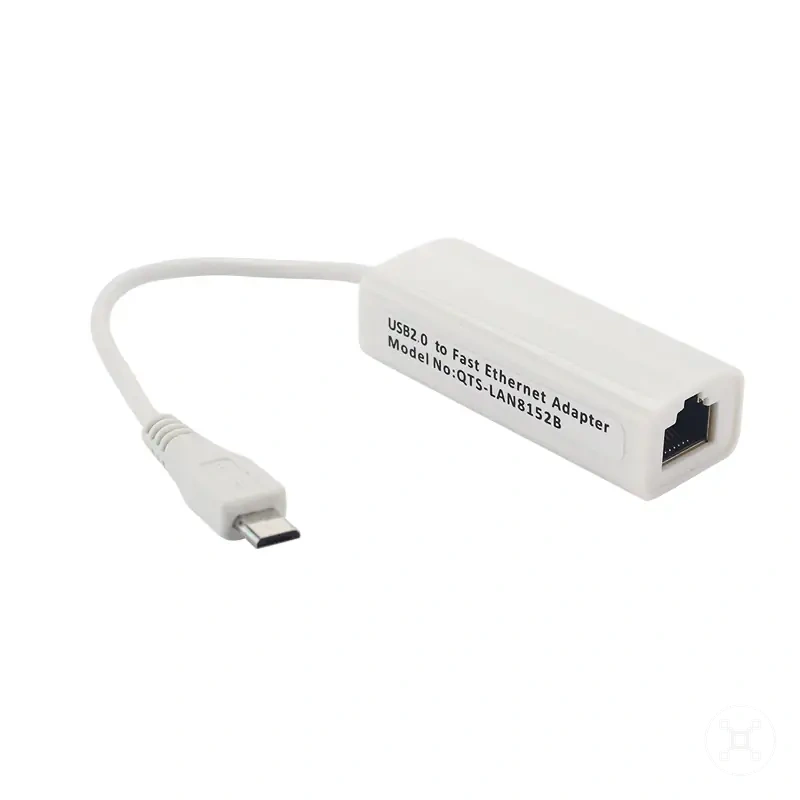
Here are product examples that may make comparison easier.
Here are product examples that may make comparison easier. Before buying, always review the compatibility criteria, essential features, and product details.
| Connection option | Best-fit condition | Trade-off | What to verify |
|---|---|---|---|
| Ethernet | Fixed projects that can use a cable connection to a router or local network | Requires cable access and suitable Ethernet support | Ethernet port, cable connection, and router availability |
| Wi-Fi | Projects needing wireless network access and flexible placement | Signal quality, interference, and configuration conditions can affect the connection | Wi-Fi support, router compatibility, and signal conditions |
| USB network adapter | Boards requiring an additional network interface | Adapter support and device recognition affect the usable connection path | USB compatibility and operating system support |
| Direct access | Local connections where a traditional network path is not the main requirement | Connection options depend on connected devices and intended use | Direct cable access, local network requirements, and device support |
Connection problems caused by ports, adapters, cables, or settings
Connection problems on Raspberry Pi usually come from the connection chain between the board, ports, cables or adapters, connected device, and settings. The same symptom can have different causes, so diagnosis should separate the visible issue from the likely cause, verification step, and safe next action.
A no-display symptom can indicate a cable fit issue, adapter mismatch, display input selection problem, or configuration setting.
A no-display symptom can indicate a cable fit issue, adapter mismatch, display input selection problem, or configuration setting. Check the HDMI cable connection, adapter path, display input, and relevant settings to identify whether the issue comes from the connection path or configuration rather than assuming the port has failed.
Network connection problems can involve Ethernet, Wi-Fi, USB network adapters, router links, or network settings.
Network connection problems can involve Ethernet, Wi-Fi, USB network adapters, router links, or network settings. Check the cable or wireless signal, adapter recognition, router connection, and configuration conditions to determine whether the symptom relates to physical connection, network conditions, or settings.
USB recognition and Bluetooth detection failures can involve device support, power limits, adapters, pairing conditions, or software settings.
USB recognition and Bluetooth detection failures can involve device support, power limits, adapters, pairing conditions, or software settings. A USB device that is not recognized may indicate a power limit or hub issue rather than a failed USB port, while a Bluetooth detection failure may require checking pairing mode, device support, and interference conditions.
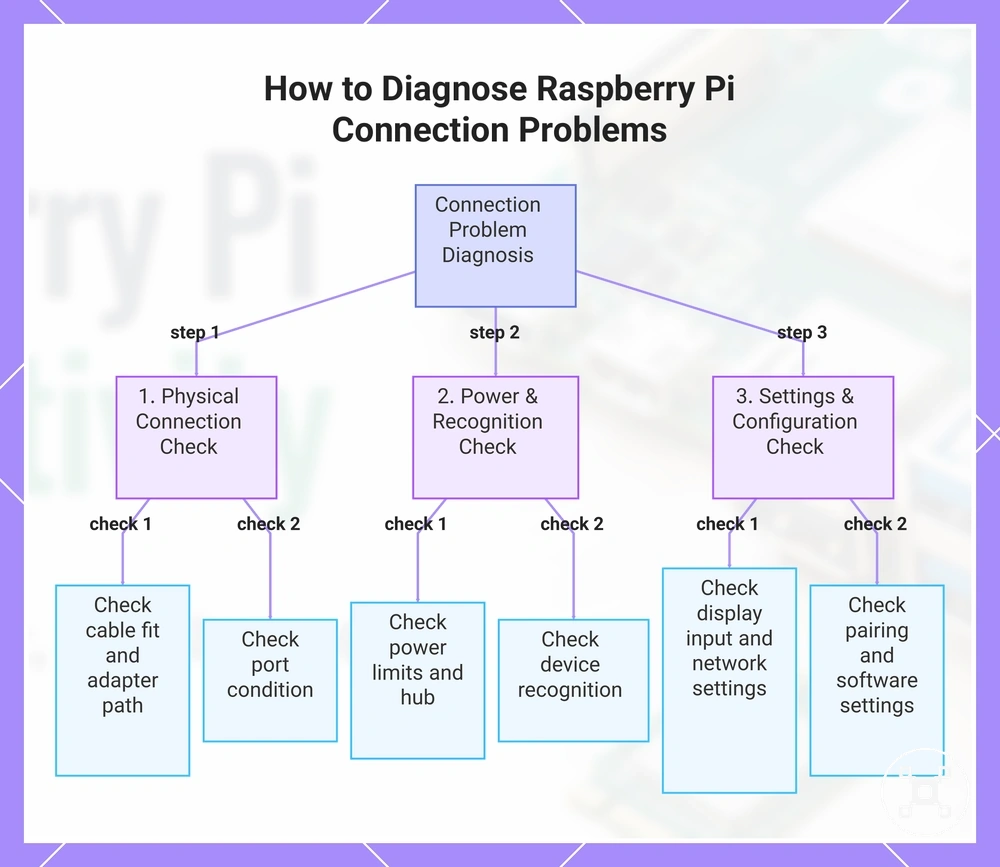
A diagnostic order starts with ports, cables, and adapter fit, then checks power limits, device recognition, and settings.
A diagnostic order starts with ports, cables, and adapter fit, then checks power limits, device recognition, and settings. This verification sequence helps separate connection problems caused by physical connection issues from problems related to configuration or network conditions before considering further changes.
Before buying, always review the compatibility criteria, essential features, and product details.
Here are product examples that may make comparison easier. Before buying, always review the compatibility criteria, essential features, and product details.
Follow this three-step diagnostic process to identify and resolve connection issues on Raspberry Pi, covering physical checks, power and recognition, and settings verification.
No display output from HDMI
No display output from HDMI usually requires checking cable fit, monitor input, adapter compatibility, power state, boot timing, and configuration. A blank display symptom can come from different points in the HDMI connection chain, so the first checks should identify whether the issue is related to physical connection conditions or display settings.
No display output from HDMI usually requires checking cable fit, monitor input, adapter compatibility, power state, boot timing, and configuration.
A local HDMI troubleshooting order can separate common causes:
- HDMI cable fit: Check the HDMI cable connection and connector type between the Raspberry Pi and display. A poor fit or unsuitable connection path can prevent display output.
- Adapter compatibility: Check the adapter when an HDMI adapter is used. Connector differences can affect whether the display signal reaches the monitor.
- Monitor input: Check that the monitor input matches the connected HDMI source. An incorrect input selection can create a blank display symptom.
- Boot timing and resolution behavior: Check whether the display changes during startup or after configuration changes. Resolution behavior and configuration settings can affect screen output even when the physical connection is present.
A no display output symptom can come from a physical connection failure or configuration-related display behavior. For example, cable fit or adapter compatibility can interrupt the signal path, while configuration settings can affect output after a valid HDMI connection is established. The symptom, check, likely cause, and next action should be considered together before changing components.
Wi-Fi, Ethernet, or internet connection failure
Wi-Fi failure, Ethernet failure, or internet connection issues can come from different layers of the connection path, including board support, cable or adapter condition, router access, credentials, IP assignment, and signal quality. The first check is to separate a local network issue from an internet access issue because a Raspberry Pi can connect to a router or local network while still lacking internet access.
The first check is to separate a local network issue from an internet access issue because a Raspberry Pi can connect to a router or local network while still lacking internet access.
A wired-versus-wireless diagnostic check can separate common connection issues:
- Ethernet failure: Check Ethernet cable seating, link light activity where available, router connection, and cable condition. A missing wired connection can indicate a cable, port, adapter, or router link issue.
- Wi-Fi failure: Check the Wi-Fi SSID, password credentials, router compatibility, and signal quality. A wireless connection issue can result from incorrect credentials, weak signal conditions, or unsupported connection requirements.
- Adapter recognition: Check whether a USB network adapter is recognized when additional network hardware is used. Missing adapter recognition can indicate support or configuration conditions that need verification.
- IP assignment and local network: Check whether the Raspberry Pi receives an IP assignment and appears on the local network. Local network visibility confirms a network link but does not confirm internet access.
- Internet connection: If the Raspberry Pi connects to the router but cannot access the internet, check whether the issue is limited to internet access rather than the local network connection itself.
Bluetooth pairing or device detection failure
Bluetooth pairing or device detection failure usually requires checking board support, adapter recognition, pairing mode, discoverability, software settings, distance, interference, and battery state. A Bluetooth connection issue can occur when the Raspberry Pi cannot detect a paired device, when the device is not ready for pairing, or when connection conditions prevent reliable detection.
A Bluetooth connection issue can occur when the Raspberry Pi cannot detect a paired device, when the device is not ready for pairing, or when connection conditions prevent reliable detection.
A local Bluetooth diagnostic order can separate common causes:
- Onboard Bluetooth and Bluetooth adapter: Check whether onboard Bluetooth is available or whether a Bluetooth adapter is recognized. Missing board support, adapter recognition, or software support can prevent device detection.
- Pairing mode and discoverability: Check that the paired device is in pairing mode and discoverable before attempting a Bluetooth connection.
- Distance and interference: Check the distance between devices and surrounding interference conditions. Distance and interference can affect Bluetooth connection reliability.
- Battery state and input devices: Check the paired-device battery state and confirm that the device type matches the intended input use. For critical input devices such as keyboards, USB can provide a more direct fallback when wireless pairing reliability is required.
- Operating system support: Check software settings and operating system support for the Bluetooth device before treating the issue as a hardware failure.
USB device issues caused by power, speed, or hub limits
USB device issues often come from power draw, hub behavior, speed limits, cable quality, or adapter support rather than the USB port alone. A USB failure can result from limits in the connection path, including peripheral load, hub limits, cable quality, adapter support, or recognition conditions.
USB device issues often come from power draw, hub behavior, speed limits, cable quality, or adapter support rather than the USB port alone.
A compact USB diagnostic checklist can separate common causes:
- Power draw and hub limits: Check whether the USB device power demand exceeds the available connection conditions. A powered hub may help when multiple peripherals or higher-draw devices are connected, while an unpowered hub may have more limited power availability.
- Hub behavior and peripheral load: Check whether multiple USB devices connected through a hub affect stability. Shared peripheral load can change device behavior when the hub connection reaches its practical limits.
- Speed limits and USB generation: Check whether the USB device, cable, and connection path support the expected speed. Speed limits can affect performance without indicating that the USB port has failed.
- Cable quality: Check the USB cable condition and connection fit. Cable quality can affect recognition and data transfer when the connection path is unreliable.
- Adapter support and recognition: Check whether USB storage devices or adapters are recognized by the Raspberry Pi. Missing recognition can indicate adapter support, device compatibility, or configuration conditions that require verification.
For example, a powered hub can change the outcome when several peripherals or higher-draw devices are connected because the hub provides a separate power path for those devices. This does not replace checking the device, cable, adapter support, and connection conditions.