mmWave Presence Detection vs Motion Detection
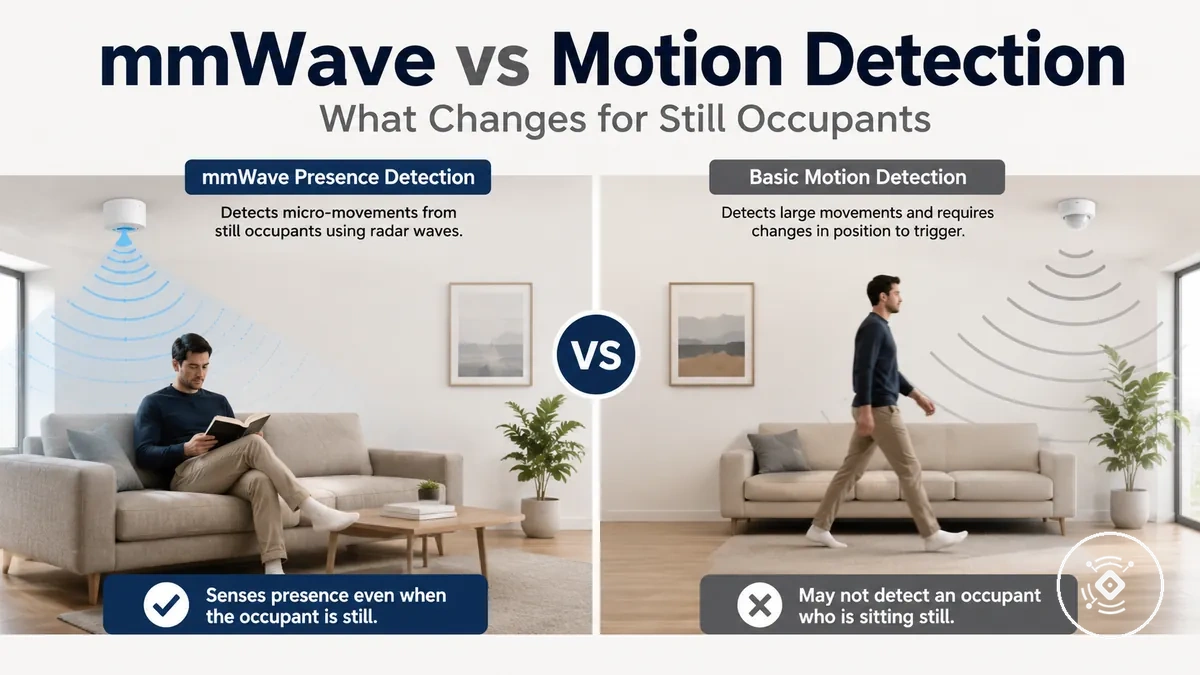
mmWave presence detection differs from motion detection because it focuses on continued presence signals rather than only detected movement events. Motion detection typically responds to a movement event, while presence detection can provide a different view of whether a space may still be occupied. This difference matters when automation depends on occupancy and detection confidence.
Motion detection and presence detection represent different interpretations of a sensor signal. Motion detection is based on detected movement, while presence detection focuses on indications that a person may remain present when movement becomes limited. This distinction helps explain why still occupants can create different automation outcomes, including possible false-off situations.
A quiet room with a person sitting at a desk or resting shows why this comparison matters. A movement-based signal may change after the last detected movement, while mmWave presence detection can use different sensing information to support continued presence recognition depending on the sensor model, placement, sensitivity, and environment. For a broader category explanation, see the mmWave presence sensor overview. These differences help explain how occupancy sensing can vary between detection approaches.
mmWave presence detection, motion detection, and occupancy are related concepts but are not identical. The sensor signal, the interpretation of that signal, and the resulting automation response represent separate parts of the detection process. This comparison focuses on movement, occupied-state signals, and the conditions that influence presence confidence.
How Presence, Motion, and Occupancy Differ
Presence, motion, and occupancy are related concepts with different meanings in sensor-based detection. Presence refers to a condition where a person may remain in a space, motion refers to a detected movement event, and occupancy refers to how a system interprets whether a space is in use. Separating the physical signal from the automation interpretation helps clarify how these concepts work together.
Motion detection and presence detection represent different signal patterns from a sensor signal. Motion detection focuses on movement detection, triggers, and timeout behaviour after a movement event, while presence detection focuses on an occupied-state signal that may continue when movement becomes limited. This distinction helps explain why still occupants can create different interpretations of room use.
Occupancy describes the interpreted automation state created from physical signal input rather than a single detection type. A smart-home platform may use presence or motion signals differently when deciding whether a room is considered in use. For a deeper explanation of the sensing process, see how mmWave presence sensing works.
How Presence, Motion, and Occupancy Differ can be summarized by separating the signal type, detected condition, and possible automation meaning.
| Term | What it refers to | Typical signal | Automation meaning |
|---|---|---|---|
| Presence | A person remaining present in a space | Occupied-state signal from sensing input | May support a room-in-use state |
| Motion | Detected movement within a space | Movement event or trigger | May start an automation response |
| Occupancy | The interpreted state of whether a space is being used | Sensor signal combined with platform logic | May influence device state or automation behaviour |
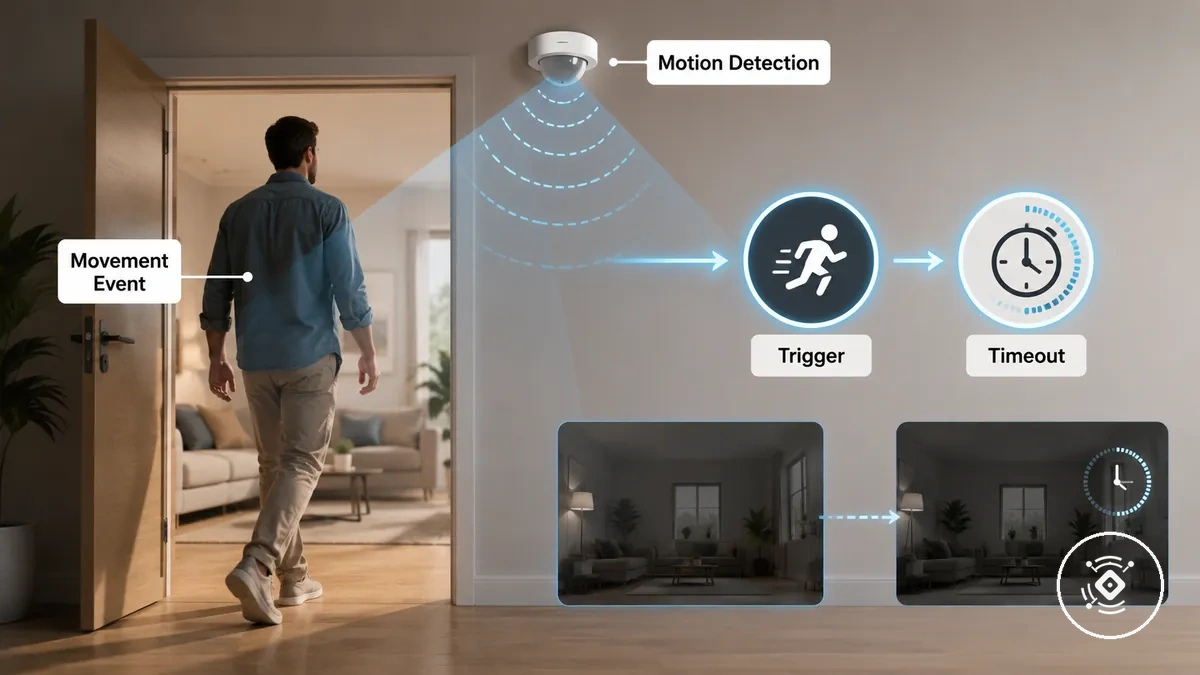
Motion detection as a movement event
Motion detection represents a detected movement event rather than confirmed continued occupancy. Motion detection uses movement as a trigger that can start an automation response when activity is identified. After a movement event, a timeout period may apply depending on the system settings and no recent movement can reduce confidence that the space remains occupied.
Presence detection as an occupied-state signal
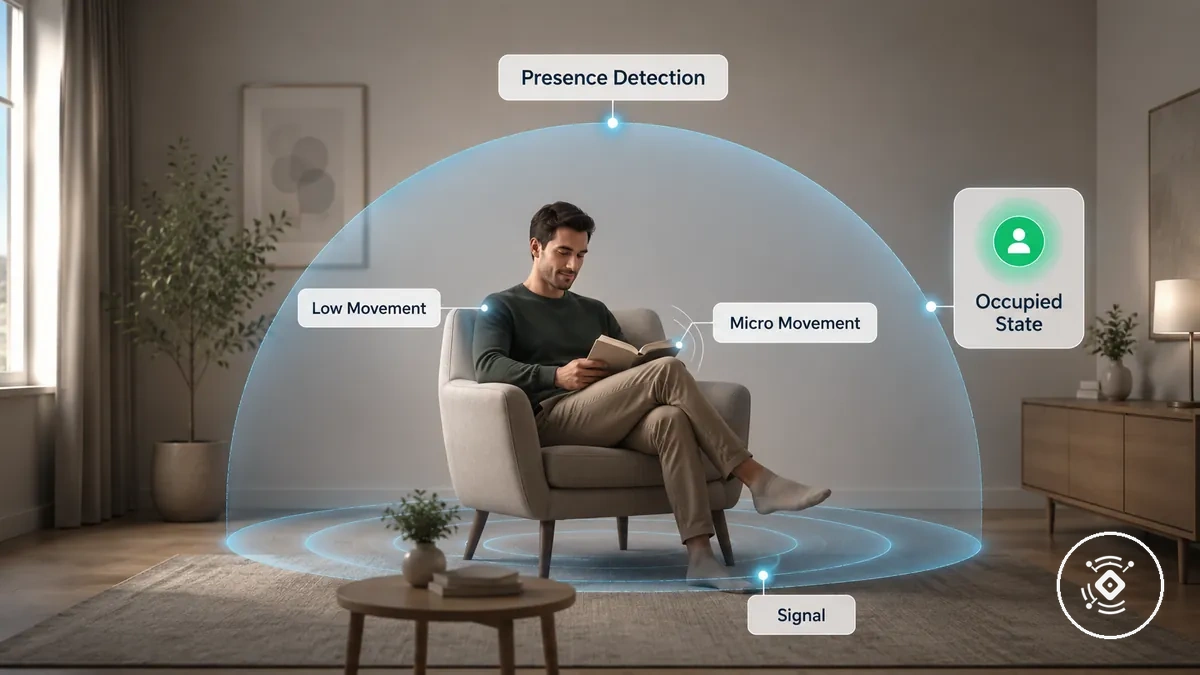
Presence detection represents an occupied-state signal that indicates human presence may continue when obvious movement is low. Presence detection differs from movement detection because it focuses on a continued presence signal rather than only a movement event. Low movement and micro-movement cues can contribute to how a sensor interprets an occupied state, while sensor-dependent reliability can vary based on factors such as sensitivity, placement, and environment.
Occupancy detection as the automation decision layer
Occupancy detection is the interpreted automation state that systems use to decide whether a space is considered in use. Occupancy detection connects sensor input with platform logic to create an occupancy state that may influence device behaviour. The automation decision can use different inputs, including presence input or motion input, rather than depending on one sensor technology. A smart-home platform may interpret these signals differently, so occupancy remains a technology-neutral concept based on how sensor information is processed.
What Changes When Still People Can Be Detected
Detecting still occupants can change the way detection confidence is interpreted when movement becomes limited. mmWave presence detection may provide a different view of continued presence compared with motion detection because it can consider conditions beyond a recent movement event. The practical difference appears when people remain seated, such as during desk work or in a quiet room, where motion timeout behaviour may contribute to false-off situations.
A person working at a desk, resting on a sofa, or staying in a quiet room may create fewer movement events than someone walking through a space. Motion detection may rely on recent movement before changing an automation state, while mmWave presence detection may use low movement or micro-movement cues to support continued presence. This can affect occupied-state reporting and may change the risk of false absence when still occupants remain in the space.
The outcome depends on factors such as sensor model, placement, sensitivity, and environment. Still people may be represented differently because detection confidence depends on the available sensor signal and how the system interprets that information. These conditions mean the practical result can vary between rooms and use cases.
What Changes When Still People Can Be Detected can be compared by separating low-movement situations from their possible detection outcomes.
| Situation | Motion-only behaviour | Presence-detection behaviour | Practical effect |
|---|---|---|---|
| Seated work | May depend on a movement event before state changes | May consider continued presence during low movement | Occupied-state reporting can differ for still occupants |
| Sofa rest | May have longer periods without new movement events | May use additional presence cues | Automation response can vary by conditions |
| Quiet room | May depend on motion timeout behaviour | May continue evaluating presence conditions | False-off risk can change depending on the situation |
| Brief movement pause | May wait for another movement event | May continue interpreting presence signals | Detection confidence can vary by context |
Why motion-only detection loses confidence after movement stops
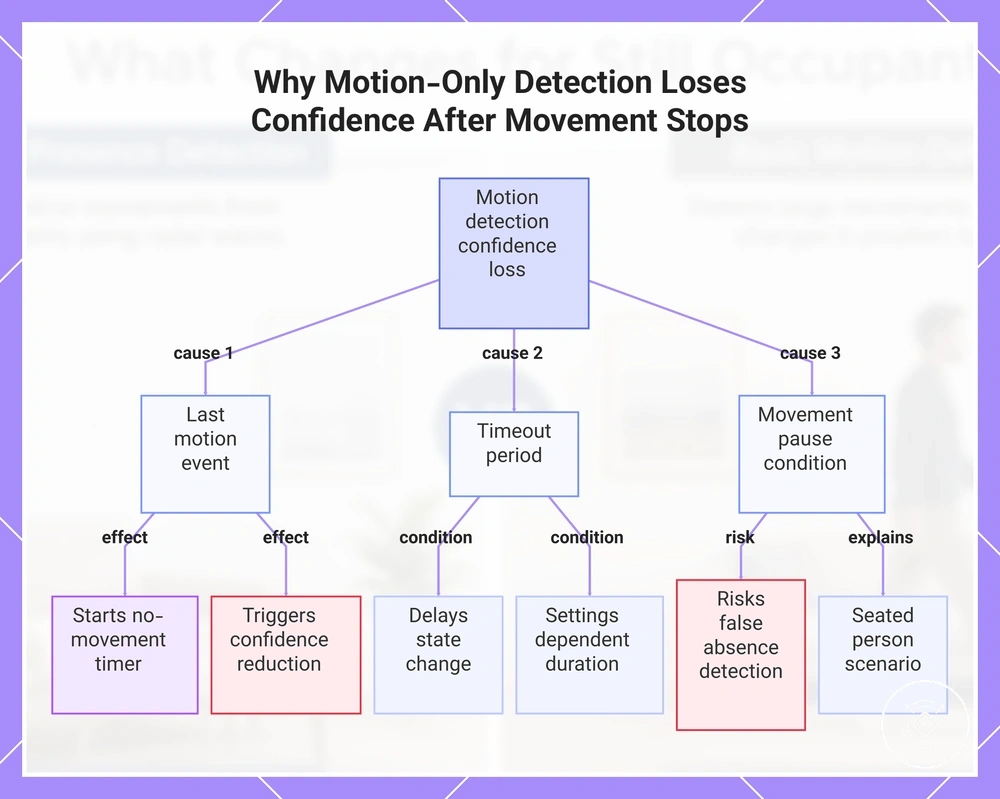
The last-motion event can reduce confidence in motion-only detection when no new movement is detected afterward. Motion-only detection may use a timeout period after a movement event before changing its state, depending on system settings. During a movement pause, a seated person may create a possible false absence condition because the system has limited movement information. This explains how a last-motion event, timer behaviour, and no new movement can affect detection confidence.
This chart shows the three key factors that reduce motion-only detection confidence after movement stops: the last motion event, the timeout period, and the absence of new movement.
Why mmWave presence detection can remain active during low movement
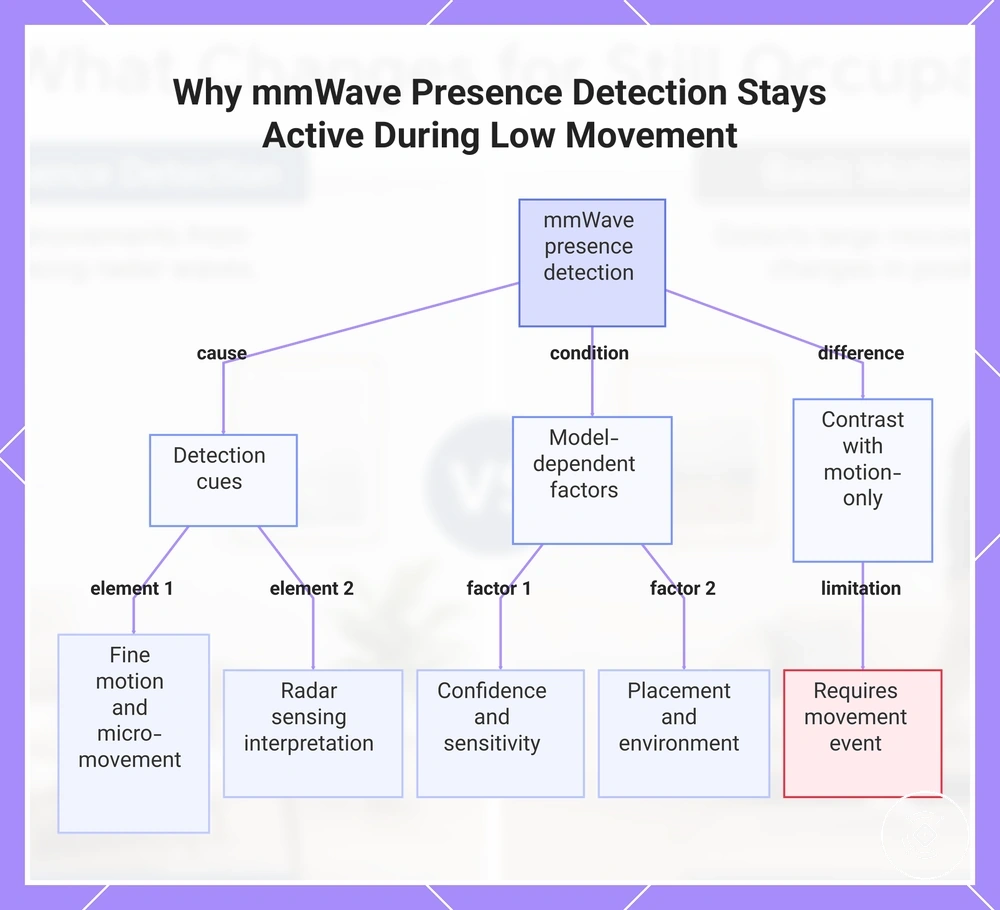
mmWave presence detection can remain active during low movement when the sensor signal includes fine motion or micro-movement cues that support a continued presence signal. Unlike motion-only detection, which relies on a movement event, mmWave presence detection can use radar sensing to interpret indications of human presence when visible movement is reduced. A seated occupant may still create detectable cues, but continued reporting depends on model-dependent confidence, sensitivity, placement, and the surrounding environment.
This chart explains why mmWave presence detection can remain active during low movement, covering detection cues, model-dependent factors, and the contrast with motion-only detection.
Detection Sensitivity, Range, and False Occupancy Tradeoffs
Sensitivity and range can improve detection usefulness only when they are balanced against false occupancy risk. Detection outcomes depend on how a sensor interprets movement, presence signals, and room conditions rather than on a single attribute alone. Sensitivity may influence the ability to recognise low movement, while range and detection zone choices can affect how a space is interpreted. These attributes create tradeoffs between missed presence, false occupancy, and detection confidence.
The main attributes in this comparison include sensitivity, range, detection zone, timeout, micro-movement, and environmental conditions. A sensitivity adjustment may help capture smaller movement cues but can also change how nearby disturbance is interpreted depending on the environment. Range and room boundaries can influence where a sensor signal is considered relevant, while timeout behaviour can affect how motion detection and presence signals contribute to automation decisions. The table below organises each attribute by condition, effect, and decision impact.
Nearby disturbance such as fans, pets, adjacent rooms, or reflective surfaces can affect how detection conditions are interpreted. These examples show why tuning and placement depend on the specific environment rather than a single universal setting. For criteria involving micro-movement detection and sensitivity, the practical outcome depends on sensor behaviour and surrounding conditions.
| Attribute | Value or condition | Possible effect | Decision cue |
|---|---|---|---|
| Sensitivity level | Higher or lower sensitivity settings | May influence detection confidence for smaller movement cues | Balance sensitivity with false occupancy risk |
| Detection range | Sensor coverage within a room area | May affect which areas contribute to detection | Consider room boundaries and intended coverage |
| Zone boundary | Defined detection area or room context | May affect how nearby areas are interpreted | Match the detection zone to the environment |
| Timeout behaviour | Time after a movement event | May influence state changes when no new movement occurs | Consider automation response during movement pauses |
| Small movement | Low movement or micro-movement conditions | May influence missed presence or continued detection | Evaluate detection confidence for the use case |
| Nearby disturbance | Fans, pets, adjacent rooms, or reflective surfaces | May affect signal interpretation and false occupancy risk | Consider environmental conditions when evaluating results |
Smart-Home Automation Changes With Presence Detection
Presence detection mainly changes keep-on logic and absence decisions by allowing smart-home automation to consider continued presence instead of relying only on a motion trigger. Continued presence can influence how a device state is maintained when a room remains occupied after the initial activation event. This can affect automation behaviour for lights, HVAC, or room modes depending on configuration, device type, and platform logic.
A room light may activate after a motion trigger, but continued presence can influence whether the device state remains active when movement becomes limited. In a quiet workspace or occupied room, keep-on logic may create a different experience compared with relying only on timeout behaviour after a movement event. The practical difference depends on how the automation routine uses sensor input and may help reduce false shutoff situations in certain conditions.
Automation outcomes depend on platform logic, device behaviour, and the way presence information is interpreted. Presence detection does not create a universal automation rule, and different systems may handle absence decisions and timeout behaviour differently. These limits mean comfort effects and false shutoff changes depend on the specific automation configuration.
Smart-Home Automation Changes With Presence Detection can be compared by separating trigger-on logic from keep-on logic and the resulting user impact.
| Automation moment | Motion cue role | Presence cue role | User impact |
|---|---|---|---|
| Initial activation | A motion trigger can start an automation response | Presence information can contribute to occupancy interpretation | Device state may respond to detected activity |
| Keeping a room active | May depend on new movement events and timers | May support keep-on logic when continued presence is interpreted | Room comfort can vary during longer stays |
| Timeout behaviour | May use a timer after movement stops | May influence whether absence decisions occur | Automation response can differ by conditions |
| Absence decision | May rely on reduced movement signals | May consider continued presence information | False shutoff risk can vary by configuration |
Turning devices on from motion cues
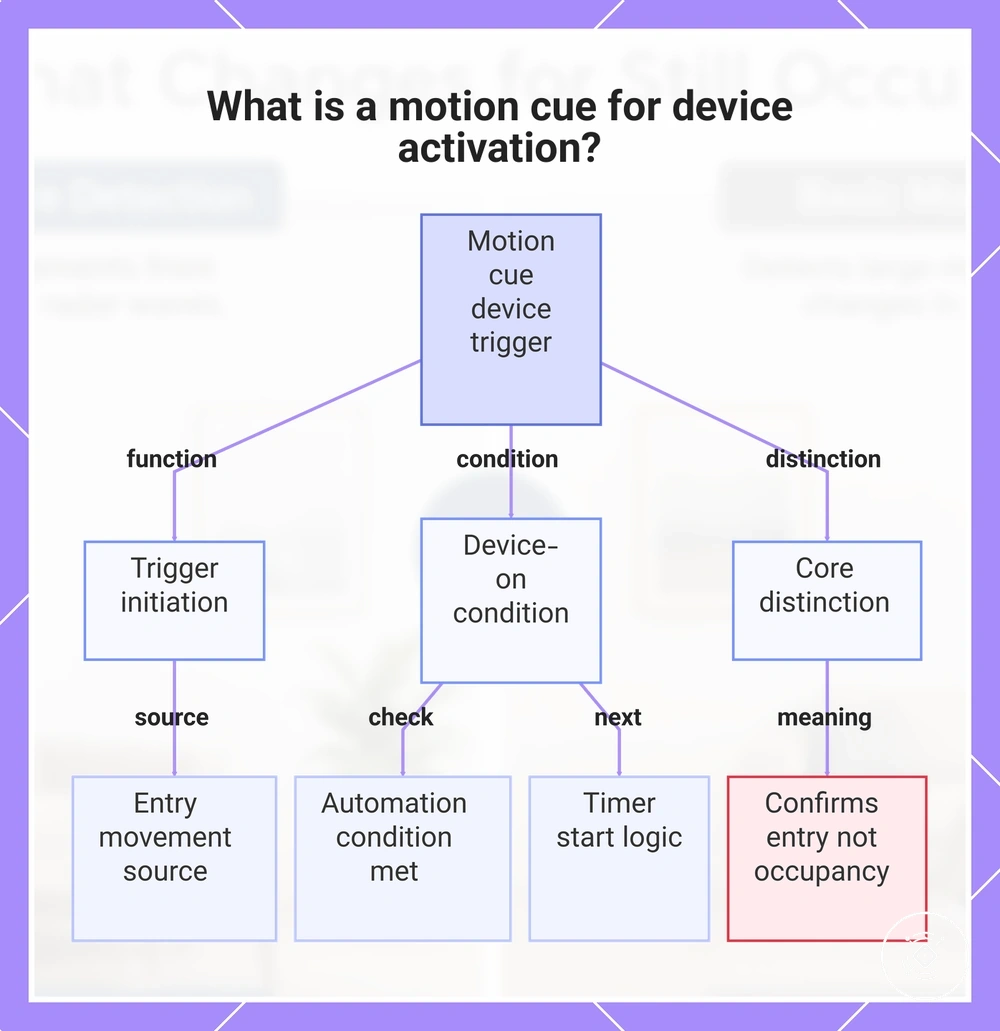
When someone enters a room, an entry movement can create a motion cue that starts an automation trigger. The motion cue acts as a start signal for activation, which may lead to device-on behaviour when the automation condition is met. A timer start may follow the trigger depending on the automation logic, but the movement event represents the cue for turning a device on rather than confirming continued occupancy.
This chart explains how a motion cue starts an automation trigger to turn on a device and clarifies that it signals entry, not continued occupancy.
Keeping devices on from continued presence cues
Continued presence cues can maintain a device state after the initial movement trigger by supporting keep-on logic. Continued presence cues contribute to occupied-state continuity when automation systems interpret that a room may still be in use after movement becomes limited. For example, a seated occupant working at a desk may create fewer movement events, while timeout extension and reduced false-off behaviour may occur when conditions support continued presence. The reliability of this behaviour depends on factors such as sensor placement, sensitivity, and the surrounding environment.
When Motion Detection Is Still Enough
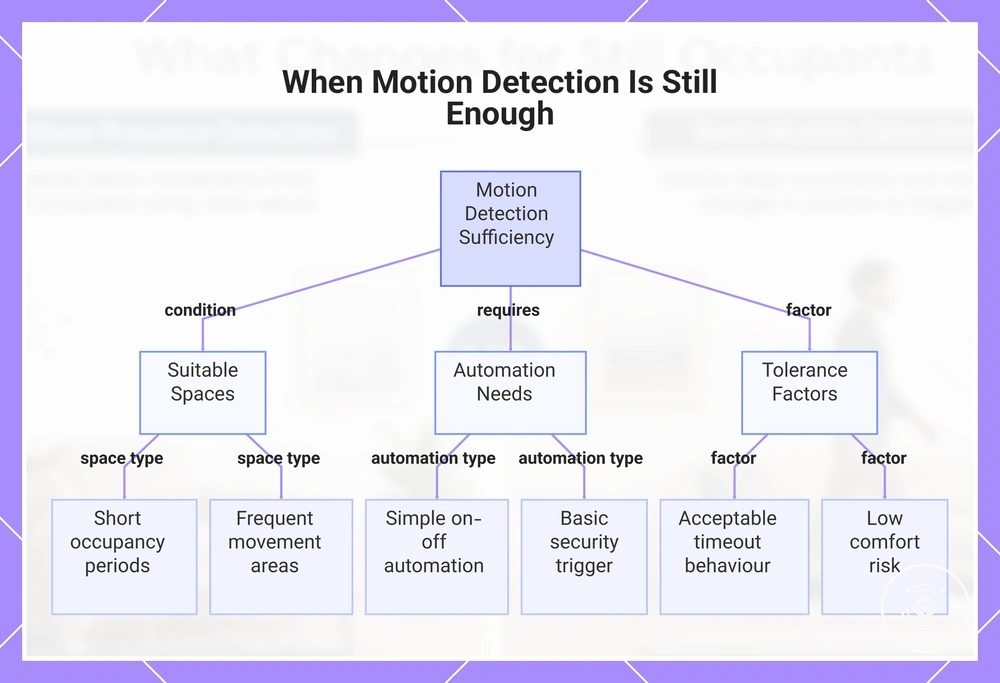
Motion detection can be sufficient when a space has short visits, frequent movement, or simple automation needs that do not require continued presence awareness. Transient spaces such as hallways or storage rooms may only need a movement trigger to start a response, while simple on-off automation can work with acceptable timeout behaviour. The decision depends on room use, automation tolerance, and whether detecting a still person is necessary for the intended use case.
Motion detection may remain enough for movement-heavy rooms where people enter, pass through, or leave within a short period. A hallway light, storage room activation, or basic security trigger may only require entry movement to create a simple automation response. When a space does not rely on detecting continued occupancy, a motion-based approach may provide sufficient behaviour. The checklist below verifies room and automation conditions rather than specific product models.
Motion detection sufficiency depends on factors such as acceptable timeout behaviour, comfort expectations, and the risk of missed presence in the space. A simpler movement-based approach may be suitable when the automation goal is focused on short activity events rather than continued presence. For a broader comparison boundary, see mmWave presence sensor vs PIR sensor.
- Short occupancy periods where people usually enter and leave quickly
- Frequent movement areas where motion events occur naturally
- Simple on-off automation that only requires a basic trigger
- Acceptable timeout behaviour after movement stops
- Low comfort risk if a device state changes after inactivity
- Basic security trigger use where movement is the main event
- Low need for detecting a person who remains still
This chart shows the conditions and factors that determine when motion detection is sufficient for a space, based on room use, automation needs, and tolerance for missed presence.
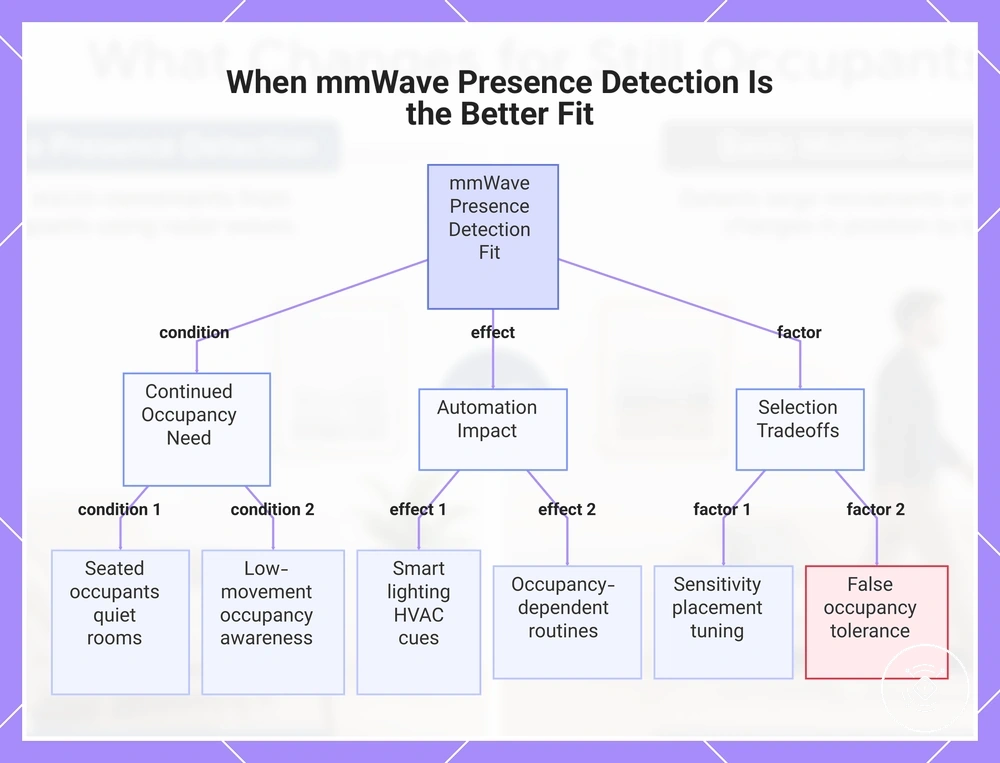
When mmWave Presence Detection Is the Better Fit
mmWave presence detection is the better fit when continued occupancy matters and a room requires awareness beyond a simple movement trigger. Seated occupants, quiet rooms, and occupancy-dependent routines may benefit from presence sensing that supports automation decisions during low movement conditions. Smart lighting and HVAC comfort routines can use continued presence information differently depending on the intended automation outcome. The selection depends on room behaviour, sensitivity tuning requirements, and false occupancy tolerance rather than a universal upgrade.
Rooms with seated work, quiet periods, or comfort-focused routines may place more value on continued presence than a basic motion event. Smart lighting and HVAC comfort automation can be affected when device state decisions need to consider more than recent movement. These situations may make mmWave presence detection a better fit when false-off risk matters, while the practical outcome depends on environment and automation conditions. The checklist below organizes fit by room behaviour and automation outcome.
mmWave presence detection selection also involves tradeoffs related to sensitivity tuning, placement, and false occupancy tolerance. Detection outcomes can vary based on room conditions, sensor behaviour, and how the automation system interprets presence information. The goal is to balance continued presence needs with environment-dependent limitations.
- Seated occupants in low-movement rooms where continued presence is important for automation decisions
- Quiet rooms where occupancy automation needs to consider people who remain in the space with limited movement
- Smart lighting routines where room behaviour depends on more than a recent movement event
- HVAC comfort routines where maintaining an occupied-room state may depend on continued presence cues
- Occupancy-dependent routines where device state changes are linked to room use conditions
- Rooms where sensitivity tuning and placement can be considered as part of the selection decision
- Situations where false occupancy tolerance and environmental conditions need careful evaluation
mmWave presence detection may be more suitable when still-occupant reliability is a key requirement, while simpler motion-based approaches may remain sufficient for short-activity use cases. The decision depends on balancing continued presence needs with sensitivity, placement, and environment-dependent tradeoffs.
This chart shows the conditions, automation impacts, and tradeoffs that determine when mmWave presence detection is a better fit than basic motion detection.